Close Menu
  • Gaming
    • Platforms
      • Nintendo
      • PC
      • PlayStation
      • Xbox
  • Entertainment
    • Movies
    • TV
    • Royals
  • Celebrity
    • Hollywood
  • Human Interest
  • Astrology
  • More
    • Reviews
Facebook X (Twitter) Instagram LinkedIn YouTube
  • About Us
  • Join Our Team
  • Meet the Team
  • Privacy Policy
  • DMCA Policy
  • Contact Us
  • Terms of Use
  • Sitemap
  • Editorial Guidelines
  • Advertising Policy
The Nerd Stash
  • Gaming
  • Celebrity
  • Hollywood
  • Human Interest
The Nerd Stash
Home»Gaming»How to Change Camera Zoom in Third Person in Starfield

How to Change Camera Zoom in Third Person in Starfield

Considering the fact that Starfield is an incredibly massive game with tons of planets to explore and characters to meet across the vastness of deep space,…

Nat CollazoBy Nat CollazoAugust 31, 20233 Mins Read
How to Change Camera Zoom in Third Person in Starfield
Image Source: Bethesda
This article is over 2 years old and may contain outdated information.

Considering the fact that Starfield is an incredibly massive game with tons of planets to explore and characters to meet across the vastness of deep space, you might want to change your perspective on how you see things; literally. Some players prefer to switch their view to the third person and with that, they like to zoom into things to get a better view. If you don’t know, we want to show you exactly how to change the camera zoom in the third person in Starfield while you travel with your companions.

How to Change Camera Zoom in Starfield
How to Change Camera Zoom in Third Person in Starfield
Image Source: Bethesda

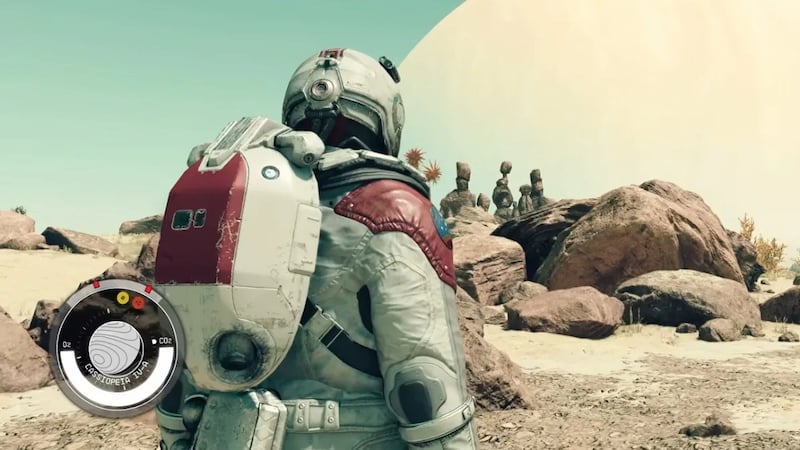
If you want to change the camera zoom in the third person in Starfield, then you will have to press the View button on your Xbox controller or the middle mouse button on your mouse. In doing so, you’ll be able to switch between three different camera views. The three camera views are first-person, third-person, and slightly more zoomed-out third-person view. Being able to switch out your perspective is incredibly important, regardless of what game you’re playing. Realistically, being the a first-person view makes it a little easier to select things to pick up or get a closer look at things that are directly in front of you.

The only real downside to this is that you won’t be able to see the backside of the character you worked so hard to create. The upside is that you’ll have a better view when it comes to things that matter a little bit more in the game like aiming at the aliens and enemies in front of you and seeing what’s around the corner from a different perspective. At the end of the day, Bethesda likes to provide different ways for you to enjoy their games because they understand that players have different styles of gaming. Many prefer being able to change the camera zoom in the third person while others would much prefer to go through the entirety of their adventure in the third person.

Besides the practical aspect of why you would want to be able to switch your perspective, Starfield is a beautiful game. We completely understand if you want to be able to experience the different wonders of space in the first person in some areas and then in the third person in other areas. Being able to have that choice is important for every sort of player.

Related:

Starfield Reveals Its File Size Ahead of Launch

Starfield launches on September 6 for Xbox Series X|S and PC.

Related Topics
Guide Starfield
Share. Facebook Twitter LinkedIn Reddit Email
Nat Collazo
  • Website
  • X (Twitter)
  • Instagram

Nat is a journalist with over ten years of online publishing experience. They are a massive fan of hanging out with both their wife and cat which would ideally be all the time. Nat received an undergraduate degree in English Literature from Florida International University, then returned to complete a graduate degree in Mass Communications before moving across the country to settle in New England.

SUGGESTED READS

007 First Light Story Review
Gaming

007 First Light Launches Its Update #1 With New TacSim Content

XBOX Backward Compatibility on PC Could Support Xbox 360 Games Too, Dataminers Confirm
Gaming

XBOX Backward Compatibility on PC Could Support Xbox 360 Games Too, Dataminers Confirm

Aliens Fireteam Elite 2 Release Date
Gaming

Aliens: Fireteam Elite 2 Launches on August 25 With Movie-inspired DLC Packs

Sony Reportedly Knew the PlayStation Disc Shut Down Would 'Piss Everyone Off,' Warned Employees to Stay Silent
Gaming

Sony Reportedly Knew the PlayStation Disc Shut Down Would ‘Piss Everyone Off,’ Warned Employees to Stay Silent

How to play Halo: Campaign Evolved Co-Op
Gaming

Halo Campaign Evolved Co-Op Guide

Aliens Fireteam Elite 2 Horde Mode
Gaming

Aliens: Fireteam Elite 2 Has Revamped Its Horde Mode In the Best Possible Way

The Nerd Stash
Facebook X (Twitter) Instagram YouTube LinkedIn
  • About Us
  • Join Our Team
  • Meet the Team
  • Privacy Policy
  • DMCA Policy
  • Contact Us
  • Terms of Use
  • Sitemap
  • Editorial Guidelines
  • Advertising Policy
© 2026 The Nerd Stash. All Rights Reserved.

Type above and press Enter to search. Press Esc to cancel.