Close Menu
  • Gaming
    • Game Guides
    • Codes
    • Game News
    • Game Previews
    • Game Reviews
    • Game Features
    • Game Lists
    • Platforms
      • Nintendo
      • PC
      • PlayStation
      • Xbox
      • Mobile
  • Entertainment
    • Movies
    • Movie Features
    • Movie Reviews
    • TV
    • Reality TV
    • Royals
  • Celebrity
    • Hollywood
  • Human Interest
  • Astrology
  • More
    • Anime
    • Lists
    • Podcasts
    • Reviews
Facebook X (Twitter) Instagram LinkedIn YouTube
  • About Us
  • Join Our Team
  • Meet the Team
  • Privacy Policy
  • DMCA Policy
  • Contact Us
  • Terms of Use
  • Sitemap
  • Editorial Guidelines
  • Advertising Policy
The Nerd Stash
  • Gaming
  • Celebrity
  • Hollywood
  • Human Interest
The Nerd Stash
Home»Game Guides»How To Use Enkidu in Assassin’s Creed Mirage

How To Use Enkidu in Assassin’s Creed Mirage

Fly like an eagle with Enkidu.

Nat CollazoBy Nat CollazoOctober 4, 20233 Mins Read
How To Use Enkidu in Assassin's Creed Mirage
Image Source: Ubisoft
This article is over 2 years old and may contain outdated information.

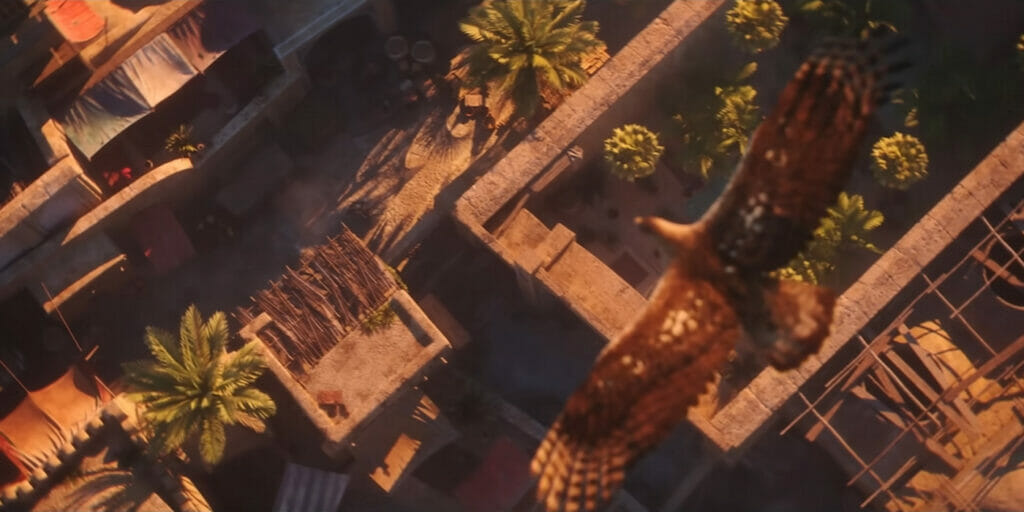
What is an Assassin’s Creed game without some sort of animal familiar whom you can use to map out the area around you? In Assassin’s Creed Mirage, that animal is Enkidu, an eagle that is also playable in-game. You’re able to call upon him and control where he goes in order to do a variety of helpful things on the map. To make things easier on you, we outlined how to use Enkidu as well as all the different abilities you can do with him.

How To Use Enkidu

How To Use Enkidu in Assassin's Creed Mirage
Image Source: Ubisoft

To call upon Enkidu, you just need to press up on the D-Pad. This doesn’t just call upon him, it gives you control of his body, allowing you to see things all over the map from a bird’s eye view. The following are each of Enkidu’s controls once you take the reigns:

  • Hide Panel: R3 on a PlayStation controller or RS on an Xbox controller.
  • Place Custom Marker: Circle on a PlayStation controller or B on an Xbox controller.
  • Call Enkidu: Up on the D-Pad on either controller.
  • Boost: R2 on a PlayStation controller or RT on an Xbox controller.
  • Hide Icons: L1 on a PlayStation controller or LB on an Xbox controller.
  • Stationary Mode: L2 on a PlayStation controller or LT on an Xbox controller.

While you have the advantage of being an eagle, you can have Enkidu survey the area and locate points of interest such as viewpoints, blacksmiths, and more. This is especially useful if you have to find a certain location. As Enkidu, you’ll see that the crosshairs turn yellow, indicating that the location of the quest item is in that area. In order to actually find the quest item, you’ll have to direct Enkidu around until the yellow crosshair gets smaller and turns into a point on the map for Basim to go to. If you would rather not be moving around as you do this, you can always turn on Stationary Mode and move the crosshairs without having to move Enkidu around.

If you feel that the map is far too cluttered up with icons and panels, you can turn these off using their respective keybinds. You can also make Endiku speed up with the boost if you feel that he’s getting to places too slowly.

Related:

How to Stealth Kill Al-Ghul in Assassin’s Creed Mirage

Assassin’s Creed Mirage will be available on October 5 for Xbox One, Xbox Series X|S, PlayStation 4, PlayStation 5, and PC.
Related Topics
Assassin’s Creed Mirage Guide
Share. Facebook Twitter LinkedIn Reddit Email
Nat Collazo
  • Website
  • X (Twitter)
  • Instagram

I am a game journalist and guide writer with ten years of experience as well as the CEO/ Founder of Frowns Marketing, a marketing company that caters to indie games, tabletop games, and board games to help developers get more wishlists, backers, and players!

SUGGESTED READS

Pragmata Solar Power Plant Mini Cabin Figures Locations
Game Guides

All Solar Power Plant Mini Cabin Locations in Pragmata

Pragmata Mass Production Array Mini Cabin Figures
Game Guides

All Mass Production Array Mini Cabin Figure Locations in Pragmata

Dragon's Dogma 2 DLC Rumors Explode Again After Massive 65GB SteamDB Updates
Game News

Dragon’s Dogma 2 DLC Rumors Explode Again After Massive 65GB SteamDB Updates

how to make gunpowder Windrose
Game Guides

How to Make Gunpowder in Windrose

Best Server Settings Windrose
Game Guides

Best Server Settings for Windrose

Skate Nike SB Limited-time Event
Game News

Skate. Kicks Off a Limited-time Event With Nike SB, and It’s Free For All

The Nerd Stash
Facebook X (Twitter) Instagram YouTube LinkedIn
  • About Us
  • Join Our Team
  • Meet the Team
  • Privacy Policy
  • DMCA Policy
  • Contact Us
  • Terms of Use
  • Sitemap
  • Editorial Guidelines
  • Advertising Policy
© 2026 The Nerd Stash. All Rights Reserved.

Type above and press Enter to search. Press Esc to cancel.