

Close Menu
  • Gaming
    • Game Guides
    • Codes
    • Game News
    • Game Previews
    • Game Reviews
    • Game Features
    • Game Lists
    • Platforms
      • Nintendo
      • PC
      • PlayStation
      • Xbox
      • Mobile
  • Entertainment
    • Movies
    • Movie Features
    • Movie Reviews
    • TV
    • Reality TV
    • Royals
  • Celebrity
    • Hollywood
  • Human Interest
  • Astrology
  • More
    • Anime
    • Lists
    • Podcasts
    • Reviews
Facebook X (Twitter) Instagram LinkedIn YouTube
  • About Us
  • Join Our Team
  • Meet the Team
  • Privacy Policy
  • DMCA Policy
  • Contact Us
  • Terms of Use
  • Sitemap
  • Editorial Guidelines
  • Advertising Policy
The Nerd Stash
  • Gaming
  • Celebrity
  • Hollywood
  • Human Interest
The Nerd Stash
Home»Game Guides»How Do Cross Platform Clans and Friends Work in Warframe? Answered

How Do Cross Platform Clans and Friends Work in Warframe? Answered

No Tenno gets left behind.

Jordan MoyerBy Jordan MoyerOctober 24, 20232 Mins Read
How Does Cross Friends and Clans Work in Warframe
Image Source: Digital Extremes via The Nerd Stash
This article is over 2 years old and may contain outdated information.

Years after the game’s initial release, Warframe finally allows cross-platform features that extend to clans and friends. While cross-platform play has been a thing for quite a while, we haven’t been able to add friends from other platforms or even invite them into our clans or join theirs. Not until now, that is. There’s nothing quite like being able to run Survival missions with a group of friends, and now that console players can add PC friends, nobody will be left out. Let’s take a look at how cross-platform clans and friends work in Warframe.

How To Add Cross Platform Friends in Warframe
Warframe Cross Friends and Clans
Image Source: Digital Extremes via The Nerd Stash

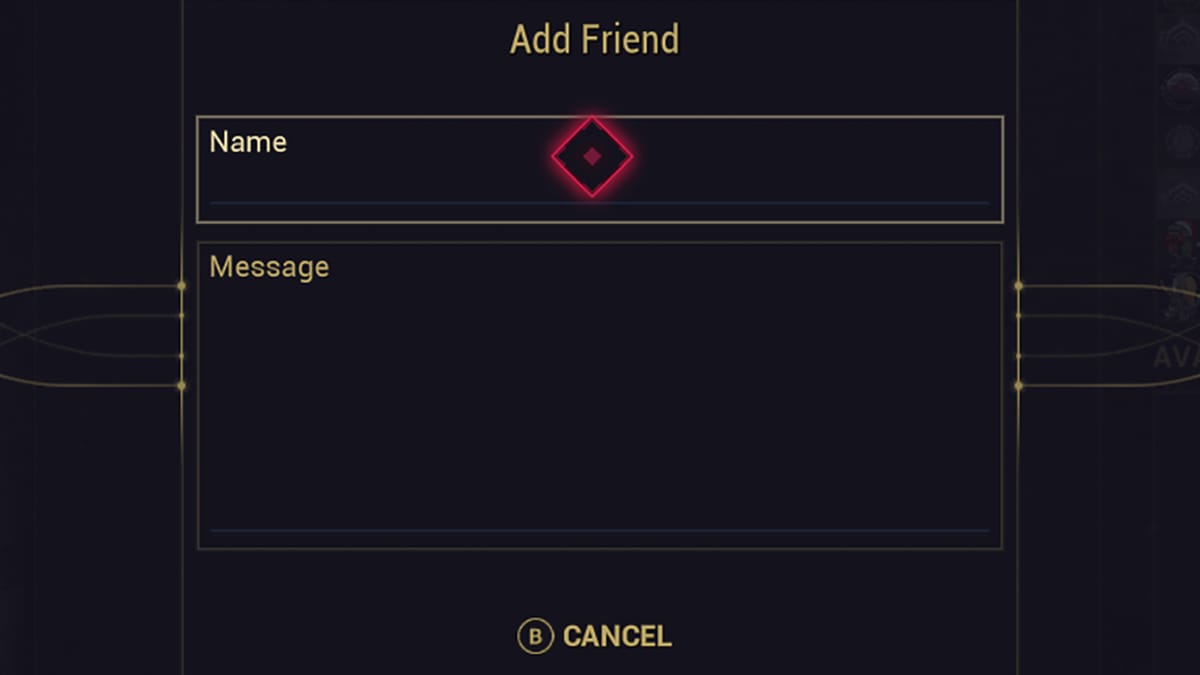
Adding friends in Warframe works the same way as it did previously.

  • Open up your menu by pressing Select or ESC, depending on your platform.
  • Navigate over to the Communication option.
  • Select Friends.
  • Choose the Add Friend option at the top left-hand section of the Friends menu.
  • Type in the name of the friend you would like to add, then press Confirm.

After you’ve completed a request, a message will pop up asking you which player you would like to add, with togs included in their player names. Choose the correct option, making note of the symbols to the right of their names, indicating their platform.

Related:

How To Get Riven Slivers in Warframe

How To Activate Cross Platform Clans

Before you can invite others into your clan from different platforms, you’ll need to enable cross-platform clans. This setting must be allowed by the Founding Warlord of the clan in question from inside their Clan Management settings. It’s unlike Cross Platform play in Warframe where it is automatically enabled by default.

Navigate into your Clan Management settings. Here, you should see the option to edit hierarchies and, directly below it, the option to enable cross-platform clans.

Once you’ve allowed cross-platform clans in Warframe, you can invite players from different platforms into your clan and allow them access to the Dojo, Research progress, and the Clan and Alliance chats. However, it’s important to note that players on different platforms will still be unable to utilize Trading Posts, as that feature is still not cross-platform. However, Cross Platform Trading in Warframe will possibly be a thing of the future.

Related:

Best Dagath Build in Warframe

Warframe is now available on PC, Nintendo, Xbox, and PlayStation consoles.

Related Topics
Guide Warframe
Share. Facebook Twitter LinkedIn Reddit Email
Jordan Moyer
  • Website
  • X (Twitter)

Jordan is an experienced fantasy writer who spends hours behind her laptop, and lost in the pages of a book. She strives to be a successful gaming blogger, and has no complaint about the hours of game time she used to increase her knowledge of all things “geek”. She primarily writes gaming articles and fantasy novels. Ark: Survival Evolved is a favorite, along with Diablo 3, Warframe and Minecraft lately, though you can’t forget the good old Magic the Gathering card game! Writing about games truly gives her joy as it gives her another perspective to look at games from, a reason to really look into the mechanics of the game.

SUGGESTED READS

How to Subscribe & Cancel Adopt Me Pet Plus Subscription
Game Guides

How to Subscribe & Cancel Adopt Me Pet Plus Subscription

Saros Outlets Previews
Game Features

Saros Previews Round-Up: Refining What Was Already Flawless

Crimson Desert Community Tips and Tricks
Game Guides

I Played Crimson Desert for 90 Hours and STILL Learned These 10 Tricks From Social Media

Doom Co-creator and Wife Say The Current Game Industry Is 'Crashier' Than the '80s Crash: 'It Can't Stay Like This Forever'
Game News

Doom Co-Creator and Wife Say the Current Game Industry Is ‘Crashier’ Than the ’80s Crash: ‘It Can’t Stay Like This Forever’

Marathon PC Review
9.5
Game Features

Marathon Review – Bungie’s Finest

XBox Partner Preview November 2025 Announcements
Game Features

Every Major Announcement at the Xbox Partner Preview (March 2026)

The Nerd Stash
Facebook X (Twitter) Instagram YouTube LinkedIn
  • About Us
  • Join Our Team
  • Meet the Team
  • Privacy Policy
  • DMCA Policy
  • Contact Us
  • Terms of Use
  • Sitemap
  • Editorial Guidelines
  • Advertising Policy
© 2026 The Nerd Stash. All Rights Reserved.

Type above and press Enter to search. Press Esc to cancel.




