Packet Burst Error is not new to Modern Warfare 3 since it has been haunting many Call of Duty players from time to time in the last few seasons. It’s causing visual stutter and sometimes it seems to single out just one player in the lobby. If you’ve seen three stacked squares on the left of your screen, possibly with the words ‘packet burst,’ you’ve met the culprit. But don’t worry; we’re here to help you understand how to fix the Packet Burst Error in Modern Warfare 3. Let’s get your gaming back on track!
Possible Fixes for the Packet Burst Error in Modern Warfare 3
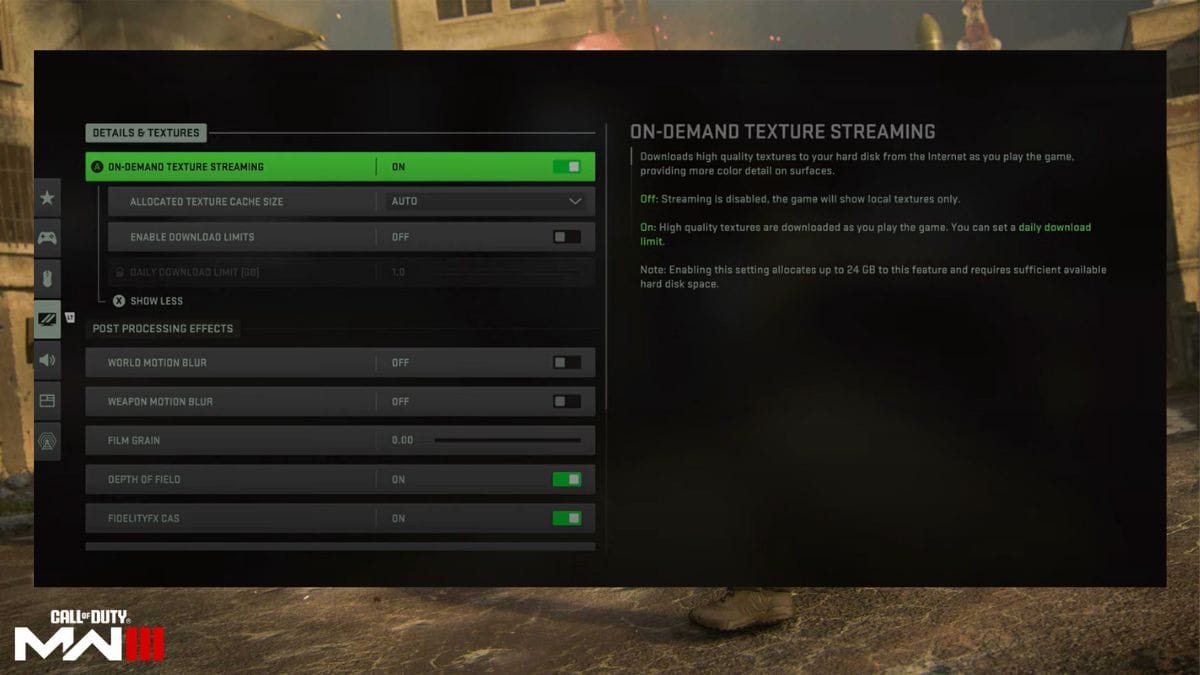
You can fix the Packet Burst Error in MW3 by turning off the On-Demand Texture Stream. This is the most recommended method that works for many players. However, most of the time, this error causally occurs when there is a problem with the servers. You can use the website packetlosstest to check whether the issue is with your network or the servers. If you have a percentage of more than 0%, there is a high probability you have problems with your network. Below are all the possible fixes to help you resolve the Packet Burst Error in Modern Warfare 3.
- 1. Turn off the On-Demand Texture Stream
This setting downloads textures in the background while you play the game. It might affect your network bandwidth and cause the Error. Go to Graphics, click on game settings, select On-Demand Texture Streaming, and turn it off.
- 2. Make sure you have more than 64 GB of space
Check the storage space in your drive and make sure it has more than 64 GB of free space. If not, delete some games or files to create space.
- 3. Make sure to use the latest Graphic Card
If you use an outdated graphic card, update it to the newest version. An old graphic card may not be able to handle the game’s graphics and cause a Packet Burst Error in Modern Warfare 3.
- 4. Manually set paging file size by deselecting the automatically manage option on the PC
If you are a PC player, go to advanced system properties. In the performance section, select settings, proceed to the advanced tab, choose change, and uncheck the option to automatically manage paging file size for all drives in the virtual memory section. Also, you must set two values: initial size and maximum size. These should be set to 24000 and 64000, respectively. Then, apply the changes and close the performance options and system properties windows by clicking Apply and OK on each.
- 5. Turn off the crossplay
This solution is only for PlayStation users. Some players reported that turning off crossplay resolved the Packet Burst Error in Modern Warfare 3. You can turn it from account and network settings.
Also, you can try some common methods, such as restarting the game, restarting the wifi connection, and having a wired connection. But our experience is most of the time, these solutions do not provide the necessary help to fix the Packet Burst Error in Modern Warfare 3. Therefore, trying the above methods before trying these standard solutions is essential. As a last resort, you can also contact customer support if none of the above solutions work.