
Close Menu
  • Gaming
    • Game Guides
    • Codes
    • Game News
    • Game Previews
    • Game Reviews
    • Game Features
    • Game Lists
    • Platforms
      • Nintendo
      • PC
      • PlayStation
      • Xbox
      • Mobile
  • Entertainment
    • Movies
    • Movie Features
    • Movie Reviews
    • TV
    • Reality TV
    • Royals
  • Celebrity
    • Hollywood
  • Human Interest
  • Astrology
  • Videos
  • More
    • Anime
    • Lists
    • Podcasts
    • Reviews
Facebook X (Twitter) Instagram LinkedIn YouTube
  • About Us
  • Join Our Team
  • Meet the Team
  • Privacy Policy
  • DMCA Policy
  • Contact Us
  • Terms of Use
  • Sitemap
  • Editorial Guidelines
  • Advertising Policy
The Nerd Stash
  • Gaming
  • Celebrity
    • Hollywood
  • Human Interest
  • Videos
The Nerd Stash
Home»Game Guides»How To Fix Error Code 14515 in Modern Warfare 3

How To Fix Error Code 14515 in Modern Warfare 3

Error Code 14515 in Modern Warfare 3 isn’t a deadly enemy. It’s just the server’s quirky way of saying, ‘Hey, can we take a break?’

Asanga WijeratneBy Asanga WijeratneNovember 11, 20232 Mins Read
How To Fix Error Code 14515 in Modern Warfare 3
Image Source: Activision
This article is over 2 years old and may contain outdated information.

Error Code 14515 tends to crop up when the Modern Warfare 3 servers are at their maximum capacity, often due to a surge of players engaging with the game. It’s a common issue, especially since MW3 is still in its early stages and can lead to players being kicked out or unable to connect. While it can be frustrating, there are methods you can take to fix Error Code 14515 in Modern Warfare 3 and get back to playing the game.

Methods To Resolve Error Code 14515 in Modern Warfare 3
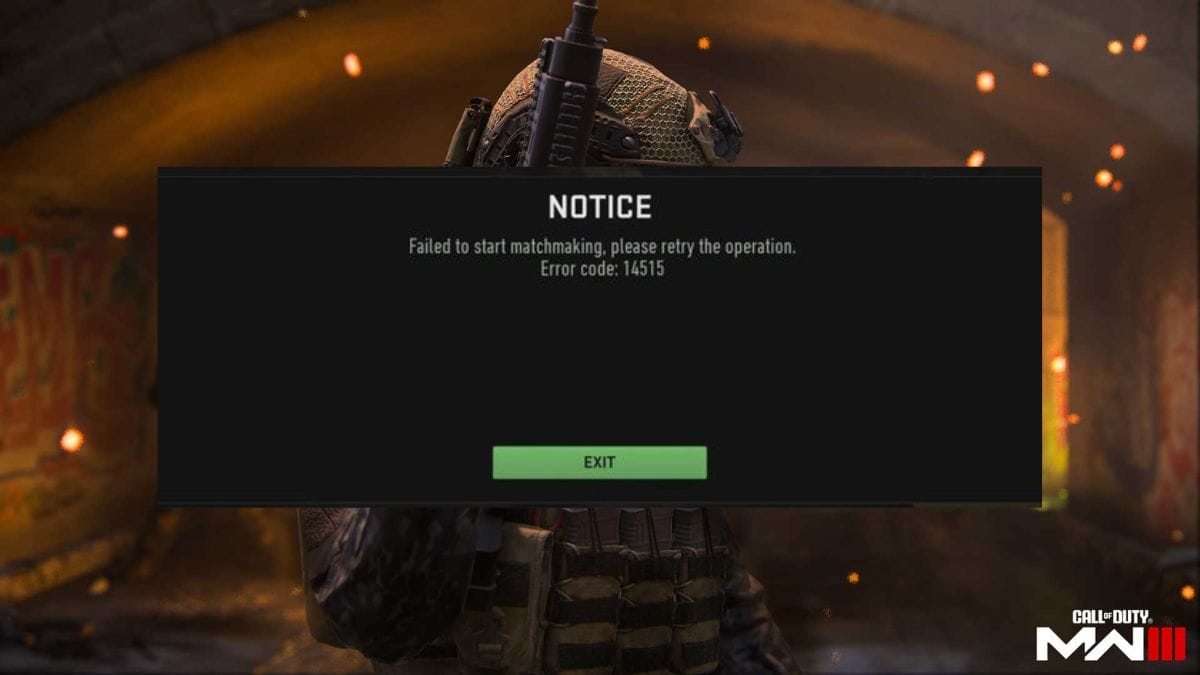
Error Code 14515 in Modern Warfare 3
Image Source: Activision via The Nerd Stash

First, you must understand that no permanent solution exists to fix this error. Because this is an issue with the game servers, it is something that only the developers can fully resolve. So, waiting for the problem to be fixed on their end is always an option. However, a few methods sometimes work to resolve Error Code 14515.

Related:

Modern Warfare 3: All Crash Site Mission Weapon Locations

  1. 1. Check the server status

    Before attempting any other method, it’s essential to check the status of the game servers. Visit the official website or social media pages for Modern Warfare 3. If there is an ongoing issue with the servers, you’ll find updates and announcements regarding it.

  2. 2. Restart your console

    Sometimes, restarting your console can help fix Error Code 14515 in Modern Warfare 3. This can refresh your internet connection and re-establish a connection with the game servers.

  3. 3. Check your internet connection

    Make sure that your internet is stable and working correctly. A poor connection can cause issues connecting to the game servers, leading to Error Code 14515.

  4. 4. Try again later

    Try playing at a different time. As mentioned, Error Code 14515 in Modern Warfare 3 often occurs due to a surge of server players. Playing during off-peak hours may reduce the likelihood of encountering this issue.

  5. 5. Contact Activision support

    If none of the above methods work, contact Activision for further assistance. Speak to their support members for additional troubleshooting procedures or to have the issue forwarded to the developers for further investigation.

While Error Code 14515 in MW3 could be frustrating, it’s important to remember that it’s mainly out of players’ control as it arises from server-side issues. However, the methods outlined above may provide a temporary respite to fix Error Code 14515 in Modern Warfare 3.


Related Topics
Guide Modern Warfare 3
Share. Facebook Twitter LinkedIn Reddit Email
Asanga Wijeratne
  • Website

SUGGESTED READS

Sony Patents Real-time AI Game Censorship Tech That Could Even Make GTA 6 Kid-Friendly
Game News

Sony Patents Real-Time AI Game Censorship Tech That Could Even Make GTA 6 Kid-Friendly

Zenless Zone Zero Version 2.5 Announcement
Game News

Zenless Zone Zero Version 2.5 Is Ready To Wrap Up the Year With Two New Agents and a Free Outfit

PC Gamers Can't Catch a Break as Nvidia Plans 40% GeForce GPU Production Cuts, Report: 'Who Needs a PC Anyways'
Game News

PC Gamers Can’t Catch a Break as Nvidia Reportedly Plans 40% GeForce GPU Production Cuts: ‘Who Needs a PC Anyways’

Destiny 2 How to Get the Praxic Blade
Game Guides

How to Get the Praxic Blade in Destiny 2: Renegades

Marathon Arrives March 2026 at $40 Without 'FOMO Passes': 'Concord 3 Release Date Confirmed'
Features

Marathon Arrives March 2026 at $40 Without ‘FOMO Passes’: ‘Concord 3 Release Date Confirmed’

Destiny 2 Renegades Equilibrium Dungeon Loot Table
Game Guides

Destiny 2: Renegades – Equilibrium Dungeon Loot Table Full Armor, Weapons, and Perks

Trending
Sony Patents Real-time AI Game Censorship Tech That Could Even Make GTA 6 Kid-Friendly

Sony Patents Real-Time AI Game Censorship Tech That Could Even Make GTA 6 Kid-Friendly

Zenless Zone Zero Version 2.5 Announcement

Zenless Zone Zero Version 2.5 Is Ready To Wrap Up the Year With Two New Agents and a Free Outfit

PC Gamers Can't Catch a Break as Nvidia Plans 40% GeForce GPU Production Cuts, Report: 'Who Needs a PC Anyways'

PC Gamers Can’t Catch a Break as Nvidia Reportedly Plans 40% GeForce GPU Production Cuts: ‘Who Needs a PC Anyways’

Destiny 2 How to Get the Praxic Blade

How to Get the Praxic Blade in Destiny 2: Renegades

The Nerd Stash
Facebook X (Twitter) Instagram YouTube LinkedIn
  • About Us
  • Join Our Team
  • Meet the Team
  • Privacy Policy
  • DMCA Policy
  • Contact Us
  • Terms of Use
  • Sitemap
  • Editorial Guidelines
  • Advertising Policy
© 2025 The Nerd Stash. All Rights Reserved.

Type above and press Enter to search. Press Esc to cancel.




