
Close Menu
  • Gaming
    • Platforms
      • Nintendo
      • PC
      • PlayStation
      • Xbox
  • Entertainment
    • Movies
    • TV
    • Royals
  • Celebrity
    • Hollywood
  • Human Interest
  • Astrology
  • More
    • Anime
    • Reviews
Facebook X (Twitter) Instagram LinkedIn YouTube
  • About Us
  • Join Our Team
  • Meet the Team
  • Privacy Policy
  • DMCA Policy
  • Contact Us
  • Terms of Use
  • Sitemap
  • Editorial Guidelines
  • Advertising Policy
The Nerd Stash
  • Gaming
  • Celebrity
  • Hollywood
  • Human Interest
The Nerd Stash
Home»Gaming»Pet Simulator 99: Fishing Guide

Pet Simulator 99: Fishing Guide

A fishing rod will help you get a new pet.

Nerd Stash StaffBy Nerd Stash StaffDecember 5, 20232 Mins Read
Pet Simulator 99: Fishing Guide
Image Source: BIG Games via ItzVexo screenshot
This article is over 2 years old and may contain outdated information.

In Pet Simulator 99, players can collect cute pets and also go fishing. This fun activity will allow you to take a break from your daily routine and earn various rewards. However, it’s worth noting that fishing is not available from the very beginning. To learn how to fish in Pet Simulator 99, you must progress until you reach the Pirate Tavern and get your first fishing rod.

How To Unlock Fishing

How To Unlock Fishing
Image Source: BIG Games via ItzVexo screenshot

As we said, you need to reach the Pirate Tavern in Pet Simulator 99 to unlock fishing. It’s in Area 27, so you’ll get there pretty quickly even if you’ve just started playing. After this, you need to go through the glowing door on the left side. There’s a sign above the door called Fishing, so you won’t miss it.

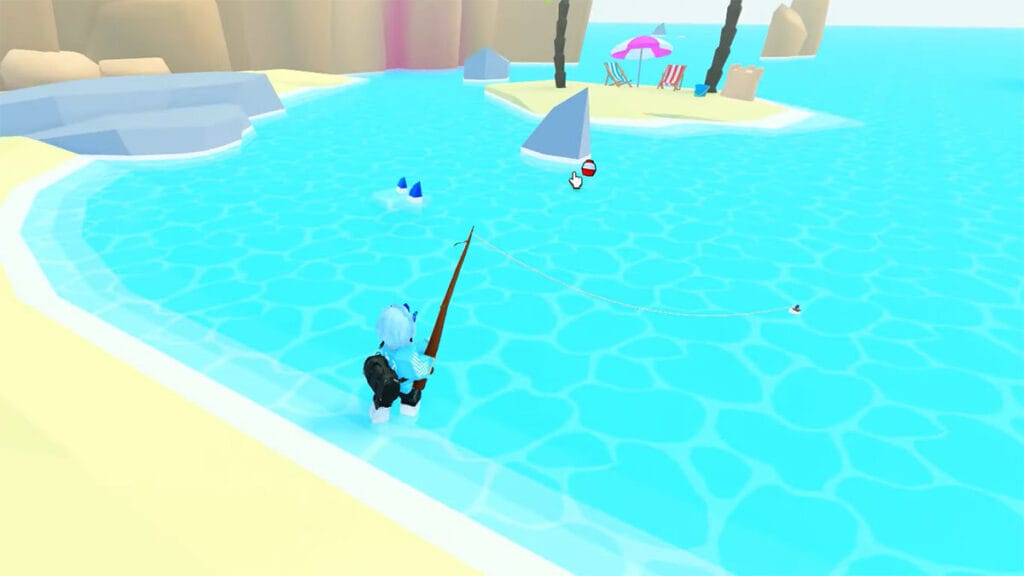
This door will lead you to a peaceful beach where every player can learn how to fish. There’s also a Phishing Merchant on the beach. He sells various Fishing Rods for Fishing Coins, which will greatly increase your chances of catching rare items.

How To Fish

Luckily, the fishing feature in Pet Simulator 99 is quite simple. All you need is to left-click anywhere on the water to cast a line. Then, wait until the float starts to twitch and press the left key again. It will start the fishing mini-game.

You will see two bars on the screen. The right bar shows the progress of catching fish. When it is full, you’ll receive your reward. At the same time, a bobber moves along the left bar. You must hold down the left mouse button so that the green bar goes up and release so that the bar goes down. Just try to keep the bobber in the green bar until the right bar is full, and you will catch a fish in Pet Simulator 99.

What You Can Catch in Pet Simulator 99

While this activity is called fishing, you won’t actually catch fish in Pet Simulator 99. Instead, players will find various items and even pets:

  • Fishing Coins
  • Diamonds
  • Basic Coin Jar
  • Rainbow Fruit
  • TNT
  • Rainbow Swirl
  • Comet
  • Flags
  • Books
  • Potions
  • Huge Poseidon Corgi
Related Topics
Guide Roblox
Share. Facebook Twitter LinkedIn Reddit Email
Nerd Stash Staff
  • Website

SUGGESTED READS

Path of Exiles 2 Build Planner Guide
Gaming

How To Use the Build Planner in Path of Exile 2

Adopt Me Kicks Off Summer With Journey to Summer Camp Update, Here's All The New Week 1 Pets & Rewards
Gaming

Roblox Adopt Me Launches Journey to Summer Camp Update, Here’s All the Week 1 Pets & Rewards

LEGO Batman Legacy of the Dark Knight PC Review
9
Gaming

LEGO Batman: Legacy of the Dark Knight Review – A Hero Rises

Call of Duty: Modern Warfare 4 Launching This October on Next-Gen Consoles & Switch 2, But Not Game Pass
Gaming

Call of Duty: Modern Warfare 4 Launching This October on Next-Gen Consoles & Switch 2, But Not Game Pass

Hideo Kojima Teams Up With Prada for an AI Film, And Fans Aren't Happy: 'Beyond Incredibly Disappointing'
Gaming

Hideo Kojima Teams Up With Prada for an AI Film, And Fans Aren’t Happy: ‘Beyond Incredibly Disappointing’

The Witcher 3 Songs of the Past expansion
Gaming

A Witcher 3 Leak Just Forced CD Projekt Red to Announce a Brand-New Expansion: Songs of the Past

The Nerd Stash
Facebook X (Twitter) Instagram YouTube LinkedIn
  • About Us
  • Join Our Team
  • Meet the Team
  • Privacy Policy
  • DMCA Policy
  • Contact Us
  • Terms of Use
  • Sitemap
  • Editorial Guidelines
  • Advertising Policy
© 2026 The Nerd Stash. All Rights Reserved.

Type above and press Enter to search. Press Esc to cancel.





