Close Menu
  • Gaming
    • Platforms
      • Nintendo
      • PC
      • PlayStation
      • Xbox
  • Entertainment
    • Movies
    • TV
    • Royals
  • Celebrity
    • Hollywood
  • Human Interest
  • Astrology
  • More
    • Anime
    • Reviews
Facebook X (Twitter) Instagram LinkedIn YouTube
  • About Us
  • Join Our Team
  • Meet the Team
  • Privacy Policy
  • DMCA Policy
  • Contact Us
  • Terms of Use
  • Sitemap
  • Editorial Guidelines
  • Advertising Policy
The Nerd Stash
  • Gaming
  • Celebrity
  • Hollywood
  • Human Interest
The Nerd Stash
Home»Gaming»How To Unlock the Mechanic in Geometry Dash

How To Unlock the Mechanic in Geometry Dash

Time to spend your hard-earned Mana Orbs. Again!

Sidharta F. RasidiBy Sidharta F. RasidiDecember 21, 20232 Mins Read
How To Unlock the Mechanic in Geometry Dash
Image source: RobTop Games via The Nerd Stash
This article is over 2 years old and may contain outdated information.

The classic indie hit rhythm-platforming game launched the 2.2 Update on December 2023. As one expects from such a long-time coming content update, a bunch of unique and hidden features come with it. Among them are the Diamonds and Mechanic Shops, where you can purchase skins or mechanics by spending Diamonds or Mana Orbs. Unlocking the Mechanic Shop in Geometry Dash, for example, lets you buy animations, ship exhaust upgrades, and explosion effects for 6,000 to 30,000 Mana Orbs.

Geometry Dash: Where Can You Unlock the Mechanic Shop?
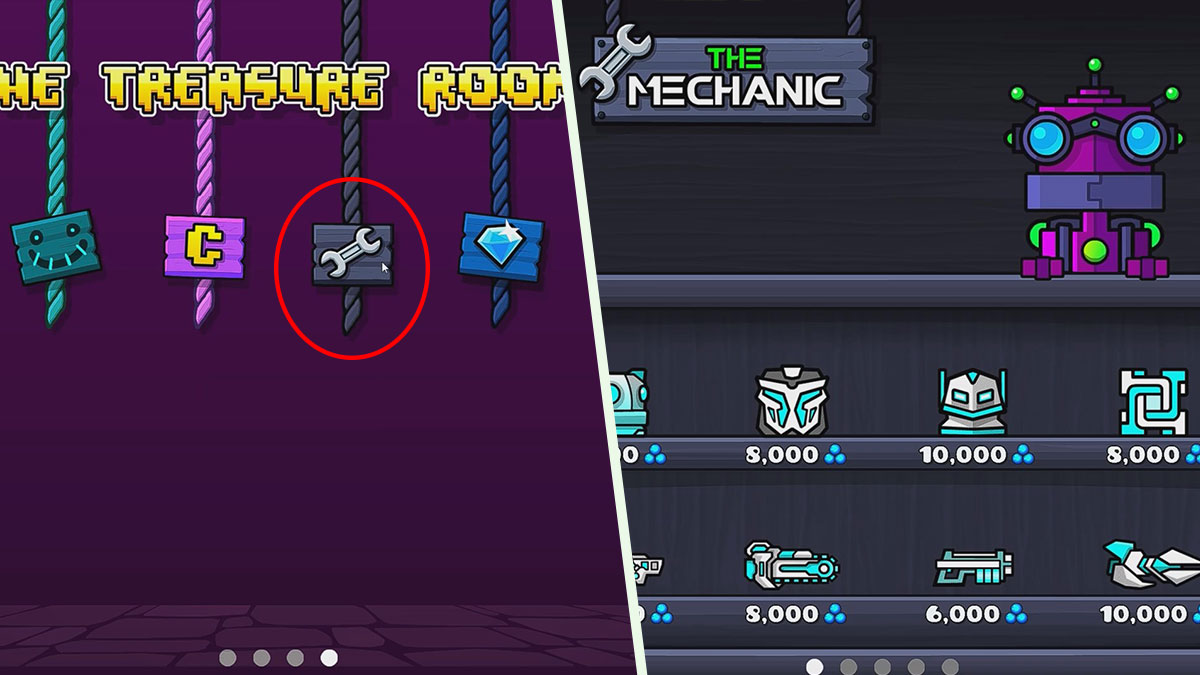
Geometry Dash: Where Can You Find the Mechanic Shop?
Image source: RobTop Games via SicaN64 screenshot

The Mechanic Shop in Geometry Dash can be unlocked through The Treasure Room. Click the purple dungeon door in the bottom-right corner of your screen from the main menu to open the room. Now from the Tiers menu, click the left arrow button and you should see four icons hanging from the ceiling. Click the one with the wrench icon for the Mechanic Shop.

Before you’re able to unlock the Geometry Dash Mechanic Shop, you have to pay the Shopkeeper 2,000 Diamonds. Be prepared to grind tons and tons of daily chest, Demon levels, and Bonus Gauntlets! If you have enough money but the Shopkeeper won’t let you in, just keep clicking the icon.

After a while, The Mechanic will say “Collect 2,000 Diamonds so I know you’re legit.” Click the Mechanic Shop icon again and the vendor will exclaim, “Now that’s an impressive collection of Diamonds!” At that point of dialogue, you should be able to unlock the Geometry Dash Mechanic Shop.

To recap, here’s what you need to do to access the Mechanic Shop in Geometry Dash:

  1. Open the Treasure Room by clicking the door in the bottom-right of the main menu.
  2. Click the left arrow in the Tiers menu.
  3. Click the wrench icon and pay the Mechanic 2,000 Diamonds to open its Shop.

Related Topics
Guide Indie Games
Share. Facebook Twitter LinkedIn Reddit Email
Sidharta F. Rasidi
  • Website

An ordinary Indonesian who enjoys playing and talking about video games. His favorite games are Monster Hunter: World, Space Invader Extreme 2, THE iDOLM@STER SP, Road Trip Adventure, Halo series, and KOEI Tecmo's Warriors series.

SUGGESTED READS

MindsEye Layoffs 2026
Gaming

Studio Behind GTA-like Game, MindsEye, Hit With More Layoffs, and Nobody is Surprised: ‘Shocked There’s Even a Janitor Working There’

Princess Peach Spin-Off Movie May Already Be in Development, Job Listing Suggests
Gaming

Princess Peach Spin-Off Movie May Already Be in Development, Job Listing Suggests

Xbox's New CEO Wants to Reconnect With the 'Community,' Yet Brings In More CoreAI Leaders
Gaming

Xbox’s New CEO Wants to Reconnect With the ‘Community,’ Yet Brings In More CoreAI Leaders

Diablo 4 Season 13 Tier List
Gaming

Class Tier List for Diablo 4 Season 13 (Best Classes for Endgame & Leveling)

Take-Two Boss Finally Explains Why GTA 6 Is Skipping PC at Launch: 'We'll See How It Works Out'
Gaming

Take-Two Boss Finally Explains Why GTA 6 Is Skipping PC at Launch: ‘We’ll See How It Works Out’

Rockstar Employee Review Claims 'Unrealistic' Crunch as GTA 6 Development Intensifies: 'Had to Work Till 3AM'
Gaming

Rockstar Employee Review Claims ‘Unrealistic’ Crunch as GTA 6 Development Intensifies: ‘Had to Work Till 3AM’

The Nerd Stash
Facebook X (Twitter) Instagram YouTube LinkedIn
  • About Us
  • Join Our Team
  • Meet the Team
  • Privacy Policy
  • DMCA Policy
  • Contact Us
  • Terms of Use
  • Sitemap
  • Editorial Guidelines
  • Advertising Policy
© 2026 The Nerd Stash. All Rights Reserved.

Type above and press Enter to search. Press Esc to cancel.