

Close Menu
  • Gaming
    • Game Guides
    • Codes
    • Game News
    • Game Previews
    • Game Reviews
    • Game Features
    • Game Lists
    • Platforms
      • Nintendo
      • PC
      • PlayStation
      • Xbox
      • Mobile
  • Entertainment
    • Movies
    • Movie Features
    • Movie Reviews
    • TV
    • Reality TV
    • Royals
  • Celebrity
    • Hollywood
  • Human Interest
  • Astrology
  • Videos
  • More
    • Anime
    • Lists
    • Podcasts
    • Reviews
Facebook X (Twitter) Instagram LinkedIn YouTube
  • About Us
  • Join Our Team
  • Meet the Team
  • Privacy Policy
  • DMCA Policy
  • Contact Us
  • Terms of Use
  • Sitemap
  • Editorial Guidelines
  • Advertising Policy
The Nerd Stash
  • Gaming
  • Celebrity
    • Hollywood
  • Human Interest
  • Videos
The Nerd Stash
Home»Game Guides»Best Helldivers 2 Graphics Settings

Best Helldivers 2 Graphics Settings

You know the drill. Low for gameplay, Ultra for screenshots.

Sid NatividadBy Sid NatividadFebruary 9, 20242 Mins Read
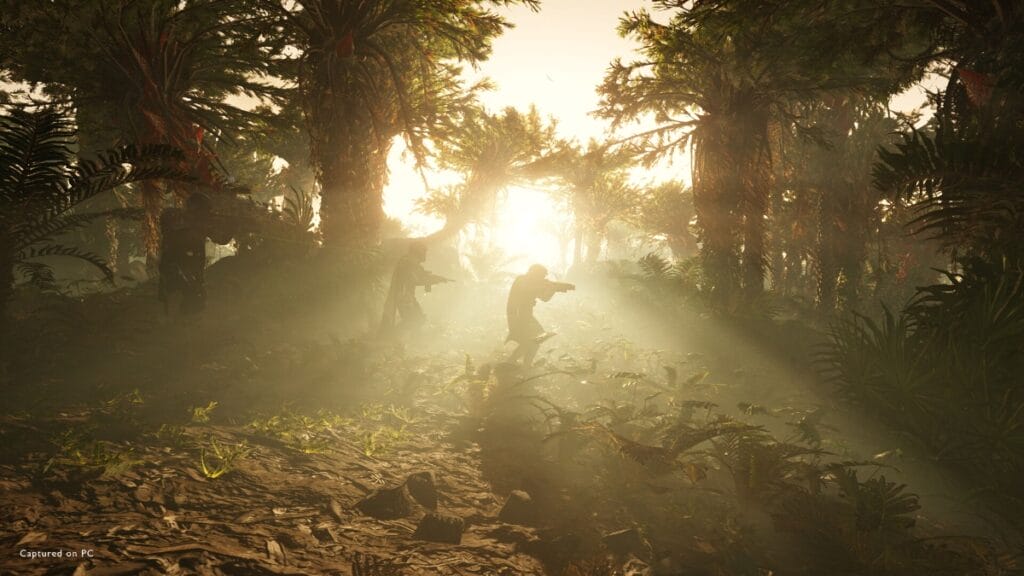
Helldivers 2 lighting image
Image Source: Steam

Skip To...

  • Display Settings
  • Graphics Settings
This article is over 1 years old and may contain outdated information.

Helldivers 2 is one of the hottest games right now, and apart from letting you experience hell on the battlefield, it will also plunge your PC into hell. Needless to say, the game can be demanding, especially past 1080p and in the middle of combat where alien swarms will also cut your framerate in half. If you’re looking to maximize performance while also minimizing visual loss, here’s our Helldivers 2 graphics settings optimization guide and suggestion.

Display Settings

Helldivers 2 Graphics settings display segment
Image Source: Arrowhead Game Studios via The Nerd Stash

By extension, this segment in the Helldivers 2 graphics settings can offer significant changes to framerate, especially Render Scale and Resolution. Vertical Field of View is subjective, but if you want to see as many enemies as possible, cranking it higher is best for practicality.

Related:

How To Unlock More Weapons in Helldivers 2

However, a good balance for FOV is to stay at 70 degrees so it won’t look as though you’re viewing everything through a fish-eye lens.

  • Vertical Field of View – 60-70
  • Resolution – Native (your monitor’s maximum)
  • Render Scale – Quality/Balanced

If you have a GPU that’s equivalent to an RTX 3060 Ti or RX 6700 XT, feel free to even go Native on the Render Scale.

Graphics Settings

Helldivers 2 Graphics Settings image
Image Source: Arrowhead Game Studios via The Nerd Stash

Again, we’re mostly aiming for performance here, so expect some sacrifices in aesthetics and fidelity. Moreover, framerate can drastically be different during combat where there are more character models on screen.

  • Depth of Field – Off (it has a performance impact, surprisingly)
  • Texture Quality – Depends on your GPU’s VRAM
  • Object Detail Quality – Medium
  • Render Distance – Medium
  • Shadow – Low
  • Particle Quality – Low
  • Reflection Quality – Low
  • Space Quality – High
  • Ambient Occlusion – Off
  • Screen-Space Global Illumination – Off
  • Vegetation and Rubble Density – Medium
  • Terrain Quality – High
  • Volumetric Fog Quality – Low
  • Volumetric Cloud Quality – Low
  • Lighting Quality – Medium
  • Anti-Aliasing – Off (On if Render Scale is Native)

As usual, the most severe offenders and framerate gluttons are Shadow, Reflection, Volumetric stuff, and Screen Space stuff (including Ambient Occlusion).

Related:

Top 5 Funniest Ship Names in Helldivers 2

If you find your framerate staying well past 60 FPS with these settings (and more than 50 FPS during combat), feel free to enable Anti-Aliasing or increase some of the other settings we sacrificed.


Related Topics
Guide Helldivers 2
Share. Facebook Twitter LinkedIn Reddit Email
Sid Natividad
  • Website

Sid was born, did some stuff, then decided to become a writer. He found respite in the sweet embrace of video games and pop culture after serving as a journalist, covering warzones and depressed areas. It seems he prefers the much lower chance of getting hit by a stray bullet during work hours.

SUGGESTED READS

Minecraft Accused of Mocking Lonely Kids, Sparking Mental Health Backlash: 'One of the Ickiest Things I've Seen'
Features

Minecraft Accused of Mocking Lonely Kids, Sparking Mental Health Backlash: ‘One of the Ickiest Things I’ve Seen’

Destiny 2 Renegades PS5 Review
8.5
Features

Destiny 2: Renegades Review – The Shooter Strikes Back

Clair Obscur: Expedition 33 Loses GOTY, Other Award from Indie Game Awards Over Generative AI: 'Some Weird Performative BS'
Game News

GOTY Stripped Over AI?: Clair Obscur: Expedition 33 Loses Awards at Indie Game Awards, ‘Some Weird Performative BS’

Sony Patents Real-time AI Game Censorship Tech That Could Even Make GTA 6 Kid-Friendly
Game News

Sony Patents Real-Time AI Game Censorship Tech That Could Even Make GTA 6 Kid-Friendly

Zenless Zone Zero Version 2.5 Announcement
Game News

Zenless Zone Zero Version 2.5 Is Ready To Wrap Up the Year With Two New Agents and a Free Outfit

PC Gamers Can't Catch a Break as Nvidia Plans 40% GeForce GPU Production Cuts, Report: 'Who Needs a PC Anyways'
Game News

PC Gamers Can’t Catch a Break as Nvidia Reportedly Plans 40% GeForce GPU Production Cuts: ‘Who Needs a PC Anyways’

Trending
Minecraft Accused of Mocking Lonely Kids, Sparking Mental Health Backlash: 'One of the Ickiest Things I've Seen'

Minecraft Accused of Mocking Lonely Kids, Sparking Mental Health Backlash: ‘One of the Ickiest Things I’ve Seen’

Destiny 2 Renegades PS5 Review
8.5

Destiny 2: Renegades Review – The Shooter Strikes Back

Clair Obscur: Expedition 33 Loses GOTY, Other Award from Indie Game Awards Over Generative AI: 'Some Weird Performative BS'

GOTY Stripped Over AI?: Clair Obscur: Expedition 33 Loses Awards at Indie Game Awards, ‘Some Weird Performative BS’

Sony Patents Real-time AI Game Censorship Tech That Could Even Make GTA 6 Kid-Friendly

Sony Patents Real-Time AI Game Censorship Tech That Could Even Make GTA 6 Kid-Friendly

The Nerd Stash
Facebook X (Twitter) Instagram YouTube LinkedIn
  • About Us
  • Join Our Team
  • Meet the Team
  • Privacy Policy
  • DMCA Policy
  • Contact Us
  • Terms of Use
  • Sitemap
  • Editorial Guidelines
  • Advertising Policy
© 2025 The Nerd Stash. All Rights Reserved.

Type above and press Enter to search. Press Esc to cancel.



