Close Menu
  • Gaming
    • Game Guides
    • Codes
    • Game News
    • Game Previews
    • Game Reviews
    • Game Features
    • Game Lists
    • Platforms
      • Nintendo
      • PC
      • PlayStation
      • Xbox
      • Mobile
  • Entertainment
    • Movies
    • Movie Features
    • Movie Reviews
    • TV
    • Reality TV
    • Royals
  • Celebrity
    • Hollywood
  • Human Interest
  • Astrology
  • Videos
  • More
    • Anime
    • Lists
    • Podcasts
    • Reviews
Facebook X (Twitter) Instagram LinkedIn YouTube
  • About Us
  • Join Our Team
  • Meet the Team
  • Privacy Policy
  • DMCA Policy
  • Contact Us
  • Terms of Use
  • Sitemap
  • Editorial Guidelines
  • Advertising Policy
The Nerd Stash
  • Gaming
  • Celebrity
    • Hollywood
  • Human Interest
  • Videos
The Nerd Stash
Home»Game Guides»How To Use the Tinker Station in Pacific Drive

How To Use the Tinker Station in Pacific Drive

Understanding your car takes time.

Julio La PineBy Julio La PineFebruary 22, 20243 Mins Read
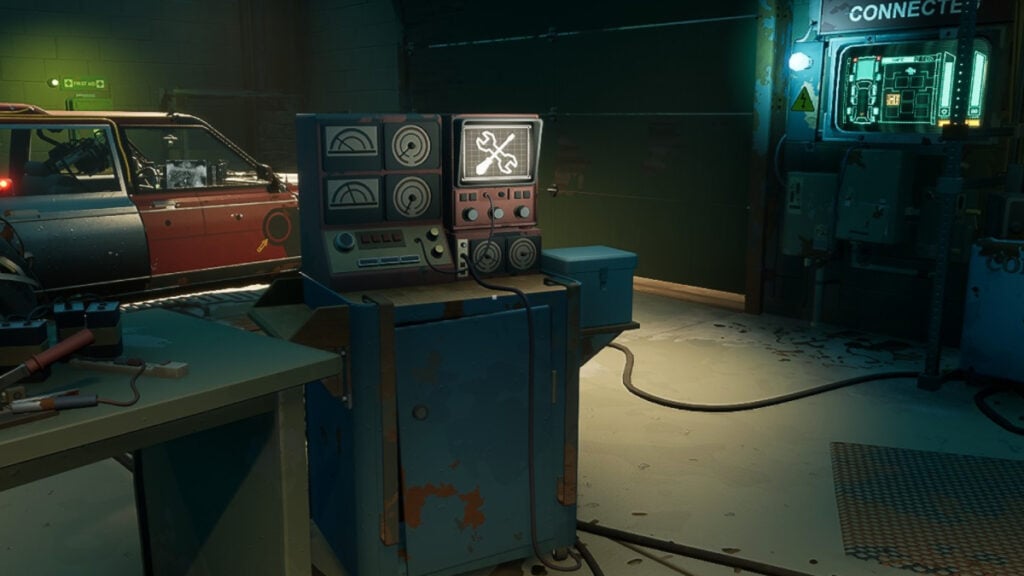
Pacific Drive Tinker Station at the Garage
Image Source: Kepler Interactive via The Nerd Stash
This article is over 1 years old and may contain outdated information.

While traveling through the bizarre roads of Pacific Drive, there’s a chance your car might develop things called Quirks. These are some of the many mechanics in Pacific Drive that can only be fixed by using the garage’s Tinker Station. Initially, this feature might be confusing for many. And honestly, we don’t blame you. Removing Quirks takes a lot of observation and patience. But thankfully, if you’re someone who pays attention to every part of your car, you can fix these issues in the blink of an eye.

How Does The Tinker Station Work in Pacific Drive?

Tinker Station Screen
Image Source: Kepler Interactive via The Nerd Stash

First, we need to understand the Tinker Station in Pacific Drive and its role in fixing car quirks. While exploring, you might have noticed your car acting strange. Sometimes, it might be a door opening on its own, the radio turning on, or even the wipers going bonkers without previous notice. This is a quirk. You get quirks after a run, and you are more likely to get one if your car is damaged a lot. Or at least, that’s what we’ve seen. While not dangerous, these issues can become annoying in certain situations. Imagine yourself escaping from the storm just for a door to open and let the radiation in. Yeah, it’ll hurt. Thankfully, the Tinker Station can solve that.

How To Fix Car Quirks in Pacific Drive

Tinker Station Fix Screen
Image Source: Kepler Interactive via The Nerd Stash

First and foremost, you need to identify your car quirk. Every player will have a different one. In our case, the most annoying was the one that made our front right door open on its own. Initially, we had no clue what was causing it; that’s when the power of observation comes in. We noticed that when we turned the radio off, the hood would open. Since we knew the cause, all we had to do was return to the garage and do the following:

  1. Interact with the Tinker Station.
  2. You must select your car quirks, which usually go like this:
    • The first two columns pertain to the action you take, and the last two columns include the quirk.
    • In our case, we selected Radio -> Turns Off, and then we selected Hood -> Opens.
  3. If you’re correct, the Tinker Station will notify you to go to fixes by switching screens. If you’re incorrect, you have more guesses, but beware because guesses refresh only after you do a run.
  4. Once you’re in the fixes screen, locate your quirk and craft the item you need to fix it. In our case, it was a Mechanic’s Kit.

Related:

Pacific Drive Review: Bizarre Road Ahead

While confusing, the Tinker Station and Car Quirks in Pacific Drive are interesting mechanics that add another layer of management and survival to the game. So, after every run, always check your car and do a test run around the garage to see if everything’s in order.


Related Topics
Guide Pacific Drive
Share. Facebook Twitter LinkedIn Reddit Email
Julio La Pine
  • Website

Been gaming since '99! I am a huge JRPG fan and my favorite franchise is Final Fantasy. I love writing about games and I hope I can do it for the rest of my days!

SUGGESTED READS

Nintendo Demanded Mario Always Be ‘Ahead’ of Sonic in Crossovers, Says Ex-SEGA Producer
Game News

Nintendo Demanded Mario Always Be ‘Ahead’ of Sonic in Crossovers, Says Ex-SEGA Producer: ‘Or There Will be No Deal’

Dynasty Warriors Origins Visions of Four Heroes Review
9
Game Features

Dynasty Warriors: Origins – Visions of Four Heroes Review – Old Foes, New Allies

Marvel Rivals Season 6 Hands-On Preview
Game Features

Marvel Rivals Season 6 Hands-On Preview: The Merc With a Mouth Has Arrived

Amazon's Tomb Raider Reveals Sophie Turner's Accurate Lara Croft Looks, But Fans Still Have One Major Concern
Game News

Amazon’s Tomb Raider Reveals Sophie Turner’s Classic-Inspired Lara Croft Looks, But Fans Still Have One Major Concern

Monster Hunter Wilds DLC FPS
Game News

More DLC Equals More FPS: Monster Hunter Wilds Player Discovers an Unintentional Flaw In the Game’s Performance

Marathon Raid Map
Features

Marathon Will Break Extraction Shooter Conventions by Bringing Destiny-like Raids Into the Mix

Trending
Nintendo Demanded Mario Always Be ‘Ahead’ of Sonic in Crossovers, Says Ex-SEGA Producer

Nintendo Demanded Mario Always Be ‘Ahead’ of Sonic in Crossovers, Says Ex-SEGA Producer: ‘Or There Will be No Deal’

Dynasty Warriors Origins Visions of Four Heroes Review
9

Dynasty Warriors: Origins – Visions of Four Heroes Review – Old Foes, New Allies

Marvel Rivals Season 6 Hands-On Preview

Marvel Rivals Season 6 Hands-On Preview: The Merc With a Mouth Has Arrived

Amazon's Tomb Raider Reveals Sophie Turner's Accurate Lara Croft Looks, But Fans Still Have One Major Concern

Amazon’s Tomb Raider Reveals Sophie Turner’s Classic-Inspired Lara Croft Looks, But Fans Still Have One Major Concern

The Nerd Stash
Facebook X (Twitter) Instagram YouTube LinkedIn
  • About Us
  • Join Our Team
  • Meet the Team
  • Privacy Policy
  • DMCA Policy
  • Contact Us
  • Terms of Use
  • Sitemap
  • Editorial Guidelines
  • Advertising Policy
© 2026 The Nerd Stash. All Rights Reserved.

Type above and press Enter to search. Press Esc to cancel.