Close Menu
  • Gaming
    • Platforms
      • Nintendo
      • PC
      • PlayStation
      • Xbox
  • Entertainment
    • Movies
    • TV
    • Royals
  • Celebrity
    • Hollywood
  • Human Interest
  • Astrology
  • More
    • Anime
    • Reviews
Facebook X (Twitter) Instagram LinkedIn YouTube
  • About Us
  • Join Our Team
  • Meet the Team
  • Privacy Policy
  • DMCA Policy
  • Contact Us
  • Terms of Use
  • Sitemap
  • Editorial Guidelines
  • Advertising Policy
The Nerd Stash
  • Gaming
  • Celebrity
  • Hollywood
  • Human Interest
The Nerd Stash
Home»Gaming»Roblox: Fruit Seas Codes (May 2024)

Roblox: Fruit Seas Codes (May 2024)

Everything you need lies in a single code

Nat CollazoBy Nat CollazoMay 27, 20242 Mins Read
Fruit Seas Codes
Image Source: Demon Time Games via The Nerd Stash
This article is over 1 years old and may contain outdated information.

Fruit Seas is yet another one of the One Piece-inspired experiences found all over Roblox. You can choose between being a pirate or marine and discovering treasures as the former or rescuing civilians as the letter. Like those other experiences, you can use codes to get more stat resets, rolls, etc. Best of all, these codes are beneficial regardless of whether you choose to be a pirate or a marine.

Fruit Seas Codes

  • Working Fruit Seas Codes
  • How to Redeem Fruit Seas Codes
  • How to Get More Codes

Working Fruit Seas Codes

We’ve tested all of the below codes in-game to ensure that they work. Since they’re all case-sensitive, I recommend copying and pasting them into the code text box in-game.

CodesRewards
UPDATETIMERedeem for double XP.
ITSFINALLYHERERedeem for double Beli.
FRESHSTARTRedeem to reset stat points.
LUCKYRACE?Redeem for the Ogre title.

How to Redeem Fruit Seas Codes

Fruit Seas Codes
Image Source: Demon Time Games via The Nerd Stash

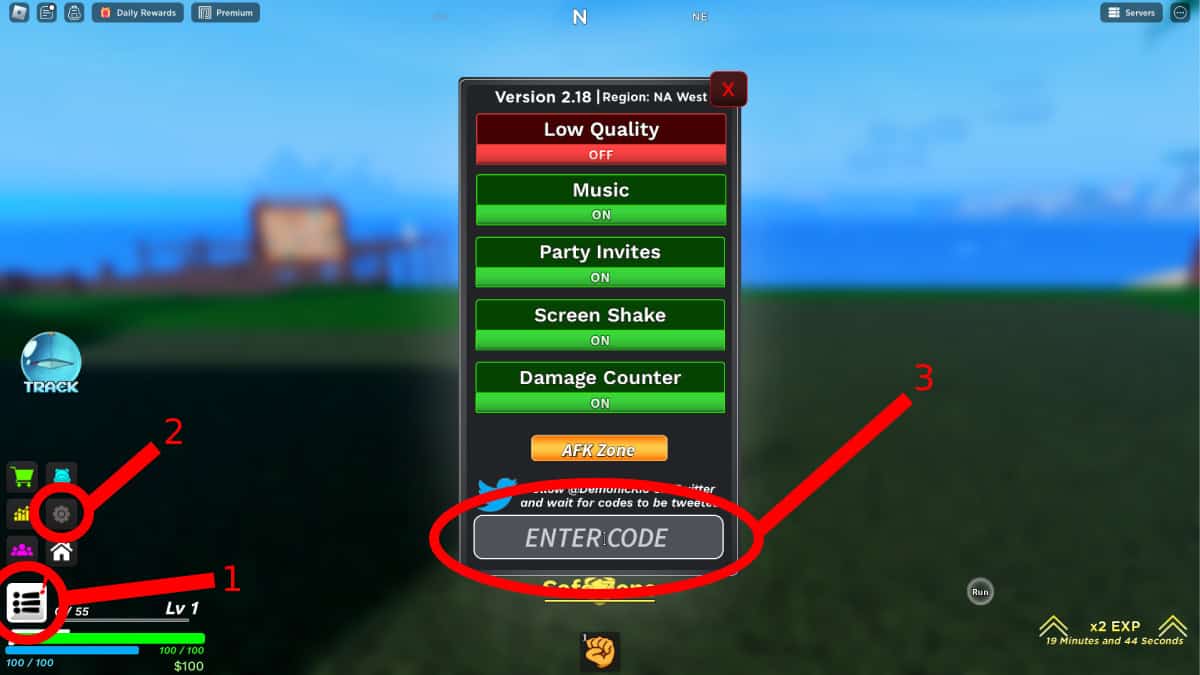
To redeem Fruit Seas codes, follow these instructions:

  1. Open up Fruit Seas on Roblox.
  2. Select the drop-down menu icon on the bottom left-hand side of the menu.
  3. A new menu above the icon will appear. Select the cog wheel icon.
  4. An all-new window will open with a text box at the bottom.
  5. In this text box, paste in any of the above codes.
  6. Without a redeem button press the Enter key on your keyboard to activate the code.

After activating the code, you will immediately be told whether or not it worked. If it was successfully redeemed, your rewards would be displayed at the very top of the screen for a few seconds.

How to Get More Codes

To get more Fruit Seas codes, bookmark this page and visit it monthly. We update the codes regularly and remove expired ones as well as add new ones. You can also follow @DemonicKio on Twitter/X to be notified as codes become available.

Roblox is available to play on PC, mobile devices, Xbox, and PlayStation!

Related Topics
Guide Roblox
Share. Facebook Twitter LinkedIn Reddit Email
Nat Collazo
  • Website
  • X (Twitter)
  • Instagram

I am a game journalist and guide writer with ten years of experience as well as the CEO/ Founder of Frowns Marketing, a marketing company that caters to indie games, tabletop games, and board games to help developers get more wishlists, backers, and players!

SUGGESTED READS

Where to Find the Secret Fall Shop in Roblox Adopt Me
Gaming

Where to Find the Secret Fall Shop in Roblox Adopt Me

Diablo 4 Lord of Hatred Review
10
Features

Diablo 4: Lord of Hatred Review – Breaking the Cycle

Shuhei Yoshida Says He Was Fired From Playstation Studios for Saying 'No' to Jim Ryan: 'He Asked For Ridiculous Things'
Gaming

Shuhei Yoshida Says He Was Fired From Playstation Studios for Saying ‘No’ to Jim Ryan: ‘He Asked For Ridiculous Things’

Splinter Cell Remake Shows Signs of Life Despite Recent Layoffs at Ubisoft Toronto
Gaming

Splinter Cell Remake Shows Signs of Life Despite Recent Layoffs at Ubisoft Toronto

Fastest Ways to Get a Purrowl in Roblox Adopt Me
Gaming

Fastest Ways to Get a Purrowl & Trade Value in Roblox Adopt Me

Fatal Fury City of the Wolves Krauser Hands-On Preview
Gaming

Fatal Fury: City of the Wolves Wolfgang Krauser Hands-On Preview – A Regal Fighter

The Nerd Stash
Facebook X (Twitter) Instagram YouTube LinkedIn
  • About Us
  • Join Our Team
  • Meet the Team
  • Privacy Policy
  • DMCA Policy
  • Contact Us
  • Terms of Use
  • Sitemap
  • Editorial Guidelines
  • Advertising Policy
© 2026 The Nerd Stash. All Rights Reserved.

Type above and press Enter to search. Press Esc to cancel.