Close Menu
  • Gaming
    • Game Guides
    • Codes
    • Game News
    • Game Previews
    • Game Reviews
    • Game Features
    • Game Lists
    • Platforms
      • Nintendo
      • PC
      • PlayStation
      • Xbox
      • Mobile
  • Entertainment
    • Movies
    • Movie Features
    • Movie Reviews
    • TV
    • Reality TV
    • Royals
  • Celebrity
    • Hollywood
  • Human Interest
  • Astrology
  • Videos
  • More
    • Anime
    • Lists
    • Podcasts
    • Reviews
Facebook X (Twitter) Instagram LinkedIn YouTube
  • About Us
  • Join Our Team
  • Meet the Team
  • Privacy Policy
  • DMCA Policy
  • Contact Us
  • Terms of Use
  • Sitemap
  • Editorial Guidelines
  • Advertising Policy
The Nerd Stash
  • Gaming
  • Celebrity
    • Hollywood
  • Human Interest
  • Videos
The Nerd Stash
Home»Game News»Can’t Stop Browsing the ‘Net? Running 240 Tabs Now Lets You Play Pong on Browser Tab Icons

Can’t Stop Browsing the ‘Net? Running 240 Tabs Now Lets You Play Pong on Browser Tab Icons

I knew there was a reason why I never closed those tabs

Sidharta F. RasidiBy Sidharta F. RasidiFebruary 23, 20252 Mins Read
Can't Stop Browsing the 'Net? Running 240 Tabs Now Lets You Play Pong on Browser Tab Icons
Image source: Nolen Royalty

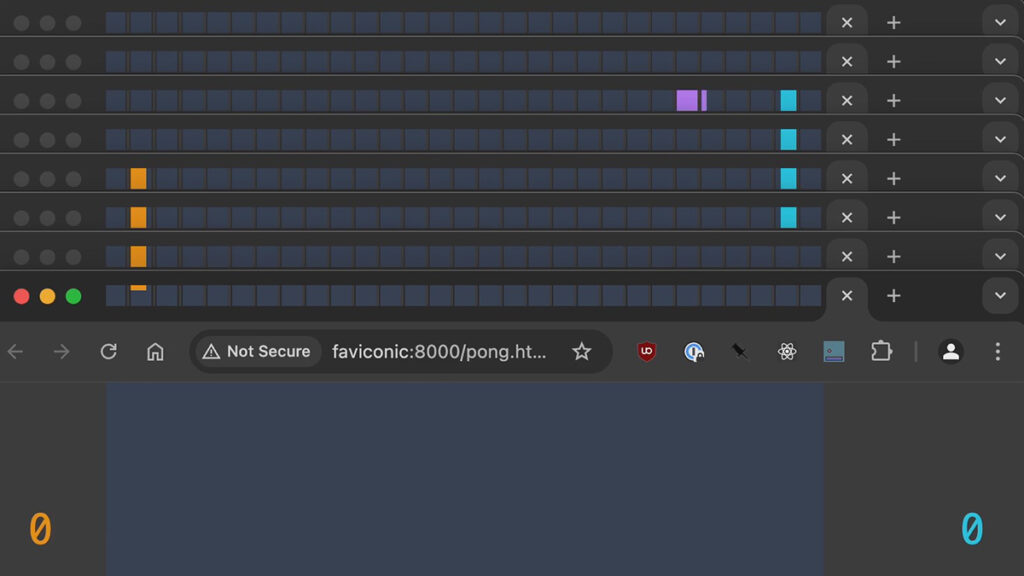
Have you ever surfed the internet for hours and ended up with hundreds of tabs open? No? Well, it can happen even to the best of internet dwellers anywhere. But if you’re wondering what should you do with those ‘waste not, want not’ tabs, one developer has turned that digital clutter into something interesting. Meet Faviconic, a system that transforms 240 tabs in a web browser to recreate the classic arcade game, Pong. Created by independent developer Nolen Royalty, this experiment transforms the tiny tab icons — or favicons — into gameplay elements.

In a video demonstration shared on X, Faviconic turned both 240 tabs arranged in a grid and the browser’s main page into a Pong arena. The ball and paddles move smoothly from the page component into the tabs as the favicons rapidly change in real time. It’s a ridiculous yet brilliant display of coding ingenuity.

what do you do with your unclosed tabs?

I've been running pong inside all 240 of mine pic.twitter.com/wBuSJ0PKNO

— nolen (@itseieio) February 20, 2025

For those born long after the third generation of consoles, Pong is a simple retro game that plays like table tennis. Two players control a paddle to bounce a ball back and forth. It may be very outdated now, but its impact on gaming history cannot be understated. Now, thanks to Faviconic, Pong is making a bizarre comeback inside your web browser.

In his portfolio website, Nolen said he was inspired by FlappyFavi, his friend’s work that lets you play Flappy Bird inside a single favicon. He thought he could make ‘something better’ considering how ridiculous it is to play something in very small tab icons. With that in mind, Nolen came up with the idea of using tabs as grids and runs with it. He also has made ‘remakes’ of other classic games using various web apps:

  • BreakTime, plays Brick Breaker inside Google Calendar.
  • Running Wordle inside the Firefox browser address bar.
  • Flappy Dird, a Flappy Bird clone inside MacOS Finder.

Top 10 Best Browser Games To Kill an Afternoon
Related: Top 10 Best Browser Games To Kill an Afternoon

To make Faviconic work, he had to solve some major technical issues. Such as web browsers slowing down unopened tabs to save resources, making smooth animation between tabs difficult.

If you’ve ever wanted to play Pong in the most absurd way possible, then thankfully you can try Faviconic yourself. The project is open-source and designed for macOS, but setting it up requires some coding skills like setting up Phyton.


Related Topics
Indie Pong
Share. Facebook Twitter LinkedIn Reddit Email
Sidharta F. Rasidi
  • Website

An ordinary Indonesian who enjoys playing and talking about video games. His favorite games are Monster Hunter: World, Space Invader Extreme 2, THE iDOLM@STER SP, Road Trip Adventure, Halo series, and KOEI Tecmo's Warriors series.

SUGGESTED READS

Crimson Desert PC Review
9.5
Features

Crimson Desert Review – It’s Real, All of it

Death Stranding 2 PC Launch Adds Fuel to DLSS 5 AI Slop Backlash: 'It Is a Disgrace'
Game News

Death Stranding 2 PC Launch Adds Fuel to DLSS 5 AI Slop Backlash: ‘It Is a Disgrace’

Starfield Free Lanes & Terran Armada DLC
Game Previews

Starfield Free Lanes & Terran Armada Hands-Off Preview – Revitalizing This Spacefaring Adventure

Resident Evil 9 DLSS5
Game Features

DLSS 5 Isn’t the Future of Graphics; It’s a Filter Over Them

What is Honey Candy in Adopt Me? How to Get It and What It's For
Game Guides

What is Honey Candy in Adopt Me on Roblox? How to Get It and What It’s For

Honkai Star Rail Version 4.1
Game News

The Phantasmoon Games Continue in Honkai: Star Rail Version 4.1

The Nerd Stash
Facebook X (Twitter) Instagram YouTube LinkedIn
  • About Us
  • Join Our Team
  • Meet the Team
  • Privacy Policy
  • DMCA Policy
  • Contact Us
  • Terms of Use
  • Sitemap
  • Editorial Guidelines
  • Advertising Policy
© 2026 The Nerd Stash. All Rights Reserved.

Type above and press Enter to search. Press Esc to cancel.