Close Menu
  • Gaming
    • Platforms
      • Nintendo
      • PC
      • PlayStation
      • Xbox
  • Entertainment
    • Movies
    • TV
    • Royals
  • Celebrity
    • Hollywood
  • Human Interest
  • Astrology
  • More
    • Reviews
Facebook X (Twitter) Instagram LinkedIn YouTube
  • About Us
  • Join Our Team
  • Meet the Team
  • Privacy Policy
  • DMCA Policy
  • Contact Us
  • Terms of Use
  • Sitemap
  • Editorial Guidelines
  • Advertising Policy
The Nerd Stash
  • Gaming
  • Celebrity
  • Hollywood
  • Human Interest
The Nerd Stash
Home»Gaming»V Rising How To Change Wolf Skin, Answered

V Rising How To Change Wolf Skin, Answered

These skins are pawsitively charming!

Nat CollazoBy Nat CollazoApril 29, 20252 Mins Read
V Rising How To Change Wolf Skin, Answered
Image Source: Stunlock Studios
This article is over 1 years old and may contain outdated information.

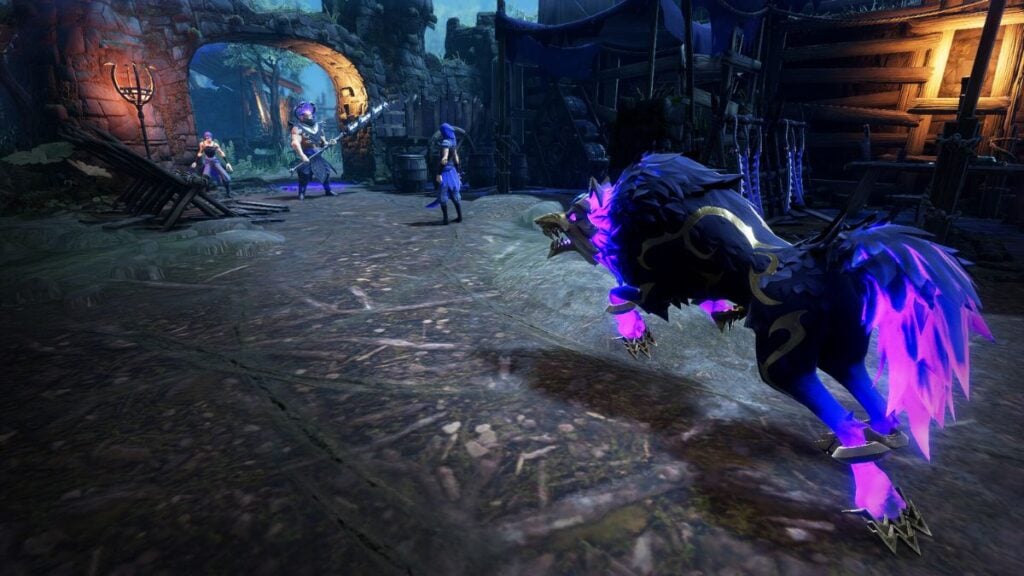
Wolf shapeshifting is one of the more interesting features of the V Rising base game. Now that players have had a chance to enjoy the beast’s gameplay style, Stunlock Studios decided it was time to up the game with additional wolf skins. This change comes about in the Eternal Dominance DLC, which offers you much more than just the ability to change skins. So, let’s review how to change wolf skins in V Rising as well as other changes introduced by the new DLC.

How to Change Your Wolf Skin in V Rising?

Before you can change your wolf skin, you need to actually be able to transform into one. So, you’ll need to defeat the Alpha Wolf within the Farbane Woods and extract its V Blood. After this point, you’ll be able to change into a wolf and use the skin you just earned from the Eternal Dominance DLC. Just follow these instructions:

  1. Open up the game menu and head to the Vampire Powers.
  2. The top of the menu will have the Wolf Form option.
  3. Select the option, and you’ll be able to cycle through all your skins.

If you happen to also have the Soul of the Wolf form from the Castlevania DLC or the Stygian Wolf form from the Founders Pack DLC, you’ll be able to switch to those in this same menu. Personally, hunting in wolf form is much more convenient than running, though it is definitely a lot slower than using a horse. However, being a wolf is also much cooler than just riding a horse, regardless of the fact that you’re a vampire. There’s also the added benefit that wolves no longer attack you because they now see you as their equal.
V Rising: Best Solo Settings
Related: V Rising: Best Solo Settings

V Rising is available to be played on PC, PlayStation, and Xbox.

Related Topics
Guide V Rising
Share. Facebook Twitter LinkedIn Reddit Email
Nat Collazo
  • Website
  • X (Twitter)
  • Instagram

Nat is a journalist with over ten years of online publishing experience. They are a massive fan of hanging out with both their wife and cat which would ideally be all the time. Nat received an undergraduate degree in English Literature from Florida International University, then returned to complete a graduate degree in Mass Communications before moving across the country to settle in New England.

SUGGESTED READS

GTA 6 Physical Copy Leaks Early, Revealing Massive 230GB Storage Requirement and 'Online Support'
Gaming

GTA 6 Physical Copy Leaks Early, Revealing Massive 230GB Storage Requirement and ‘Online Support’

XBOX Is Giving Away 25 PC Games for Its 25th Anniversary, With One Major Catch
Gaming

XBOX Is Giving Away 25 PC Games for Its 25th Anniversary, With One Major Catch

WoW Forever Error BLZ51934200
Gaming

How to Fix Error BLZ51934200 in WoW Forever

Honkai Nexus Anima Final Closed Beta Test
Gaming

Honkai: Nexus Anima Announces Its Final Closed Beta Test

Chivalware Review
8.5
Gaming

Chivalware Review – A Unique Roguelike That Just Clicks

WoW Forever Best Race Class Combos
Gaming

Best Race & Class Combos for New Players in WoW Forever

The Nerd Stash
Facebook X (Twitter) Instagram YouTube LinkedIn
  • About Us
  • Join Our Team
  • Meet the Team
  • Privacy Policy
  • DMCA Policy
  • Contact Us
  • Terms of Use
  • Sitemap
  • Editorial Guidelines
  • Advertising Policy
© 2026 The Nerd Stash. All Rights Reserved.

Type above and press Enter to search. Press Esc to cancel.