Close Menu
  • Gaming
    • Platforms
      • Nintendo
      • PC
      • PlayStation
      • Xbox
  • Entertainment
    • Movies
    • TV
    • Royals
  • Celebrity
    • Hollywood
  • Human Interest
  • Astrology
  • More
    • Reviews
Facebook X (Twitter) Instagram LinkedIn YouTube
  • About Us
  • Join Our Team
  • Meet the Team
  • Privacy Policy
  • DMCA Policy
  • Contact Us
  • Terms of Use
  • Sitemap
  • Editorial Guidelines
  • Advertising Policy
The Nerd Stash
  • Gaming
  • Celebrity
  • Hollywood
  • Human Interest
The Nerd Stash
Home»Gaming»All West Coast Classics Media Stick Locations in GTA Online

All West Coast Classics Media Stick Locations in GTA Online

Beats to escape the police/players to.

Sidharta F. RasidiBy Sidharta F. RasidiDecember 19, 20233 Mins Read
All West Coast Classics Media Stick Locations in GTA Online
Image source: Rockstar Games via KellerHawk screenshot
This article is over 2 years old and may contain outdated information.

The Chop Shop Update builds upon the game’s music collection, adding DaM-FunK’s new album, Even the Score, to the mix. Like in the previous GTA 5 Online updates, you need to find the location of a USB or Media Stick to unlock the track. You only have to get it once but the West Coast Classics Media Stick can appear in five different spots randomly. Thankfully, DJ Pooh (and us!) are here to help.

GTA 5 Online: Where Are the Locations of All the West Coast Classics Media Sticks?
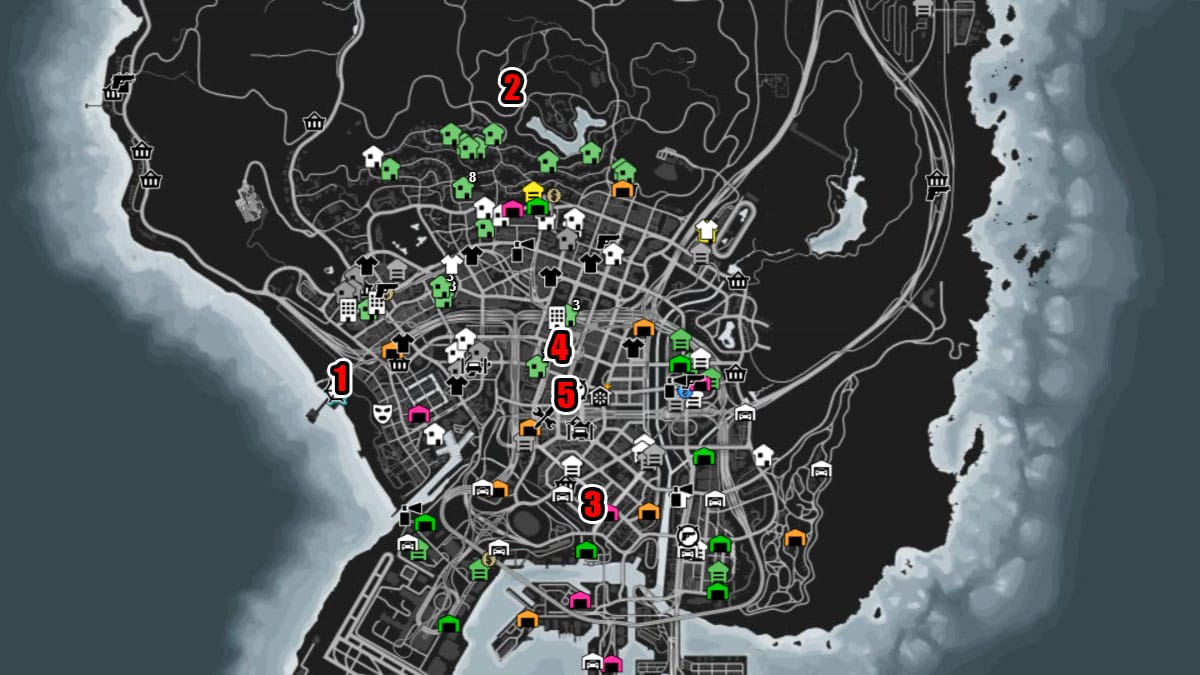
GTA Online: Where Are the Locations of All the West Coast Classics Media Sticks?
Image source: Rockstar Games via Gtaweb.eu

You can try calling the West Coast Classics radio station to get clues on the GTA 5 Online Even the Score mix Media Sticks whereabouts. Open your Phone and select the West Coast Classics phone number on your Contacts. DJ Pooh will answer your call by directing you to one of the five possible spawn locations. A marker should appear on your map as well, so you should not miss his direction!

To unlock the Even the Score mix in GTA 5 Online, you only need to collect one Media Stick. For that reason, once you have found it in one location, you don’t have to keep looking.

You can start listening to DaM-FunK’s mixtape by opening the “Inventory” option from the “Interaction Menu.” Select “Media Player” and cycle through all the mixes you’ve unlocked. Afterward, hop on to your favorite vehicle and turn on the radio. Pick the “Media Player” option to listen to the Media Stick beats in GTA 5 Online.

NumberLocationPhone Clue
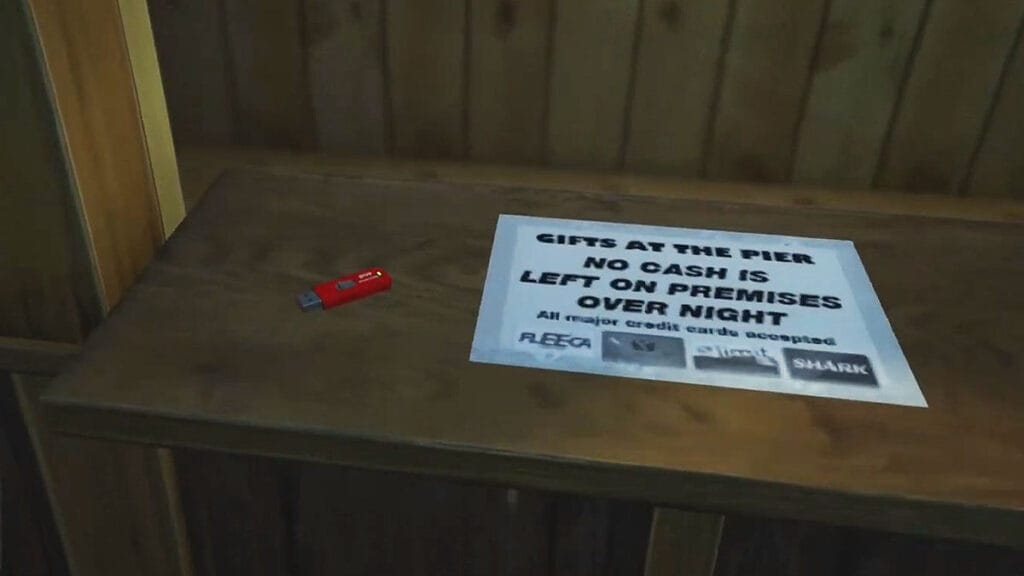
1Del Pierro Pier.
The GTA 5 Online Media Stick location is in the wooden gift kiosk.
“This is DJ Pooh at West Coast Classic. Check this out. You can’t find this at a store, but you can find a copy of the Even the Score mixtape on a kiosk near the rides, by the shore.”
2Galileo Observatory.
On the edge that’s overlooking Los Santos buildings.
“Thanks for calling. DJ Pooh Here. What be the reason for this call? If it’s about the mixtape, you need to pay a visit to the Observatory wall. Yes, yes, y’all.”
3Grove Street.
On a small porch of a gray-colored house, the southern part of the neighborhood.
“You just got through to West Coast Classics. Ain’t nothing like finding a mixtape with some DaM-FunK heat. Somewhere on a porch out there on Grove Street. Go get it.”
4Maze Bank Tower.
The GTA 5 Online Media Stick location is on the building’s rooftop. Precisely on the edge that’s overlooking the Vinewood sign.
“Congratulations and thanks for calling. This ain’t no prank. If you want the DaM-FunK mixtape, head over to Maze Bank. If you’re on the roof, check the Vinewood sign for proof. Let’s go.”
5Premium Deluxe Motorsport.
The location of the GTA 5 Online Media Stick is on a coffee table inside the building.
“This is DJ Pooh. Thanks for calling West Coast Classics. If you want in on the Even the Score mixtape, go kick back at Premium Deluxe Motorsport. If you’re able. Just don’t put your feet up on their table. Good luck.”

GTA Online is available on PlayStation, Xbox, and PC.

Related Topics
GTA 5 Guide
Share. Facebook Twitter LinkedIn Reddit Email
Sidharta F. Rasidi
  • Website

Since middle school, Sidharta has used his video game blog as a handy excuse to avoid studying. After graduating with a degree in Management Information Systems from Bina Nusantara University, he spent years honing his skills as a games journalist, working as an editor for a local gaming site and freelancing elsewhere. Nowadays, when he’s not busy crafting outrageous plots for his serialized comic, Sidharta covers niche games on his personal blog, StoPlayinGame.com. His favorite game series includes Monster Hunter, Earth Defense Force, THE iDOLM@STER, Road Trip Adventure, and KOEI Tecmo's Warriors.

SUGGESTED READS

How to get Radiant Gems In Palworld 1.0
Gaming

How to get Radiant Gems In Palworld 1.0

gamescom dev 2026 Adds Subnautica 2 Creative Director as Keynote Speaker, Reveals New Awards
Gaming

gamescom dev 2026 Adds Subnautica 2 Creative Director as Keynote Speaker, Reveals New Awards

Fortnite Summer Skins Censored Rumors
Gaming

Fortnite Fans Disappointed as Upcoming Summer Skins Have Been Allegedly Censored One Day After Their Reveal: ‘They Folded Without Any Pressure’

Where to Mine Soralite and Paloxite in Palworld
Gaming

Where to Mine Soralite and Paloxite in Palworld

Beast of Reincarnation Game Previews
Gaming

Beast of Reincarnation Previews Just Made It One of the Most Anticipated Games of 2026

Palworld 1.0 Patched the Tower Boss Glitch, but You Can Recruit Them Instead
Gaming

Palworld 1.0 Patched the Tower Boss Glitch, but You Can Recruit Them Instead

The Nerd Stash
Facebook X (Twitter) Instagram YouTube LinkedIn
  • About Us
  • Join Our Team
  • Meet the Team
  • Privacy Policy
  • DMCA Policy
  • Contact Us
  • Terms of Use
  • Sitemap
  • Editorial Guidelines
  • Advertising Policy
© 2026 The Nerd Stash. All Rights Reserved.

Type above and press Enter to search. Press Esc to cancel.