Before adding another CS2 skin, take a moment to look at what you already have. Does your inventory feel organized, or does it look like a collection of random skins? Building a good inventory is not just about expensive skins. How you organize it, when you refresh it, and which skins you keep all matter. In this article, we’ll show you how to build and maintain your CS2 inventory without overcomplicating it.
How to Build a Strong CS2 Skin Inventory
A good CS2 inventory is rarely accidental. Experienced traders have clear strategies behind their choices, and you can learn from them instead of figuring everything out through trial and error. Let’s look at some approaches you can try.
Mix Weapon Types
A common mistake is buying too many skins for just one or two weapons, usually the ones people use most, like the AK-47 or AWP, and ending up with nothing for the rest of your loadout. These two weapons do have the most trading activity since almost everyone uses them, but that also means prices for their skins change more often, and competition is higher.
Watch Float and Pattern
Two copies of the same skin can have very different prices depending on their float and pattern, so it helps to check these details instead of buying the first listing you find. On skins like Case Hardened, a specific pattern known for a strong blue color can sell for much more than a regular version of the same skin, sometimes several times the price.
Track Market Trends
Skin prices change along with what is happening in the game, so paying attention to new cases, retired collections, and major tournaments usually tells you more than just watching a single price. Skins tied to pro players or creators can see short-term price spikes, while retired collections often rise slowly as supply decreases.
How to Refresh Your CS2 Skin Inventory
Already have a few skins in your inventory? Over time, some may start to feel outdated or no longer fit your style. That’s where refreshing your inventory comes in. Let’s look at when and how to replace old skins with new ones.
When to Replace
Timing matters more than people think, and the best moments to refresh your inventory usually line up with real events in the game rather than random timing. Prices for skins tied to a weapon or design often rise briefly around major tournaments, since viewership spikes and more players are watching what pros are using. Player numbers also grew around 15 percent in recent quarters, which has kept steady demand for mid-priced skins in the $5 to $50 range, making this a more reliable window to sell than during quieter stretches.
What Skins to Replace
The clearest sign a skin is worth replacing is when it stops selling or keeps losing value compared to similar items. A skin tied to a retired case or an old collection that nobody talks about anymore, something from an older Operation, for example, often sits in your inventory without moving even if the price looks fine on paper. Skins from weapons people rarely use in the current meta also tend to lose buyers over time, since demand naturally follows what’s popular in matches and on stream.
What Skins to Get
When picking what to bring into your inventory next, it helps to look at what’s actually gaining value rather than just what looks appealing. Skins with a strong pattern, like a Fade close to full coverage or a clean roll on a popular finish, tend to hold and grow in value more reliably than an average copy of the same skin. Items from newer, actively supported collections are usually a safer pick than something from a case that’s about to be phased out, since ongoing demand matters more than a low starting price.
How to Get CS2 Skins for Less
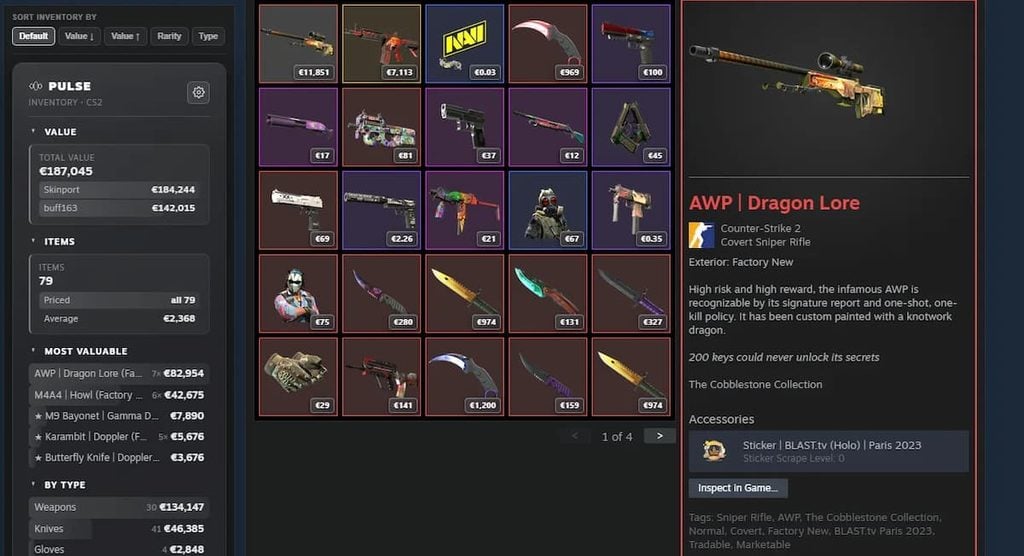
Another question is how to actually get the skins you want. Building an inventory does not have to cost a fortune. You can find good deals, trade for skins, or even add items without spending much. Let’s look at some of the options.
Trade Away What You Don’t Use
Instead of buying every skin you want with cash, look through your inventory for items you’ve stopped using or never really liked and offer them as part of a trade. Someone else might value that skin more than you do, especially if it fits the weapon or style they are building around. This can make a fair CS2 skin exchange easier to find than you might expect.
Opening Cases
Cases can be picked up a few different ways; they sometimes drop naturally just from playing matches, or you can buy them directly off the Steam Market for a low price, often just a dollar or two. To actually open one, you need a matching key, which is a separate purchase on Steam, usually priced a bit higher than the case itself. Once you have both, opening the case gives you one item from its fixed list, with common items showing up far more often than rare ones. Since keys are a repeated cost every time you want to open something, this is really the main expense in the whole process, not the case itself.
Compare Prices
The same skin can sell for noticeably different prices across marketplaces, sometimes a real gap of ten to thirty percent depending on the platform and its fees. Running a quick price comparison before buying takes only a minute but can save real money, especially on higher-priced items where even a small percentage difference adds up fast. Getting into the habit of checking two or three sources before every purchase, rather than buying from the first listing you see, is one of the simplest ways to consistently pay less over time.
Conclusion
A good CS2 inventory takes time to build. As your knowledge and trading experience grow, you will likely change your skins, and that is completely normal. What matters is having a reason behind what you keep, trade, and add. Take another look at your inventory, see what could be improved, and make it your own.