Close Menu
  • Gaming
    • Platforms
      • Nintendo
      • PC
      • PlayStation
      • Xbox
  • Entertainment
    • Movies
    • TV
    • Royals
  • Celebrity
    • Hollywood
  • Human Interest
  • Astrology
  • More
    • Anime
    • Reviews
Facebook X (Twitter) Instagram LinkedIn YouTube
  • About Us
  • Join Our Team
  • Meet the Team
  • Privacy Policy
  • DMCA Policy
  • Contact Us
  • Terms of Use
  • Sitemap
  • Editorial Guidelines
  • Advertising Policy
The Nerd Stash
  • Gaming
  • Celebrity
  • Hollywood
  • Human Interest
The Nerd Stash
Home»Gaming»Elden Ring: Inappropriate Activity Detected Error Fix

Elden Ring: Inappropriate Activity Detected Error Fix

Don’t get exiled from online play

Mykel BrightBy Mykel BrightJune 22, 20243 Mins Read
elden ring inappropriate activity detected error
Image Source: Bandai Namco via The Nerd Stash
This article is over 1 years old and may contain outdated information.

Elden Ring: Shadow of Erdtree sees Tarnished travelers new and old diving into the free-roaming RPG, but not everyone can enjoy the latest DLC. Perhaps you’ve jumped on and discovered you can’t hop online with friends? Or maybe you have yet to download the DLC in the first place? You may have run into a common error: Inappropriate Activity Detected. There’s always a fix, though. So, try a few of these solutions to the Inappropriate Activity Detected error so you can get into online mode and enjoy Elden Ring with the exciting new DLC.

Best Fix for Inappropriate Activity Detected
elden ring online mode
Image Source: Bandai Namco via The Nerd Stash

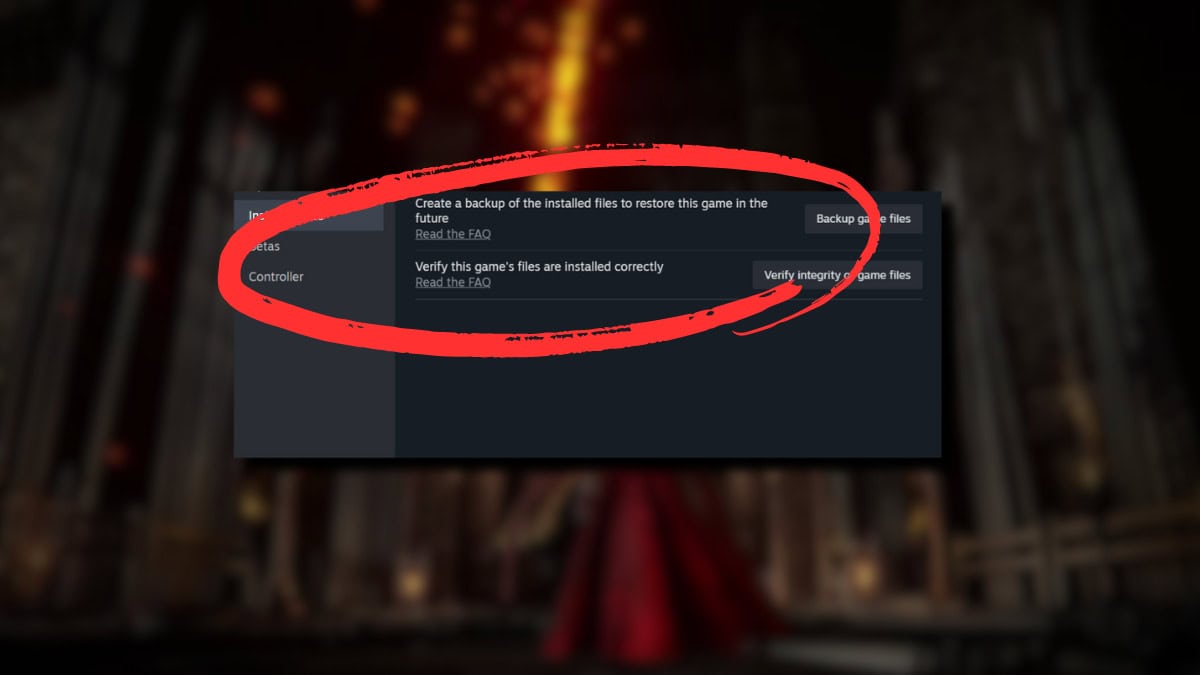
There are a few solutions proven to work for many players. However, the first thing you should try to fix the Inappropriate Activity Detected error in Elden Ring is to verify the game’s files. You’ll do this by going through the Steam game client:

  1. Once inside Steam, head to your Library
  2. Right-click on Elden Ring and choose Properties
  3. Select the Installed Files tab and choose Verify Integrity of Game Files

This solution tends to work because corruption within the files is most likely the culprit behind your inability to access online mode in Elden Ring. The process automatically checks all the files, replacing anything damaged or otherwise missing. Once completed, launch Elden Ring to see if everything is in order.

Additional Solutions

If the above solution hasn’t resolved the Inappropriate Activity Detected error in Elden Ring, you still have a few fixes to try:

  • Disabling VPN
  • Repairing Easy Anti-Cheat Service
  • Reinstalling Elden Ring

Disable VPN

There’s a chance that a VPN can falsely trigger the anti-cheating software and keep you from online mode. Consider disabling your VPN when you play to see if that resolves anything.

Repair the Easy Anti-Cheat Service

Speaking of the Elden Ring Easy Anti-Cheat Service, it could be yet another cause of the Inappropriate Activity Detected error. In this case, you’ll have to manually try to fix it:

  1. In the Steam client, head to the Library
  2. Right-click Elden Ring and select Manage
  3. Click Browse Local Files and open the Easy Anti-Cheat folder
  4. Open EasyAntiCheat_Setup.exe and press Repair
  5. Click on Finish to close out the software

Reinstall Elden Ring

If all else fails, you can always uninstall and reinstall Elden Ring to correct the error. Not a go-to solution many players probably want to go through, but it’s a potential fix. Remember to back up your saves before doing so.

Related:

How To Beat the Blackgaol Knight in Elden Ring Shadow of the Erdtree

It’s difficult to narrow down why the Inappropriate Activity Detected error shows up in Elden Ring when you aren’t using any sort of cheating software, but you aren’t short of potential solutions. Hopefully, you’ll join your fellow Tarnished to tackle all the new content in no time.


Related Topics
Elden Ring Guide
Share. Facebook Twitter LinkedIn Reddit Email
Mykel Bright
  • Website

Since childhood, Mykel has had a passion for writing, drawing, comic books, video games, and all things horror. She finds various ways to blend her loves such as sketching out ideas for potential comics and working out ideas for choice-based visual novels.

SUGGESTED READS

MindsEye Layoffs 2026
Gaming

Studio Behind GTA-like Game, MindsEye, Hit With More Layoffs, and Nobody is Surprised: ‘Shocked There’s Even a Janitor Working There’

Princess Peach Spin-Off Movie May Already Be in Development, Job Listing Suggests
Gaming

Princess Peach Spin-Off Movie May Already Be in Development, Job Listing Suggests

Xbox's New CEO Wants to Reconnect With the 'Community,' Yet Brings In More CoreAI Leaders
Gaming

Xbox’s New CEO Wants to Reconnect With the ‘Community,’ Yet Brings In More CoreAI Leaders

Diablo 4 Season 13 Tier List
Gaming

Class Tier List for Diablo 4 Season 13 (Best Classes for Endgame & Leveling)

Take-Two Boss Finally Explains Why GTA 6 Is Skipping PC at Launch: 'We'll See How It Works Out'
Gaming

Take-Two Boss Finally Explains Why GTA 6 Is Skipping PC at Launch: ‘We’ll See How It Works Out’

Rockstar Employee Review Claims 'Unrealistic' Crunch as GTA 6 Development Intensifies: 'Had to Work Till 3AM'
Gaming

Rockstar Employee Review Claims ‘Unrealistic’ Crunch as GTA 6 Development Intensifies: ‘Had to Work Till 3AM’

The Nerd Stash
Facebook X (Twitter) Instagram YouTube LinkedIn
  • About Us
  • Join Our Team
  • Meet the Team
  • Privacy Policy
  • DMCA Policy
  • Contact Us
  • Terms of Use
  • Sitemap
  • Editorial Guidelines
  • Advertising Policy
© 2026 The Nerd Stash. All Rights Reserved.

Type above and press Enter to search. Press Esc to cancel.