
Close Menu
  • Gaming
    • Platforms
      • Nintendo
      • PC
      • PlayStation
      • Xbox
  • Entertainment
    • Movies
    • TV
    • Royals
  • Celebrity
    • Hollywood
  • Human Interest
  • Astrology
  • More
    • Reviews
Facebook X (Twitter) Instagram LinkedIn YouTube
  • About Us
  • Join Our Team
  • Meet the Team
  • Privacy Policy
  • DMCA Policy
  • Contact Us
  • Terms of Use
  • Sitemap
  • Editorial Guidelines
  • Advertising Policy
The Nerd Stash
  • Gaming
  • Celebrity
  • Hollywood
  • Human Interest
The Nerd Stash
Home»Gaming»How To Change Camera Angle NCAA 25 (EA College Football 25)

How To Change Camera Angle NCAA 25 (EA College Football 25)

A new perspective

Julio La PineBy Julio La PineJuly 22, 20242 Mins Read
NCAA 25 Change Camera Angle
Image Source: EA Sports via The Nerd Stash
This article is over 2 years old and may contain outdated information.

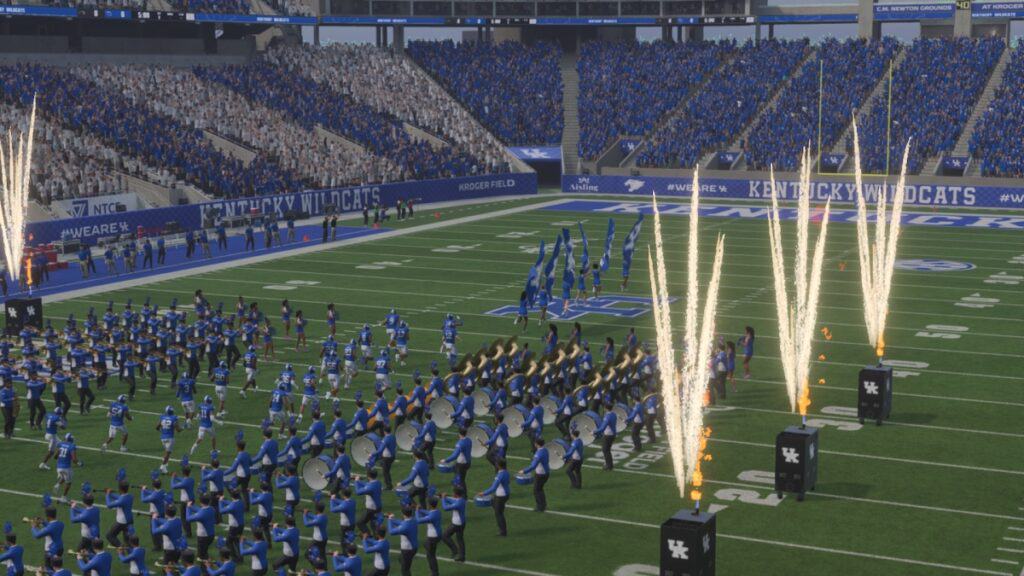
During any NCAA 25 match, you might want to change the camera angle to execute some plays better. Even if the normal camera angle works perfectly fine, those with a bit more expertise in this sport will like to look at things from a different perspective. Thankfully, CFB 25 offers many ways to do so. While some are hidden behind a few menus, others are as easy as pressing a button during a match, so you can experiment with different angles until you find the right one.

Changing Camera Angles in NCAA 25

College Football 25 Change Camera Angle
Image Source: EA Sports via The Nerd Stash

The easiest way to change your camera angle in NCAA 25 is by pressing the up and down directional buttons, regardless of your console. This will alternate between different camera modes. It is important to remember that this only works during a match. Also, this option applies to Road to Glory. If you want a more permanent change for other modes, you can change the angle for your defense and offense. To do so, do the following:

  1. While outside of a match, head to the settings menu.
  2. Scroll through the tabs with LB/L1 or RB/R1 until you find the Visual Feedback tab.
  3. Find the Cameras section. The last two options will allow you to change offense and defense cameras.

Here are the choices for offense and defense:

  • Offense
    • Standard
    • Wide
    • All-22
    • Broadcast
    • Zoom
  • Defense
    • Standard
    • Wide
    • All-22
    • Broadcast
    • Defensive Perspective
    • Zoom

Related:

College Football Coming Back Puts More Pressure on Madden To Evolve

If you want to play around with all these options, we recommend trying them out at a practice game first. Since you can only change the angles outside of a match, it is better to experiment with them without the worry of losing a game. While the process of doing all this is a bit tiring, it is nice to have so many options to find the right angle to manage your team.


Related Topics
EA Sports College Football 25 Guide
Share. Facebook Twitter LinkedIn Reddit Email
Julio La Pine
  • Website

News/Guide Writer for The Nerd Stash. When not working, you'll find him playing Final Fantasy 14, any good JRPG, and modding Project Zomboid.

SUGGESTED READS

GTA 6 Netflix Trailer Deal
Gaming

GTA 6 Is Gatekeeping Its Next Trailer Behind a Netflix Exclusive Deal

Coin Master: All Village List and Their Build Cost
Gaming

Coin Master: All Village List and Their Build Cost (2026)

Best Project Zomboid Mods Build 42 Stable
Gaming

Top 10 Best Project Zomboid Mods (Updated for Build 42 Stable)

Best Character Builds in Project Zomboid
Gaming

Best Character Builds in Project Zomboid (Updated for Build 42 Stable)

Fire Emblem Fortune's Weave Nintendo Direct
Gaming

Everything Announced at the Fire Emblem: Fortune’s Weave Direct

SEGA Gamescom Line-Up 2026
Gaming

SEGA Unveils Its Gamescom 2026 Line-up

The Nerd Stash
Facebook X (Twitter) Instagram YouTube LinkedIn
  • About Us
  • Join Our Team
  • Meet the Team
  • Privacy Policy
  • DMCA Policy
  • Contact Us
  • Terms of Use
  • Sitemap
  • Editorial Guidelines
  • Advertising Policy
© 2026 The Nerd Stash. All Rights Reserved.

Type above and press Enter to search. Press Esc to cancel.