Close Menu
  • Gaming
    • Platforms
      • Nintendo
      • PC
      • PlayStation
      • Xbox
  • Entertainment
    • Movies
    • TV
    • Royals
  • Celebrity
    • Hollywood
  • Human Interest
  • Astrology
  • More
    • Anime
    • Reviews
Facebook X (Twitter) Instagram LinkedIn YouTube
  • About Us
  • Join Our Team
  • Meet the Team
  • Privacy Policy
  • DMCA Policy
  • Contact Us
  • Terms of Use
  • Sitemap
  • Editorial Guidelines
  • Advertising Policy
The Nerd Stash
  • Gaming
  • Celebrity
  • Hollywood
  • Human Interest
The Nerd Stash
Home»Gaming»How to Change Dice Skin in Baldur’s Gate 3

How to Change Dice Skin in Baldur’s Gate 3

Baldur’s Gate 3 is a very diverse game, and you will notice it as soon as you create a character. Every player wants to have…

Vladyslav PetrenkoBy Vladyslav PetrenkoAugust 9, 20233 Mins Read
How to Change Dice Skin in Baldur’s Gate 3
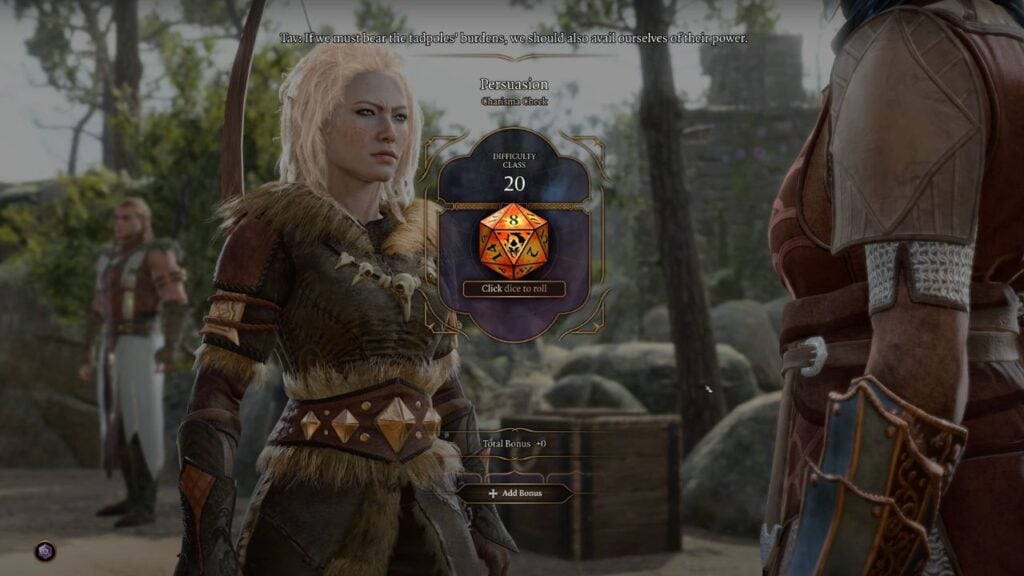
Image Source: Larian Studios via MySpaceGuide Screenshot
This article is over 2 years old and may contain outdated information.

Baldur’s Gate 3 is a very diverse game, and you will notice it as soon as you create a character. Every player wants to have a unique style and appearance in the D&D world, and the developers have worked hard to give fans this opportunity. And next, we will tell you how to change dice skin in Baldur’s Gate 3. Even here, you have a choice to customize something if you’re tired of the usual dice skin. Let’s take a look at the skins available in the game and how you can change them.

How to Choose a Dice Skin in Baldur’s Gate 3
How to Choose a Dice Skin in Baldur’s Gate 3
Image Source: Larian Studios via MySpaceGuide Screenshot

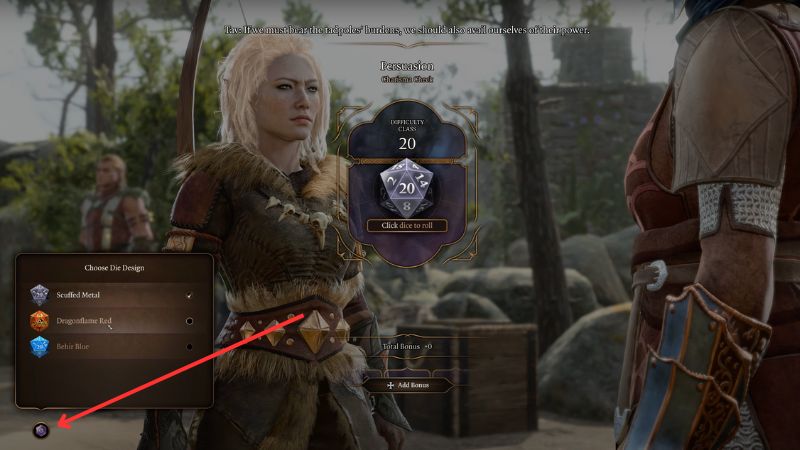
To change the dice skin, you don’t have to go into the game settings or anything like that, it’s much easier than you might think. All you need to do is wait for the next dice roll, and then, after carefully examining the interface, you will be able to find the purple dice icon in the bottom left. Hovering over it, you will see the inscription “Customize Dice,” and you should click on it to see the available skins.

Now, you can choose any of the skins available to you to customize your dice. This option will be available to you every time you roll the dice when you need to make a decision that requires the use of your skills. As you know, in Baldur’s Gate 3, you often roll the dice, so you’ll have plenty of opportunities to apply new changes. It is also worth noting that the dice skin does not affect the gameplay in any way but only serves to stylize the process of rolling dice.

How to Get More Dice Skins in Baldur’s Gate 3

At the moment, Baldur’s Gate 3 has only three variations of the appearance of your dice, namely:

  • Behir Blue
  • Dragonflame Red
  • Scuffed Metal

As you know, Behir Blue is a standard skin for the dice and you can always use it. As for the others, unfortunately, you can only get them by purchasing different editions of the game. This means that you will not be able to find them during your adventures or get them as loot from enemies. If you would like to spend extra money and buy a more expensive edition, you can get new skins depending on your purchase, namely:

  • Collector’s Edition – Scuffed Metal
  • Digital Deluxe Edition – Dragonflame Red

Of course, dice skins in Baldur’s Gate 3 aren’t the only thing you’ll get with the DLC. You’ll also get a bunch of other stuff to help you start.

Related:

How To Get the Blood of Lathander in Baldur’s Gate 3

Baldur’s Gate 3 was released on PC on August 3.

Related Topics
Baldur's Gate 3 Guide
Share. Facebook Twitter LinkedIn Reddit Email
Vladyslav Petrenko
  • Website
  • Facebook

Vladyslav Petrenko is a freelance contributor for TNS.

SUGGESTED READS

Vampire Survivors Developer Goes Wild With Over 15 New Games, Expands to Japan and Italy: 'Profit Is Not a Priority'
Gaming

Vampire Survivors Developer Goes Wild With Over 15 New Projects, Expands to Japan and Italy: ‘Profit Is Not a Priority’

Gaming

The Expanse: Osiris Reborn Is Owlcats Most Ambitious Leap Yet ‘A stunning jump forward’

World of Tanks HEAT Closed Beta Preview
Features

World of Tanks HEAT Hands-On Preview – Faster, Flashier, and Just as Tactical

Where to Find the Secret Fall Shop in Roblox Adopt Me
Gaming

Where to Find the Secret Fall Shop in Roblox Adopt Me

Diablo 4 Lord of Hatred Review
10
Features

Diablo 4: Lord of Hatred Review – Breaking the Cycle

Shuhei Yoshida Says He Was Fired From Playstation Studios for Saying 'No' to Jim Ryan: 'He Asked For Ridiculous Things'
Gaming

Shuhei Yoshida Says He Was Fired From Playstation Studios for Saying ‘No’ to Jim Ryan: ‘He Asked For Ridiculous Things’

The Nerd Stash
Facebook X (Twitter) Instagram YouTube LinkedIn
  • About Us
  • Join Our Team
  • Meet the Team
  • Privacy Policy
  • DMCA Policy
  • Contact Us
  • Terms of Use
  • Sitemap
  • Editorial Guidelines
  • Advertising Policy
© 2026 The Nerd Stash. All Rights Reserved.

Type above and press Enter to search. Press Esc to cancel.