Close Menu
  • Gaming
    • Game Guides
    • Codes
    • Game News
    • Game Previews
    • Game Reviews
    • Game Features
    • Game Lists
    • Platforms
      • Nintendo
      • PC
      • PlayStation
      • Xbox
      • Mobile
  • Entertainment
    • Movies
    • Movie Features
    • Movie Reviews
    • TV
    • Reality TV
    • Royals
  • Celebrity
    • Hollywood
  • Human Interest
  • Astrology
  • More
    • Anime
    • Lists
    • Podcasts
    • Reviews
Facebook X (Twitter) Instagram LinkedIn YouTube
  • About Us
  • Join Our Team
  • Meet the Team
  • Privacy Policy
  • DMCA Policy
  • Contact Us
  • Terms of Use
  • Sitemap
  • Editorial Guidelines
  • Advertising Policy
The Nerd Stash
  • Gaming
  • Celebrity
  • Hollywood
  • Human Interest
The Nerd Stash
Home»Game Guides»How To Change Difficulty in Final Fantasy 16

How To Change Difficulty in Final Fantasy 16

Square Enix’s latest entry takes a non-traditional approach to difficulty with game mode, so you’ll want to learn how to change difficulty in Final Fantasy…

Cande MaldonadoBy Cande MaldonadoJune 23, 20233 Mins Read
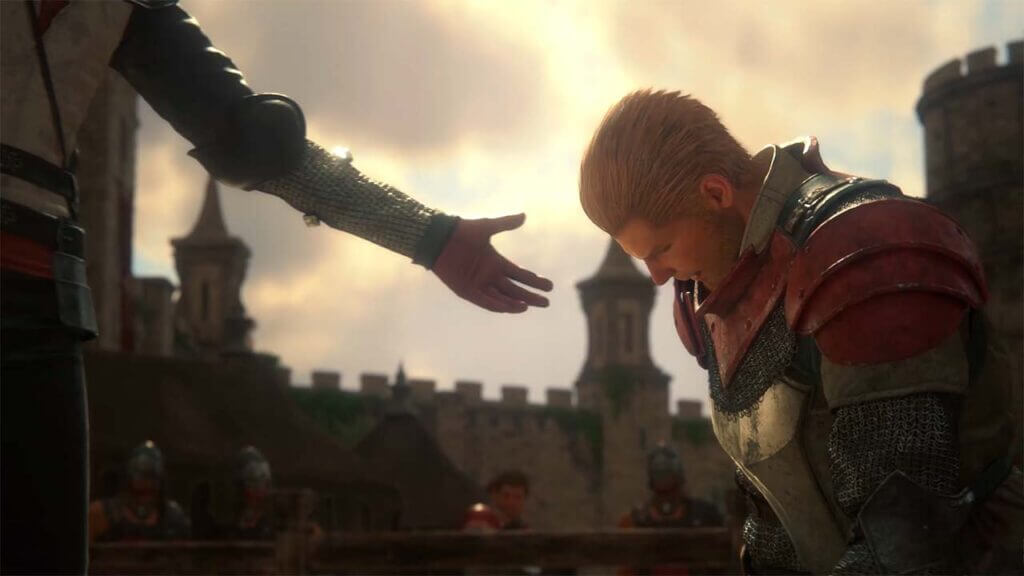
Final Fantasy 16 Character Giving his Friend a Hand
Image Source: Square Enix via The Nerd Stash
This article is over 2 years old and may contain outdated information.

Square Enix’s latest entry takes a non-traditional approach to difficulty with game mode, so you’ll want to learn how to change difficulty in Final Fantasy 16. Whether you prefer a laid-back narrative journey or an intense, action-packed adventure, Final Fantasy 16 has a mode to suit your gaming desires. Still, it’s not as straightforward as choosing between “easy,” “normal,” and “hard.” You won’t find a veteran mode, even if you played every previous Final Fantasy entry. Here’s a complete guide on how to work around the game’s difficulty settings.

Changing Difficulty Settings in Final Fantasy 16
final fantasy 16 difficulty
Image Source: Square Enix via The Nerd Stash

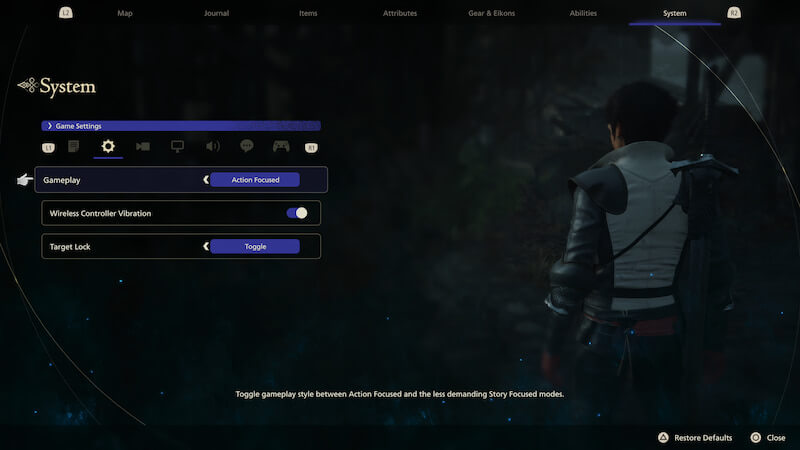
To change the difficulty in Final Fantasy 16, whether it’s at the beginning of the game or during gameplay, follow these steps:

  1. Press the “Options” button on your joystick to access the menu when prompted.
  2. Press your controller’s “Options” button to pause the game and open the menu.
  3. Use the R2 button on your controller to scroll through the menu options until you reach the “System” tab.
  4. Within the “System” menu, locate and select the “Game Settings” option.
  5. In the “Game Settings” tab, you will find the option to adjust the gameplay setting. Select “Action focused” or “Story focused” based on your preference.
  6. After adjusting the gameplay setting, exit the menu, and the game will automatically save your preferences.

By following these steps, you can successfully change the difficulty in Final Fantasy 16, whether at the beginning or during gameplay and tailor your experience to an action-focused or story-focused gameplay style.

Final Fantasy 16 Game Modes Explained

Final Fantasy 16 presents two gameplay modes: Story Focus and Action Focus, each with unique characteristics and gameplay experiences. Let’s take a look at the differences between the two difficulty modes you can change in Final Fantasy 16:

How Does The Story Focus Mode Work

  • Takes it easy on the action, allowing .players to focus on the game’s immersive story… and take a stroll through the gameplay.
  • Offers less intense combat encounters because who needs all that stress when you can peacefully sip virtual tea?
  • Lets players summon mighty beasts with minimal effort. This difficulty mode you can change to in Final Fantasy 16 knows sometimes it’s nice to have an entourage of powerful creatures do the heavy lifting for you.

How Does the Action Focus Mode Work

  • Provides a much more demanding experience. This difficulty mode you can change to in Final Fantasy 16 is perfect for players who thrive on adrenaline and have biceps made of steel.
  • Features more formidable enemies that will make you question your life choices and wonder if you should’ve picked up knitting instead.
  • Considered the ultimate difficult choice unless you’re a pacifist ninja who would rather avoid combat like the plague (or like vegetables at dinner).

Final Fantasy 16 is available on PlayStation 5.

Related Topics
Final fantasy Guide
Share. Facebook Twitter LinkedIn Reddit Email
Cande Maldonado
  • Website

Pot-smasher, NPC-annoyer, side quest-completionist. Oh, there's that writing gig, too.

SUGGESTED READS

LEGO Batman Legacy of the Dark Knight Batcave
Game News

LEGO Batman: Legacy of the Dark Knight Could Oddly Be the Most Faithful Love Letter to the Caped Crusader

New York City Recording Artist Lana Del Rey Announced as Singer for 007 First Light Title Song
Gaming

New York City Recording Artist Lana Del Rey Announced as Singer for 007 First Light Title Song

Marvel Rivals Season 7.5 Preview
Game Previews

Marvel Rivals Season 7.5 Hands-On Preview – The Good, the Bad, and the Ugly

Leaked GTA Online Sales Suggest It Recoups GTA 6's $1B Budget in Just 2 Years, Skyrockets Take-Two Stock
Game News

Leaked GTA Online Sales Suggest It Recoups GTA 6’s $1B Budget in Just 2 Years, Skyrockets Take-Two Stock

Pragmata Solar Power Plant Mini Cabin Figures Locations
Game Guides

All Solar Power Plant Mini Cabin Locations in Pragmata

Pragmata Mass Production Array Mini Cabin Figures
Game Guides

All Mass Production Array Mini Cabin Figure Locations in Pragmata

The Nerd Stash
Facebook X (Twitter) Instagram YouTube LinkedIn
  • About Us
  • Join Our Team
  • Meet the Team
  • Privacy Policy
  • DMCA Policy
  • Contact Us
  • Terms of Use
  • Sitemap
  • Editorial Guidelines
  • Advertising Policy
© 2026 The Nerd Stash. All Rights Reserved.

Type above and press Enter to search. Press Esc to cancel.