Close Menu
  • Gaming
    • Platforms
      • Nintendo
      • PC
      • PlayStation
      • Xbox
  • Entertainment
    • Movies
    • TV
    • Royals
  • Celebrity
    • Hollywood
  • Human Interest
  • Astrology
  • More
    • Reviews
Facebook X (Twitter) Instagram LinkedIn YouTube
  • About Us
  • Join Our Team
  • Meet the Team
  • Privacy Policy
  • DMCA Policy
  • Contact Us
  • Terms of Use
  • Sitemap
  • Editorial Guidelines
  • Advertising Policy
The Nerd Stash
  • Gaming
  • Celebrity
  • Hollywood
  • Human Interest
The Nerd Stash
Home»Gaming»How To Delete PSN Account (& Close Playstation Account Permanently)

How To Delete PSN Account (& Close Playstation Account Permanently)

It’s time to burn bridges.

Gabriela JessicaBy Gabriela JessicaMay 6, 20242 Mins Read
How To Delete PSN Account (& Close Playstation Account Permanently)
Image Source: Sony via The Nerd Stash
This article is over 2 years old and may contain outdated information.

Are you fed up with Sony? Do you want to cut all ties with the company by permanently closing your PlayStation account? Although it is quite a big move, it is completely understandable after all the questionable decisions the company has made. However, deleting your PSN account is not the same as removing your PlayStation user account. Sony also understands this issue, which is why you must go through customer service to close your PSN account.

How To Close Your PSN Account

I would like to make it clear once again that closing your PSN account is not the same as deleting your PlayStation user account. If you want to give away or sell your PlayStation console, then you must delete your user account on your device. This will ensure that strangers won’t be able to use your account to play on the console.

On the other hand, closing your PlayStation account is a lot more permanent. You will lose your wallet funds, PlayStation ID, subscriptions, games, and saved data. It is basically the big red button that you shouldn’t push unless you’re absolutely done with Sony.

Related:

PlayStation Trophies Are Officially Coming to PC

PC

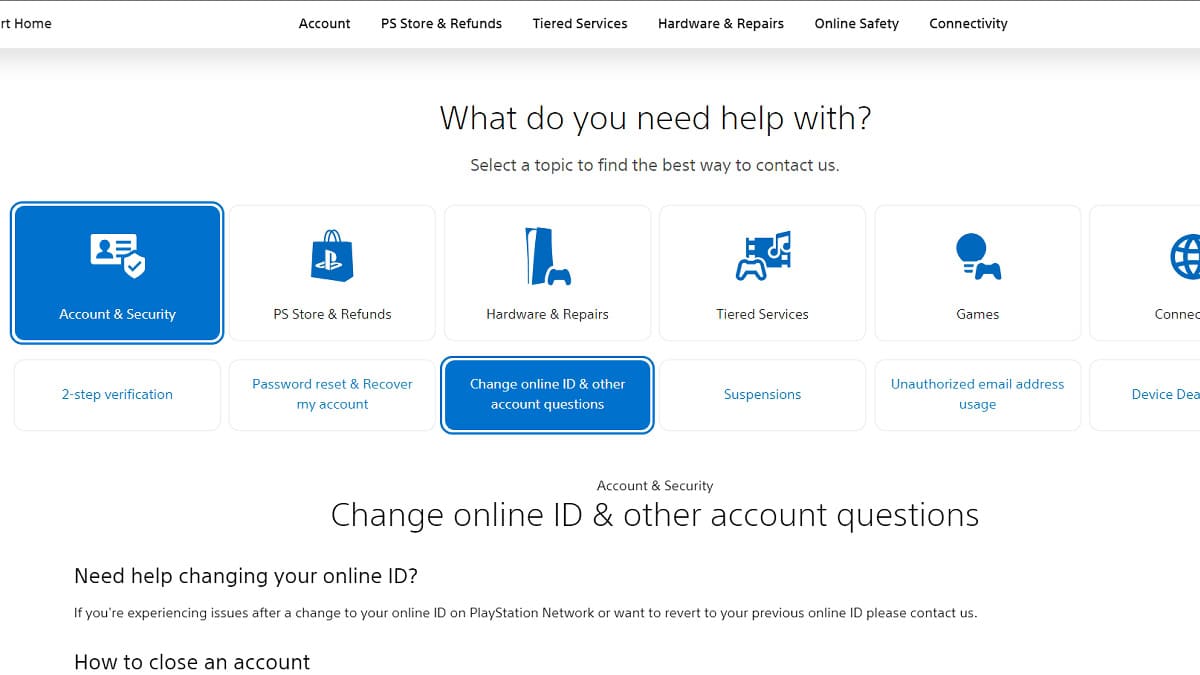
Deleting your PSN account on PC.
Image Source: Sony via The Nerd Stash

If you still insist on going down this path, here’s how you can delete your PSN account on your PC:

  1. Visit the PlayStation Support Contact Us page.
  2. Sign in to your PSN account.
  3. Click Account & Security.
  4. Choose Change online ID & other account questions.
  5. Scroll down and click on Online Assistant.
  6. Insert your name and chat with the Customer Service.

Related:

Helldivers 2 Developers Open Up About PlayStation Acquisition Rumors

Mobile

For mobile users, you can follow these steps to delete your PSN account:

  1. Launch the Playstation mobile app.
  2. Sign in to your PlayStation account.
  3. Click the gear icon to open Settings.
  4. Scroll down to PlayStation Network.
  5. Select Support and click Account & Security.
  6. Tap Account Management.
  7. Click Create, change, and close account.
  8. Select How to close your PlayStation Network account.
  9. Click Close an Account and tap the Contact Us hyperlink.

You will get in touch with a support agent who will help you permanently close your PlayStation account. I also recommend requesting refunds from the store before you do this. If you want to see whether you’re eligible, you can read this support page for more info.

Related Topics
Guide playstation
Share. Facebook Twitter LinkedIn Reddit Email
Gabriela Jessica
  • Website

Gabriela has been writing game guides since 2023, mainly covering WuWa, Genshin Impact, and Honkai: Star Rail. She also loves exploring new titles, with favorites like Tears of the Kingdom, P5R, Stardew Valley, RDR2, The Witcher 3, WWM, and the RE4 Remake.

SUGGESTED READS

Marvel's Wolverine Makes $130 Million in Just 3 Days in Spite of 'Online Mauling'
Gaming

Marvel’s Wolverine Makes $130 Million in Just 3 Days in Spite of ‘Online Mauling’

Silent Hill Townfall key art
8.5
Gaming

Silent Hill: Townfall Review – A Beacon in the Fog

Microsoft's In-Game Ad Breaks Patent Surfaced Amid Rumors of a Cheaper Game Pass Tier
Gaming

Microsoft’s In-Game Ad Breaks Patent Surfaced Amid Rumors of a Cheaper Game Pass Tier

Two PlayStation Veterans Recreated Iconic PS4 Game Sharing Moment, Except There's No Game to Share This Time
Gaming

Two PlayStation Veterans Recreated Iconic PS4 Game Sharing Moment, Except There’s No Game to Share This Time

The Crew Motorfest Season 11 Preview
Gaming

The Crew Motorfest Season 11 Preview – The Road to Adventure

GTA 6 The Album Announcement
Gaming

Rockstar Games and Atlantic Records Unveil GTA 6: The Album, With 34 Original Tracks for the Game

The Nerd Stash
Facebook X (Twitter) Instagram YouTube LinkedIn
  • About Us
  • Join Our Team
  • Meet the Team
  • Privacy Policy
  • DMCA Policy
  • Contact Us
  • Terms of Use
  • Sitemap
  • Editorial Guidelines
  • Advertising Policy
© 2026 The Nerd Stash. All Rights Reserved.

Type above and press Enter to search. Press Esc to cancel.