Close Menu
  • Gaming
    • Platforms
      • Nintendo
      • PC
      • PlayStation
      • Xbox
  • Entertainment
    • Movies
    • TV
    • Royals
  • Celebrity
    • Hollywood
  • Human Interest
  • Astrology
  • More
    • Reviews
Facebook X (Twitter) Instagram LinkedIn YouTube
  • About Us
  • Join Our Team
  • Meet the Team
  • Privacy Policy
  • DMCA Policy
  • Contact Us
  • Terms of Use
  • Sitemap
  • Editorial Guidelines
  • Advertising Policy
The Nerd Stash
  • Gaming
  • Celebrity
  • Hollywood
  • Human Interest
The Nerd Stash
Home»Gaming»How to Disable the Guardian Statues in Baldur’s Gate 3

How to Disable the Guardian Statues in Baldur’s Gate 3

Enter the Druid Grove

Tristan ZeldenBy Tristan ZeldenSeptember 25, 20242 Mins Read
Druid Grove Guardian Statues
Image Source: Larian Studios via The Nerd Stash
This article is over 1 years old and may contain outdated information.

Enemies are not the only threat to you and the rest of your party in Baldur’s Gate 3, so you will want to disable Guardian statues – deadly devices that will blast you if spotted. Larian Studios always gives multiple solutions to any problem. There are two main ways to get around these obstacles, and we have some other suggestions to give you some ideas on what to do about these statues. No matter who is in your party, these solutions will apply to you and them.

Ways to Disable Guardian Statues in Baldur’s Gate 3

[Updated on September 25, 2024 – Updated links, images, and information]
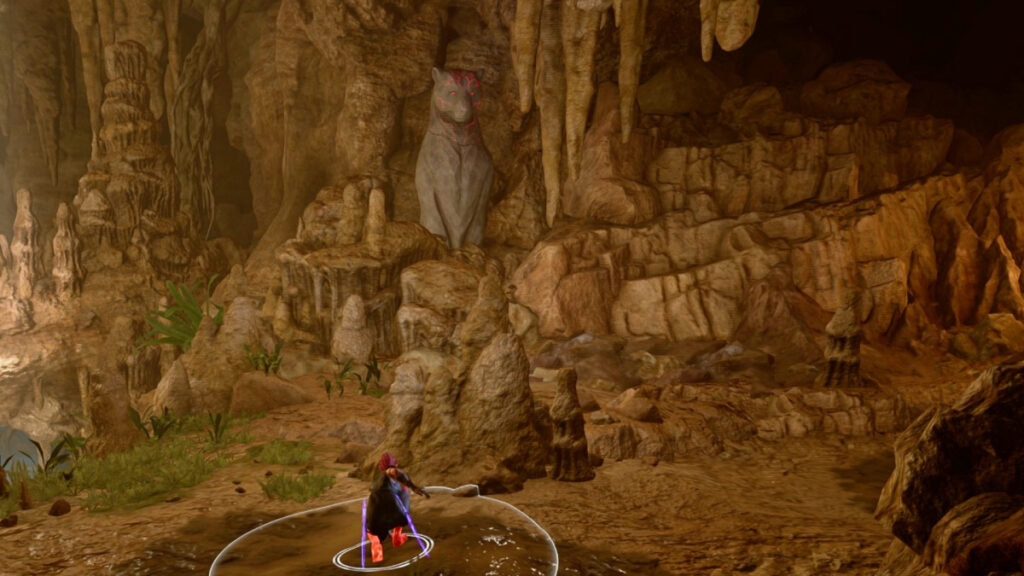
Guardian Statues in Baldur's Gate 3 Act 1
Image Source: Larian Studios via The Nerd Stash

Early on, after you have formed your initial party, you will likely find yourself in the Underground Passage, which connects to Druid Grove. As Baldur’s Gate 3 introduces new mechanics and enemies, it will welcome you with the Guardian statues in these passages. You can either destroy them or turn them off. The latter is much easier and safer since the statues have a lot of resistances and the Sturdy property.

Related:

Is There a Difficulty Trophy in Baldur’s Gate 3? Answered

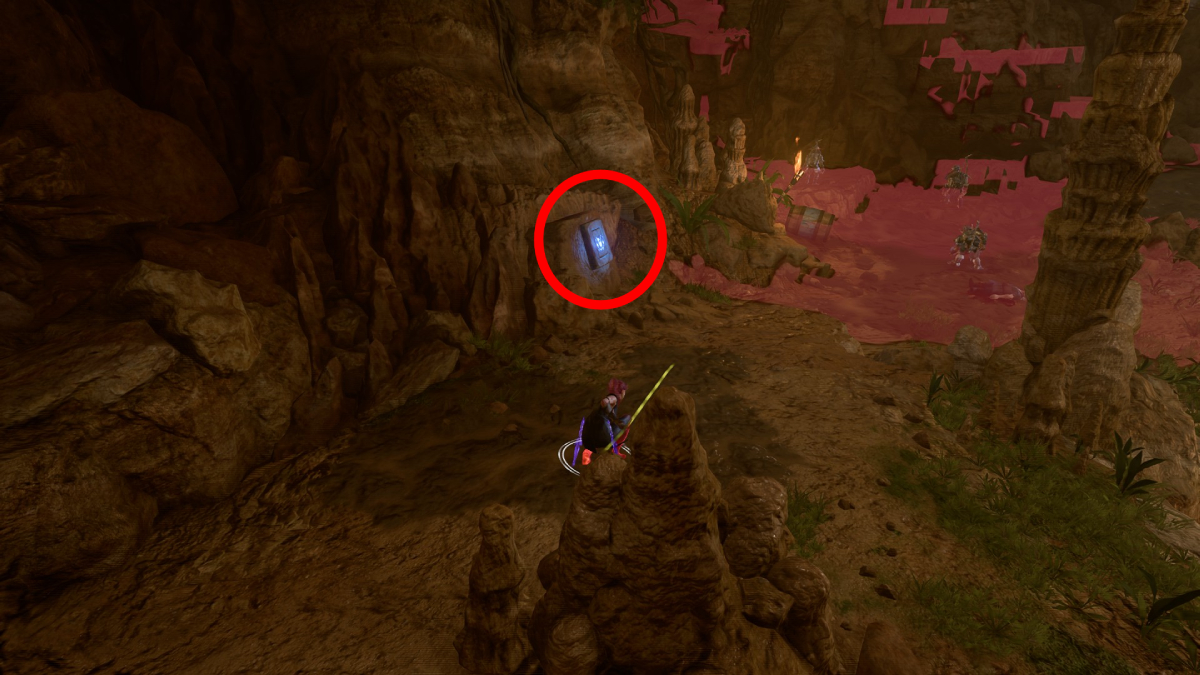
To switch them, you will find tablets with a blue glow near the statue. A Perception check is required to interact with them. You know that one is hostile if it has a red glow on its face. By either passing a stealth check or using something to obscure yourself, like casting Fog Cloud, you can reach the switch to turn it off. The best way to go about the stealthy route is to select one character and let the rest of the party stand back to reduce the number of people needing to pass stealth checks. Click on the switch, and you will notice that the red glow on the statue will fade. Now, it is safe to move through that part of the Underground Passage without getting blasted.


Related Topics
Baldur's Gate 3 Larian Studios
Share. Facebook Twitter LinkedIn Reddit Email
Tristan Zelden
  • Website
  • X (Twitter)

Tristan Zelden is an entertainment journalist. You can see his work across multiple outlets covering the latest in movies, TV, and video games. Outside of work and enjoying entertainment, he thinks about corgis and loves getting tattoos.

SUGGESTED READS

Onimusha: Way of the Sword Kyoto Trailer
Gaming

Capcom Unveils New Onimusha: Way of the Sword Trailer Featuring an Iconic Kyoto Location

GTA 6 Netflix Trailer Deal
Gaming

GTA 6 Is Gatekeeping Its Next Trailer Behind a Netflix Exclusive Deal

Coin Master: All Village List and Their Build Cost
Gaming

Coin Master: All Village List and Their Build Cost (2026)

Best Project Zomboid Mods Build 42 Stable
Gaming

Top 10 Best Project Zomboid Mods (Updated for Build 42 Stable)

Best Character Builds in Project Zomboid
Gaming

Best Character Builds in Project Zomboid (Updated for Build 42 Stable)

Fire Emblem Fortune's Weave Nintendo Direct
Gaming

Everything Announced at the Fire Emblem: Fortune’s Weave Direct

The Nerd Stash
Facebook X (Twitter) Instagram YouTube LinkedIn
  • About Us
  • Join Our Team
  • Meet the Team
  • Privacy Policy
  • DMCA Policy
  • Contact Us
  • Terms of Use
  • Sitemap
  • Editorial Guidelines
  • Advertising Policy
© 2026 The Nerd Stash. All Rights Reserved.

Type above and press Enter to search. Press Esc to cancel.