The launch of Elden Ring: Nightreign wasn’t as smooth as everyone hoped for. A few things plague the game, ranging from the lack of crossplay and a duo mode to several matchmaking errors. While the former two will need a lot of work to be implemented, the last one has a quick fix that has worked for many. So, if you’re experiencing the “matchmaking not working” error in Elden Ring: Nightreign, here are a few things you can do to fix it.
Fixing the ‘Matchmaking Not Working in Error’ in Elden Ring: Nightreign
This issue has appeared for many players regardless of the platform. Since Nightreign is an online co-op-oriented game, the fact that the matchmaking system is not working is a big deal. Usually, this happens when there’s a hiccup between your system and the game’s servers. This means that it can sometimes be a thing on your end or on Nightreign‘s end. Regardless, here are some of the things that tend to fix the problem:
- Restarting the game or switching to offline mode, and then switching back to online.
- The fastest way to fix this error is by restarting the game. However, if you don’t want to go through the hassle, you can switch your game to offline mode by going to the network settings, going to the main menu, and then switching back to online mode. Both require a bit of time, but the latter is definetely faster and has worked for many (ourselves included).
- Check your internet connection.
- This might be too obvious, but if you’re connection is spotty or too slow, it won’t help the matchmaking part much. If that happens, restart your router or contant your interner provider.
- Check if the game’s servers are online.
- At the time of writing, there isn’t a dedicated website to check the server’s status. However, you can see if the game is online by looking at the bottom right corner of the main menu. If it says online, that means everything is working (this also assumes you’re playing in online mode).
Turn On Cross-Region Matchmaking
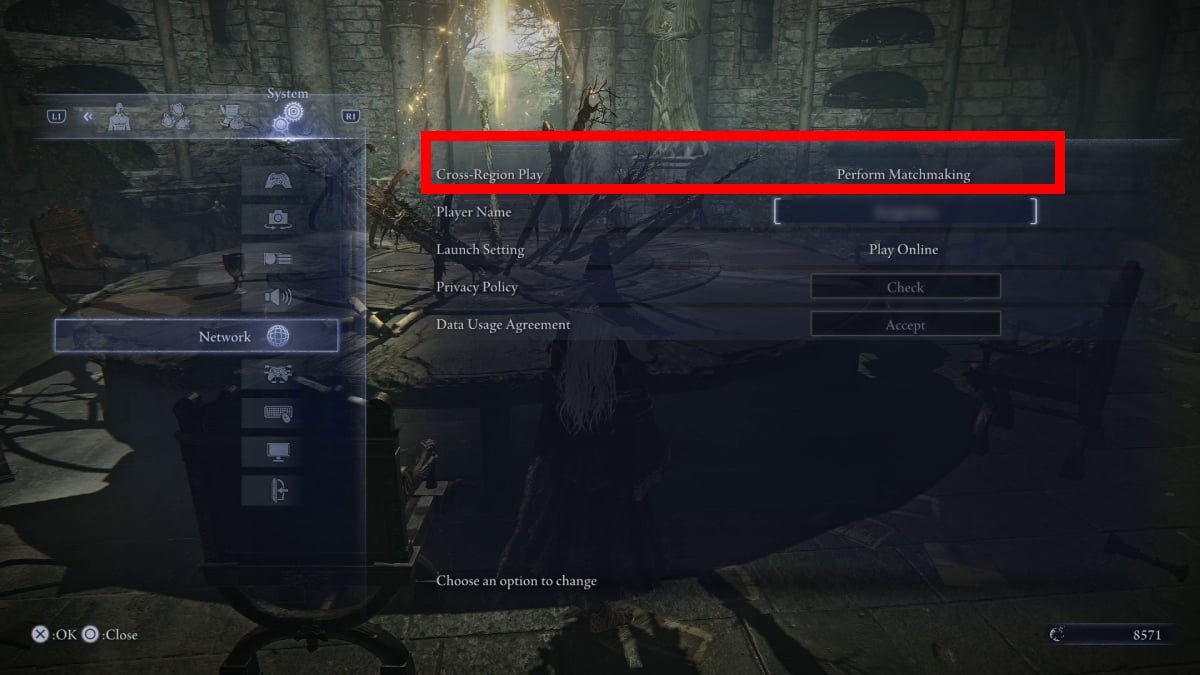
The “matchmaking not working” error of Elden Ring: Nightreign isn’t tied to cross-region matchmaking, but it is still one option you should have on at all times. As you may know, the game doesn’t have cross-play, so if you’re looking at long queue times, enabling this option can help you considerably. You’ll notice the difference quickly as this system will bring players from all other regions to your platform.
Yet, if you’re still experiencing matchmaking issues, it is better to follow any of the above steps or just play solo until you get a match. The latter might not be the most balanced experience right now, but with FromSoftware’s track record, we expect it will get fixed soon.