
Close Menu
  • Gaming
    • Platforms
      • Nintendo
      • PC
      • PlayStation
      • Xbox
  • Entertainment
    • Movies
    • TV
    • Royals
  • Celebrity
    • Hollywood
  • Human Interest
  • Astrology
  • More
    • Anime
    • Reviews
Facebook X (Twitter) Instagram LinkedIn YouTube
  • About Us
  • Join Our Team
  • Meet the Team
  • Privacy Policy
  • DMCA Policy
  • Contact Us
  • Terms of Use
  • Sitemap
  • Editorial Guidelines
  • Advertising Policy
The Nerd Stash
  • Gaming
  • Celebrity
  • Hollywood
  • Human Interest
The Nerd Stash
Home»Gaming»How to Fix Skull and Bones Failed to Join Game Session

How to Fix Skull and Bones Failed to Join Game Session

Choppy seas ahead.

Asanga WijeratneBy Asanga WijeratneFebruary 12, 20242 Mins Read
How to Fix Skull and Bones Failed to Join Game Session
Image Source: Ubisoft
This article is over 2 years old and may contain outdated information.

Skull and Bones failed to join a game session, or the Error Code DODO-FFF0BE2B is one of the most troublesome errors would be sailors are going to run into. This error is popping up for many reasons, including server errors, outdated game files, and unstable internet connection. Ubisoft hasn’t given much response on this error yet. However, there are some fixes you can try for Skull and Bones’s failed-to-join game session error.

Possible Fixes for Skull and Bones Failed To Join Game Session
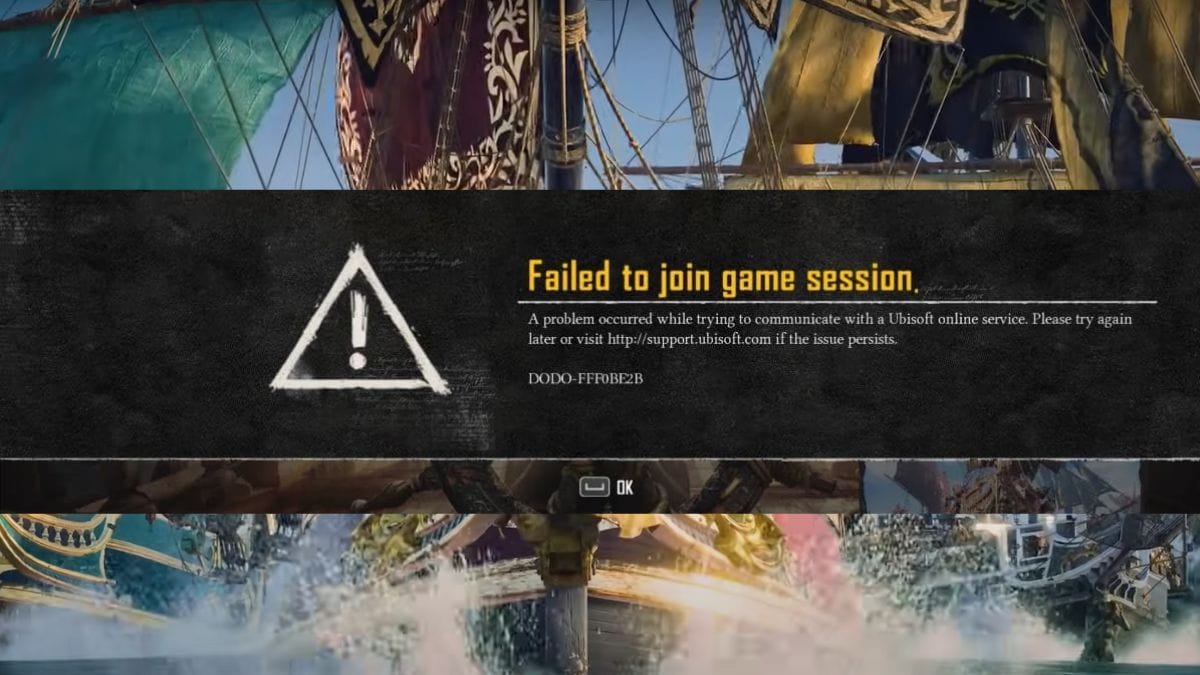
Image Source: Ubisoft

You can fix the Failed-to-join game session or the Error Code DODO-FFF0BE2B by updating the graphic card and Game files to the latest version, ensuring a stable internet connection, and allowing Skull and Bones through your firewall. However, before trying any fixes, check for issues with Ubisoft servers. If there are no server issues, you can try the methods below.

  1. Update Graphic Card and Game Files: Outdated graphic cards and game files often cause errors due to incompatible issues. Also, some players in relevant Reddit threads have mentioned that they have sorted out the Error Code DODO-FFF0BE2B by updating graphic cards. So, this is one of the first things you need if you get the “Failed to join game session” error.
  2. Ensure Stable Internet Connection: Try to use a wired connection if you use a wireless internet connection; resetting the router is also a good option. An uninterrupted internet connection is crucial for any online game, and Skull and Bones are no different.
  3. Allow Skull and Bones Through Firewall: Sometimes, your firewall settings might block Skull and Bones from accessing the necessary servers, causing Failed to join game session error. Allow the game through your firewall settings to ensure it can establish a connection without hindrance.

Related:

Skull and Bones Another Creative Director Leaves the Project

If you still get the “Failed to join game session” error message in Skull and Bones after trying the above methods, it is best to contact the Ubisoft support team for further assistance.


Related Topics
Guide Skull and Bones
Share. Facebook Twitter LinkedIn Reddit Email
Asanga Wijeratne
  • Website

SUGGESTED READS

MindsEye Layoffs 2026
Gaming

Studio Behind GTA-like Game, MindsEye, Hit With More Layoffs, and Nobody is Surprised: ‘Shocked There’s Even a Janitor Working There’

Princess Peach Spin-Off Movie May Already Be in Development, Job Listing Suggests
Gaming

Princess Peach Spin-Off Movie May Already Be in Development, Job Listing Suggests

Xbox's New CEO Wants to Reconnect With the 'Community,' Yet Brings In More CoreAI Leaders
Gaming

Xbox’s New CEO Wants to Reconnect With the ‘Community,’ Yet Brings In More CoreAI Leaders

Diablo 4 Season 13 Tier List
Gaming

Class Tier List for Diablo 4 Season 13 (Best Classes for Endgame & Leveling)

Take-Two Boss Finally Explains Why GTA 6 Is Skipping PC at Launch: 'We'll See How It Works Out'
Gaming

Take-Two Boss Finally Explains Why GTA 6 Is Skipping PC at Launch: ‘We’ll See How It Works Out’

Rockstar Employee Review Claims 'Unrealistic' Crunch as GTA 6 Development Intensifies: 'Had to Work Till 3AM'
Gaming

Rockstar Employee Review Claims ‘Unrealistic’ Crunch as GTA 6 Development Intensifies: ‘Had to Work Till 3AM’

The Nerd Stash
Facebook X (Twitter) Instagram YouTube LinkedIn
  • About Us
  • Join Our Team
  • Meet the Team
  • Privacy Policy
  • DMCA Policy
  • Contact Us
  • Terms of Use
  • Sitemap
  • Editorial Guidelines
  • Advertising Policy
© 2026 The Nerd Stash. All Rights Reserved.

Type above and press Enter to search. Press Esc to cancel.




