
Close Menu
  • Gaming
    • Platforms
      • Nintendo
      • PC
      • PlayStation
      • Xbox
  • Entertainment
    • Movies
    • TV
    • Royals
  • Celebrity
    • Hollywood
  • Human Interest
  • Astrology
  • More
    • Reviews
Facebook X (Twitter) Instagram LinkedIn YouTube
  • About Us
  • Join Our Team
  • Meet the Team
  • Privacy Policy
  • DMCA Policy
  • Contact Us
  • Terms of Use
  • Sitemap
  • Editorial Guidelines
  • Advertising Policy
The Nerd Stash
  • Gaming
  • Celebrity
  • Hollywood
  • Human Interest
The Nerd Stash
Home»Gaming»How to Get Armor Trims in Minecraft 1.20 Snapshot

How to Get Armor Trims in Minecraft 1.20 Snapshot

Minecraft 1.20 update is going to be released later this month, and it’s adding a bunch of new and exciting stuff to play around with…

Sidharta F. RasidiBy Sidharta F. RasidiJanuary 28, 20233 Mins Read
This article is over 3 years old and may contain outdated information.

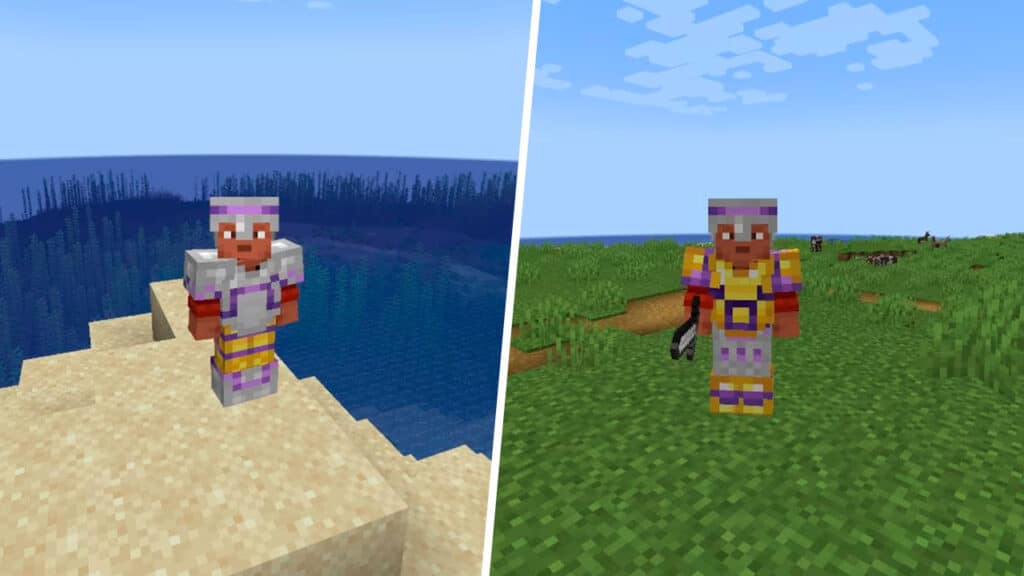
Minecraft 1.20 update is going to be released later this month, and it’s adding a bunch of new and exciting stuff to play around with including the new Camel and Sniffer mob, seven default skins, and Armor Trim, a way to customize the iconic Minecraft‘s blocky armor. But before the update is launched, you can take a sneak peek at some of the new features by running the Minecraft 1.20 Snapshot. Here’s how you can play the Minecraft 1.20 Snapshot and try out the Armor Trims yourself.

How to Get Minecraft 1.20 Snapshot
How to Get Armor Trims in Minecraft 1.20 Snapshot

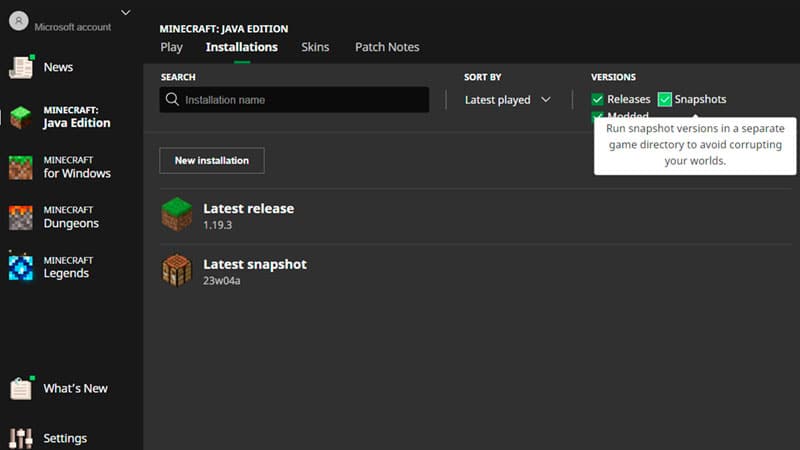
Make sure you’re in the correct Minecraft version, otherwise Armor Trims won’t show up in the game. Here’s how you can boot up the experimental Minecraft 1.20 snapshot before the full update is released:

  1. Open the Minecraft Launcher.
  2. Select the Installations tab (in either Java Edition or Minecraft for Windows/Bedrock), and choose the Snapshots checkbox.
    • If there is no option to check the Snapshot, create a new Installation by pressing the green Install button first.
  3. Click on the Latest Snapshot and press Play.
  4. Now, after creating a new World, go to Data Packs then move the update_1_20 and bundle files to Selected.

How to Get Armor Trims in Minecraft 1.20 Snapshot
How to Get Armor Trims in Minecraft 1.20 Snapshot

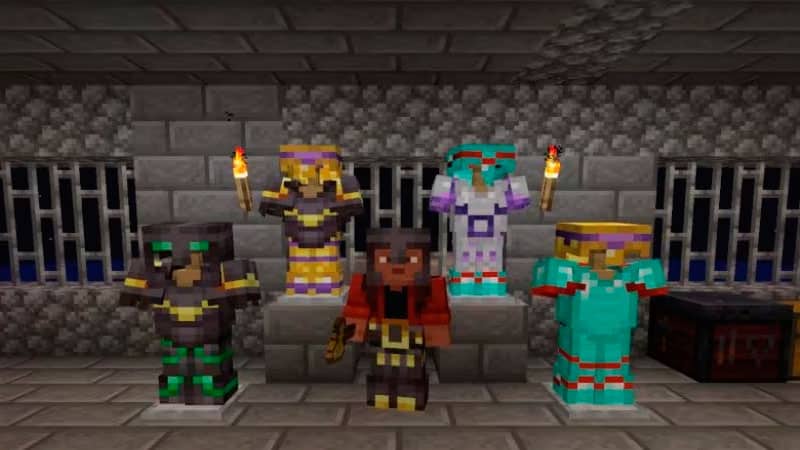
This part lists the locations where you can find Armor Trim Templates and the materials needed to apply them to your armor:

Armor Trim Template Template Location/Dropped by Crafting Material
Coast Armor Trim Shipwreck Cobblestone x1
Template x1
Diamond x7
Dune Armor Trim Desert Pyramid Sandstone x1
Template x1
Diamond x7
Eye Armor Trim Stronghold End Stone x1
Template x1
Diamond x7
Rib Armor Trim Nether Fortress Netherrack x1
Template x1
Diamond x7
Sentry Armor Trim Pillage Outpost Cobblestone x1
Template x1
Diamond x7
Snout Armor Trim Bastion Remnant Blackstone x1
Template x1
Diamond x7
Spire Armor Trim End City Purpur Block x1
Template x1
Diamond x7
Tide Armor Trim Ocean Monument
Elder Guardian
Prismarine x1
Template x1
Diamond x7
Ward Armor Trim Ancient City Cobbled Deepslate x1
Template x1
Diamond x7
Wild Armor Trim Jungle Temple Mossy Cobblestone x1
Template x1
Diamond x7
Vex Armor Trim Woodland Mansion Cobblestone x1
Template x1
Diamond x7

To apply those Armor Trim Templates, you will need a Smithing Table. Place the Smithing Template and the piece of armor you want to change, then use the crafting materials listed above. However, you can replace the Diamond with other ores listed below to change the color of the Trim:

  • Iron
  • Copper
  • Gold
  • Lapis
  • Emerald
  • Diamond
  • Netherite
  • Redstone
  • Amethyst
  • Quartz

Minecraft is available on PC, Android, iOS, Xbox One, Xbox Series X|S, Nintendo Switch, and PlayStation platforms.

Related Topics
Guide Minecraft
Share. Facebook Twitter LinkedIn Reddit Email
Sidharta F. Rasidi
  • Website

Since middle school, Sidharta has used his video game blog as a handy excuse to avoid studying. After graduating with a degree in Management Information Systems from Bina Nusantara University, he spent years honing his skills as a games journalist, working as an editor for a local gaming site and freelancing elsewhere. Nowadays, when he’s not busy crafting outrageous plots for his serialized comic, Sidharta covers niche games on his personal blog, StoPlayinGame.com. His favorite game series includes Monster Hunter, Earth Defense Force, THE iDOLM@STER, Road Trip Adventure, and KOEI Tecmo's Warriors.

SUGGESTED READS

Aliens Fireteam Elite 2 Release Date
Gaming

Aliens: Fireteam Elite 2 Launches on August 25 With Movie-inspired DLC Packs

Sony Reportedly Knew the PlayStation Disc Shut Down Would 'Piss Everyone Off,' Warned Employees to Stay Silent
Gaming

Sony Reportedly Knew the PlayStation Disc Shut Down Would ‘Piss Everyone Off,’ Warned Employees to Stay Silent

How to play Halo: Campaign Evolved Co-Op
Gaming

Halo Campaign Evolved Co-Op Guide

Aliens Fireteam Elite 2 Horde Mode
Gaming

Aliens: Fireteam Elite 2 Has Revamped Its Horde Mode In the Best Possible Way

BioShock Creator's FPS-RPG Judas May 'Never Come Out,' Says Insider
Gaming

BioShock Creator’s FPS-RPG Judas May Never ‘Actually Come Out,’ Says Insider

BlizzCon 2026 Bundles
Gaming

Blizzard Has Unveiled All of Its BlizzCon 2026 Digital Bundles For WoW, Diablo, And More

The Nerd Stash
Facebook X (Twitter) Instagram YouTube LinkedIn
  • About Us
  • Join Our Team
  • Meet the Team
  • Privacy Policy
  • DMCA Policy
  • Contact Us
  • Terms of Use
  • Sitemap
  • Editorial Guidelines
  • Advertising Policy
© 2026 The Nerd Stash. All Rights Reserved.

Type above and press Enter to search. Press Esc to cancel.




