
Close Menu
  • Gaming
    • Game Guides
    • Codes
    • Game News
    • Game Previews
    • Game Reviews
    • Game Features
    • Game Lists
    • Platforms
      • Nintendo
      • PC
      • PlayStation
      • Xbox
      • Mobile
  • Entertainment
    • Movies
    • Movie Features
    • Movie Reviews
    • TV
    • Reality TV
    • Royals
  • Celebrity
    • Hollywood
  • Human Interest
  • Astrology
  • Videos
  • More
    • Anime
    • Lists
    • Podcasts
    • Reviews
Facebook X (Twitter) Instagram LinkedIn YouTube
  • About Us
  • Join Our Team
  • Meet the Team
  • Privacy Policy
  • DMCA Policy
  • Contact Us
  • Terms of Use
  • Sitemap
  • Editorial Guidelines
  • Advertising Policy
The Nerd Stash
  • Gaming
  • Celebrity
    • Hollywood
  • Human Interest
  • Videos
The Nerd Stash
Home»Game Guides»How to Get the Chainsaw in Fallout 76

How to Get the Chainsaw in Fallout 76

Paul Bunyan’s got nothing on this

Patrick ArmstrongArtur NovichenkoBy Patrick Armstrong and Artur NovichenkoSeptember 10, 20242 Mins Read
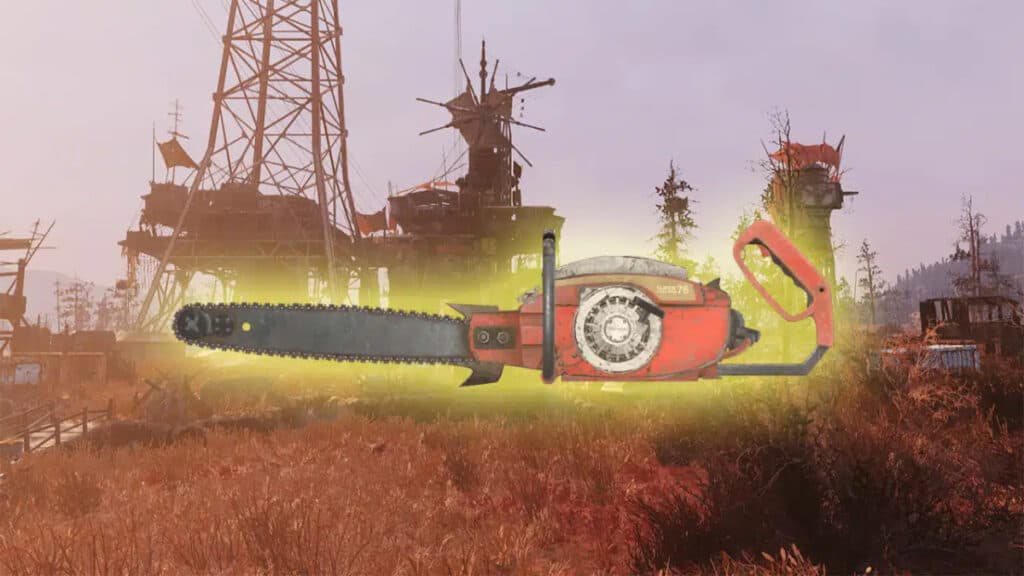
The Chainsaw, highlighted with a yellow glow, in Fallout 76
Image Source: Bethesda Game Studios via The Nerd Stash

Your list of apocalypse essentials probably starts with a good weapon and a non-radioactive snack. It might be several items down, but before long a certain toothy tool will come to mind. The Chainsaw is useful enough in the real world, but there’s far more than lumber to cut down in Bethesda‘s Appalachian wasteland. Whether you’re theorycrafting a Chainsaw build or you just want something more efficient than an axe, there’s no better place to start. Here’s how to get the Chainsaw in Fallout 76.

Fallout 76 Chainsaw Location Guide

(Updated on September 10, 2024 – updated info, links, and images)
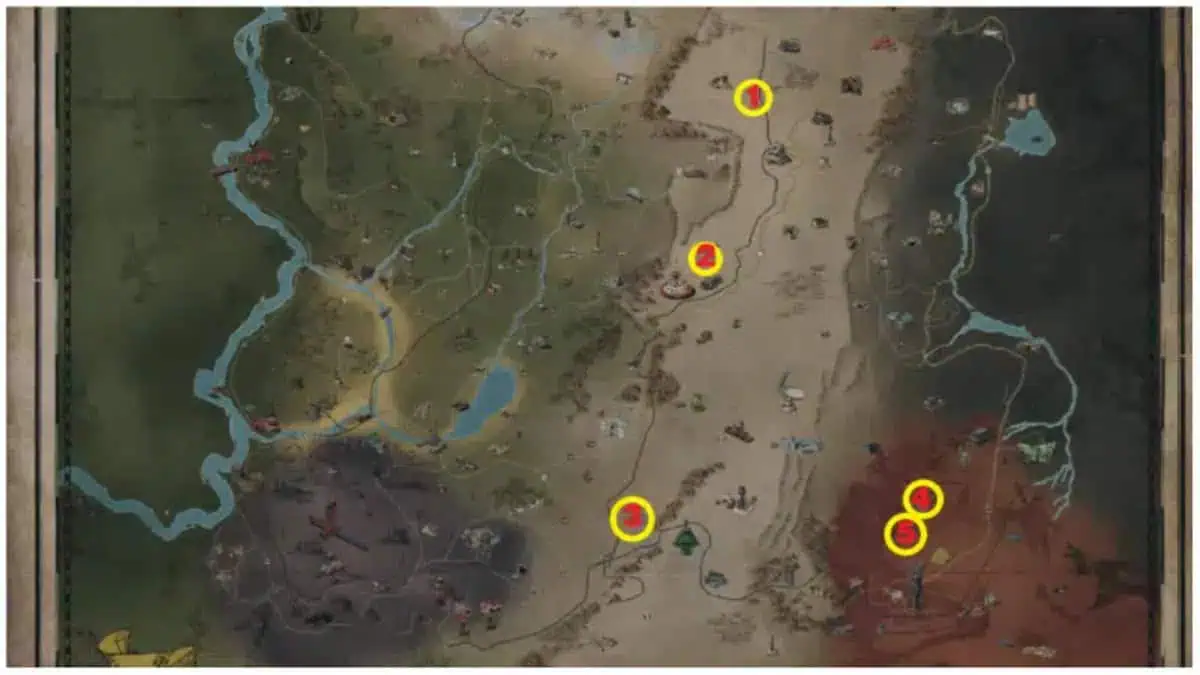
A map showing Chainsaw locations in Fallout 76
Image Source: Bethesda Game Studios via The Nerd Stash

Though you can craft many useful weapons and items, you can’t get the Chainsaw that way in Fallout 76. Instead, you’ll need to explore the open world and discover it, similar to the hunt for Mirelurk Eggs. On the plus side, that means you won’t have to waste any money or resources getting this toothy wonder. You’ll just have to visit one of the following locations to find what you need:

  • Metal Dome – Take the Spawn Point as your starting point and go to the other side of the Arena. Climb the ramp, enter the small metal building, and get your first Chainsaw.
  • Pleasant Valley Cabins – Take the icon of this location on the map as a starting point and go west. Approach the large pine tree and pick up the Chainsaw.
  • Mountainside Bed & Breakfast – Find the entrance to the basement and go down into it. You can pick up the Chainsaw from the ammo shelf.
  • Ranger District Office – Enter the office and visit the cage room. Opposite the cage, you will see a cabinet on which lies Chainsaw.
  • Crimson Prospect – Visit this location and then go southwest. Next to the old bus is a metal shelf with Chainsaw.

Related:

Fallout 76 Eyebot Locations – Where to Find Them

You can find the Chainsaw at any of these locations in Fallout 76, but it’s not recommended that you do so right away. Try to reach at least Level 20 before hunting for the Chainsaw. Once you’ve gotten your hands on the saw, you can enhance it with mods like the Flamer, Longbar, and (of course) Longbar Flamer. The Snallygasters won’t be happy to see you, but that’s kind of the point. Rev on, Vault Dweller.


Related Topics
Fallout 76 Guide
Share. Facebook Twitter LinkedIn Reddit Email
Patrick Armstrong, Artur Novichenko
  • Website

Artist and writer with a lifelong love of video games. Their favorite games include Dead by Daylight, Meet Your Maker, and Project Zomboid.

Patrick Armstrong, Artur Novichenko
  • Website

Artist and writer with a lifelong love of video games. Their favorite games include Dead by Daylight, Meet Your Maker, and Project Zomboid.

SUGGESTED READS

Minecraft Accused of Mocking Lonely Kids, Sparking Mental Health Backlash: 'One of the Ickiest Things I've Seen'
Features

Minecraft Accused of Mocking Lonely Kids, Sparking Mental Health Backlash: ‘One of the Ickiest Things I’ve Seen’

Destiny 2 Renegades PS5 Review
8.5
Features

Destiny 2: Renegades Review – The Shooter Strikes Back

Clair Obscur: Expedition 33 Loses GOTY, Other Award from Indie Game Awards Over Generative AI: 'Some Weird Performative BS'
Game News

GOTY Stripped Over AI?: Clair Obscur: Expedition 33 Loses Awards at Indie Game Awards, ‘Some Weird Performative BS’

Sony Patents Real-time AI Game Censorship Tech That Could Even Make GTA 6 Kid-Friendly
Game News

Sony Patents Real-Time AI Game Censorship Tech That Could Even Make GTA 6 Kid-Friendly

Zenless Zone Zero Version 2.5 Announcement
Game News

Zenless Zone Zero Version 2.5 Is Ready To Wrap Up the Year With Two New Agents and a Free Outfit

PC Gamers Can't Catch a Break as Nvidia Plans 40% GeForce GPU Production Cuts, Report: 'Who Needs a PC Anyways'
Game News

PC Gamers Can’t Catch a Break as Nvidia Reportedly Plans 40% GeForce GPU Production Cuts: ‘Who Needs a PC Anyways’

Trending
Minecraft Accused of Mocking Lonely Kids, Sparking Mental Health Backlash: 'One of the Ickiest Things I've Seen'

Minecraft Accused of Mocking Lonely Kids, Sparking Mental Health Backlash: ‘One of the Ickiest Things I’ve Seen’

Destiny 2 Renegades PS5 Review
8.5

Destiny 2: Renegades Review – The Shooter Strikes Back

Clair Obscur: Expedition 33 Loses GOTY, Other Award from Indie Game Awards Over Generative AI: 'Some Weird Performative BS'

GOTY Stripped Over AI?: Clair Obscur: Expedition 33 Loses Awards at Indie Game Awards, ‘Some Weird Performative BS’

Sony Patents Real-time AI Game Censorship Tech That Could Even Make GTA 6 Kid-Friendly

Sony Patents Real-Time AI Game Censorship Tech That Could Even Make GTA 6 Kid-Friendly

The Nerd Stash
Facebook X (Twitter) Instagram YouTube LinkedIn
  • About Us
  • Join Our Team
  • Meet the Team
  • Privacy Policy
  • DMCA Policy
  • Contact Us
  • Terms of Use
  • Sitemap
  • Editorial Guidelines
  • Advertising Policy
© 2025 The Nerd Stash. All Rights Reserved.

Type above and press Enter to search. Press Esc to cancel.




