

Close Menu
  • Gaming
    • Game Guides
    • Codes
    • Game News
    • Game Previews
    • Game Reviews
    • Game Features
    • Game Lists
    • Platforms
      • Nintendo
      • PC
      • PlayStation
      • Xbox
      • Mobile
  • Entertainment
    • Movies
    • Movie Features
    • Movie Reviews
    • TV
    • Reality TV
    • Royals
  • Celebrity
    • Hollywood
  • Human Interest
  • Astrology
  • More
    • Anime
    • Lists
    • Podcasts
    • Reviews
Facebook X (Twitter) Instagram LinkedIn YouTube
  • About Us
  • Join Our Team
  • Meet the Team
  • Privacy Policy
  • DMCA Policy
  • Contact Us
  • Terms of Use
  • Sitemap
  • Editorial Guidelines
  • Advertising Policy
The Nerd Stash
  • Gaming
  • Celebrity
  • Hollywood
  • Human Interest
The Nerd Stash
Home»Game Guides»How to Gift Battle Pass in Fortnite

How to Gift Battle Pass in Fortnite

Fortnite Battle Pass might be the best gift your friend will receive for Christmas!

Asanga WijeratneBy Asanga WijeratneDecember 6, 20232 Mins Read
how to gift battle pass in fortnite
Image Source: Epic Games
This article is over 2 years old and may contain outdated information.

As a fan of Fortnite, you will agree that every season brings an exciting wave of change. Exploring all revamped locations and checking out all the cool new cosmetic styles always makes it a blast! Investing in the Battle Pass is the best way to immerse ourselves in this transformation. Getting your hand on the Battle Pass is the best way to collect most new items, such as skins, emotes, and gliders. Also, you can gift a Fortnite Battle Pass to your friends and share the excitement.

Steps to Gift a Battle Pass in Fortnite
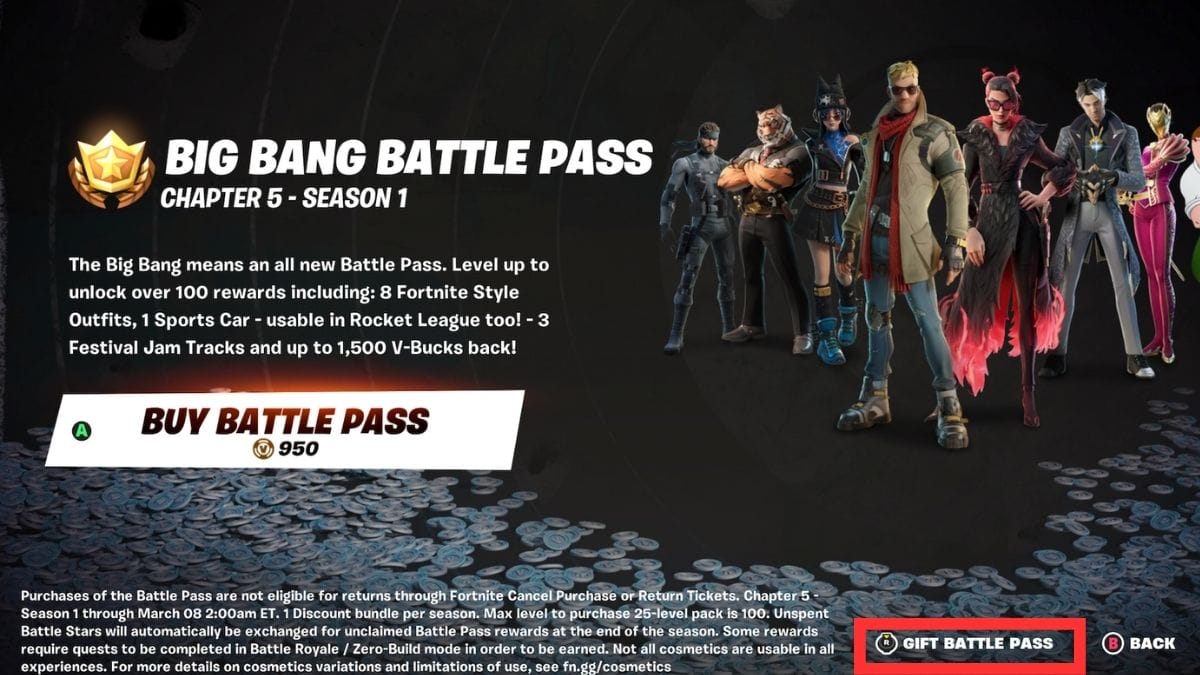
Gift Battle Pass in Fortnite
Image Source: Epic Games via The Nerd Stash

Below are the steps you need to follow to gift a Fortnite Battle Pass. But before jumping to the steps, remember your friend has to be on your friend list for at least three days before you can send them a gift.

  1. Open Fortnite and log into your account.
  2. Go to the Battle Pass tab at the top of the screen.
  3. If you have already purchased the Battle Pass, click the Gigft Battle Pass Button. You can see the Gift Battle Pass button at the bottom right-hand corner if you have not purchased the Battle Pass.
  4. Search for the friend from the list you want to send the gift to.
  5. Click on Wrap Options and select the gift color.
  6. Click Continue once selected, and your friend will receive the Battle Pass gift immediately.

Remember, you cannot gift Battle Pass in Fortnite from V Bucks. Instead, you have to purchase it with actual money. It will cost around $8.49.

Recently, there were some issues with gifting Battle Pass on all platforms. Some players claim that their friends have not received the gift. According to Epic Games, you can resend the Battle Pass to the same friend, and it will not add any cost if the gift has not been received the first time.


Related Topics
Fortnite Guide
Share. Facebook Twitter LinkedIn Reddit Email
Asanga Wijeratne
  • Website

SUGGESTED READS

Dragon's Dogma 2 DLC Rumors Explode Again After Massive 65GB SteamDB Updates
Game News

Dragon’s Dogma 2 DLC Rumors Explode Again After Massive 65GB SteamDB Updates

how to make gunpowder Windrose
Game Guides

How to Make Gunpowder in Windrose

Best Server Settings Windrose
Game Guides

Best Server Settings for Windrose

Skate Nike SB Limited-time Event
Game News

Skate. Kicks Off a Limited-time Event With Nike SB, and It’s Free For All

All Materials in Windrose
Game Guides

Windrose: All Materials (& How to Obtain Them)

Bloodborne Anime Announced, Sony Keeps It R-Rated to Stay 'True' to the Game
Game News

Bloodborne Anime Movie Announced, Sony Keeps It R-Rated to Stay ‘Very True’ to the Game

The Nerd Stash
Facebook X (Twitter) Instagram YouTube LinkedIn
  • About Us
  • Join Our Team
  • Meet the Team
  • Privacy Policy
  • DMCA Policy
  • Contact Us
  • Terms of Use
  • Sitemap
  • Editorial Guidelines
  • Advertising Policy
© 2026 The Nerd Stash. All Rights Reserved.

Type above and press Enter to search. Press Esc to cancel.




