

Close Menu
  • Gaming
    • Platforms
      • Nintendo
      • PC
      • PlayStation
      • Xbox
  • Entertainment
    • Movies
    • TV
    • Royals
  • Celebrity
    • Hollywood
  • Human Interest
  • Astrology
  • More
    • Anime
    • Reviews
Facebook X (Twitter) Instagram LinkedIn YouTube
  • About Us
  • Join Our Team
  • Meet the Team
  • Privacy Policy
  • DMCA Policy
  • Contact Us
  • Terms of Use
  • Sitemap
  • Editorial Guidelines
  • Advertising Policy
The Nerd Stash
  • Gaming
  • Celebrity
  • Hollywood
  • Human Interest
The Nerd Stash
Home»Gaming»How To Invite and Play With Friends in GTFO

How To Invite and Play With Friends in GTFO

The ultimate experience brings friends with you.

Nat CollazoBy Nat CollazoDecember 8, 20232 Mins Read
How To Invite and Play With Friends in GTFO
Image Source: 10 Chambers via The Nerd Stash
This article is over 2 years old and may contain outdated information.

GTFO is a co-op game that relies more heavily on how your teammates act than most other games. While possible, Rundowns are nearly impossible to complete on your own. While you can always use the matchmaker with random players, it isn’t something we would advise doing. Playing with your friends can make expeditions go by so much more smoothly. Let’s dive into how to invite and play with friends in GTFO for the ultimate horror experience.

How To Play Multiplayer In GTFO
How To Invite and Play With Friends in GTFO
Image Source: 10 Chambers via The Nerd Stash

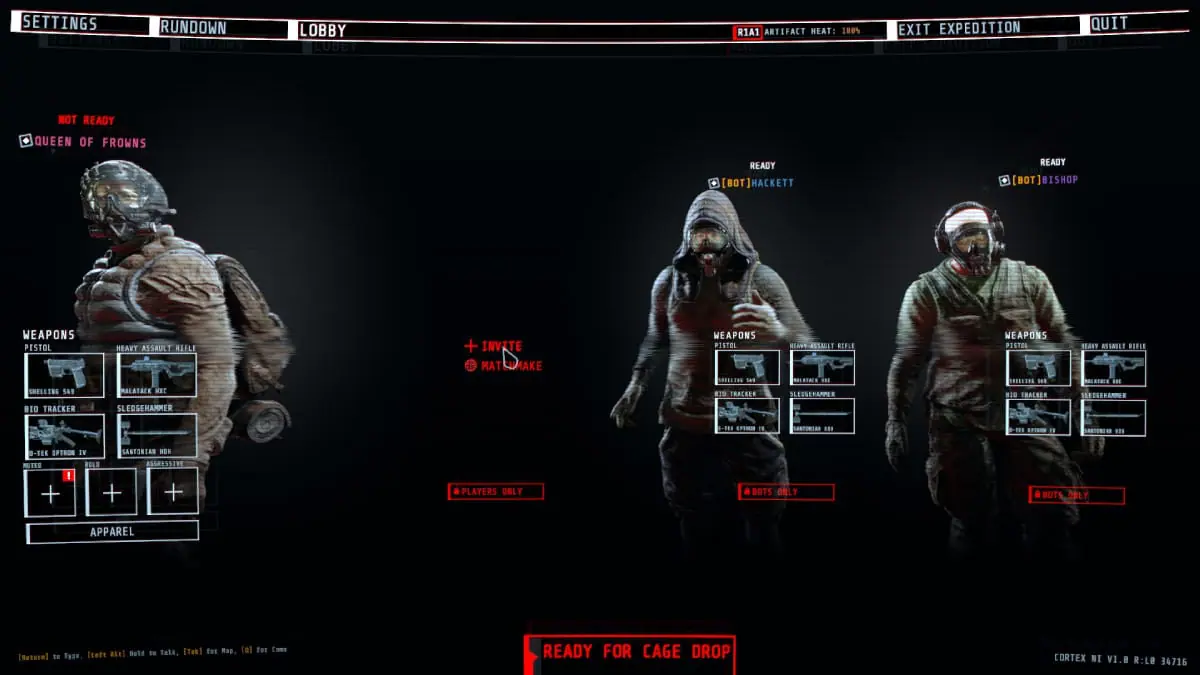
To play with your friends in GTFO, you need to follow these instructions:

  • Select the Rundown and expedition that you’d like to play.
  • Host a lobby.
  • In the spaces where the other three players would, select the red drop-down menu.
  • Select the Players Only option.
  • The player’s character will disappear and be replaced with a red Invite button.
  • Select the Invite button and select the player that you’d like to invite.

Related:

From Blood, Sweat, and More Blood, 10 Chambers Rises Up

GTFO Matchmaking

If you’re looking to be a bit of a masochist, then hop into a quick game with strangers.

  • From the main menu of GTFO, select the Matchmake option.
  • Choose which expeditions you’d like to be a part of.
  • Choose which primary language you are using.
  • If applicable, select a secondary language.
  • Enable whether or not you are using voice chat.
  • Select the Start Matchmake option.

In this same area, there is a button to go to the GTFO discord. As we said, the game is much better with friends. Considering that, if you can find players who want to play with other “serious players,” then heading to the Discord server might be a good idea. Otherwise, there’s still a chance that you’ll find friends in GTFO through a random matchmaking game.

GTFO: Final Edition is available now on PC.

Related Topics
GTFO Guide
Share. Facebook Twitter LinkedIn Reddit Email
Nat Collazo
  • Website
  • X (Twitter)
  • Instagram

I am a game journalist and guide writer with ten years of experience as well as the CEO/ Founder of Frowns Marketing, a marketing company that caters to indie games, tabletop games, and board games to help developers get more wishlists, backers, and players!

SUGGESTED READS

MindsEye Layoffs 2026
Gaming

Studio Behind GTA-like Game, MindsEye, Hit With More Layoffs, and Nobody is Surprised: ‘Shocked There’s Even a Janitor Working There’

Princess Peach Spin-Off Movie May Already Be in Development, Job Listing Suggests
Gaming

Princess Peach Spin-Off Movie May Already Be in Development, Job Listing Suggests

Xbox's New CEO Wants to Reconnect With the 'Community,' Yet Brings In More CoreAI Leaders
Gaming

Xbox’s New CEO Wants to Reconnect With the ‘Community,’ Yet Brings In More CoreAI Leaders

Diablo 4 Season 13 Tier List
Gaming

Class Tier List for Diablo 4 Season 13 (Best Classes for Endgame & Leveling)

Take-Two Boss Finally Explains Why GTA 6 Is Skipping PC at Launch: 'We'll See How It Works Out'
Gaming

Take-Two Boss Finally Explains Why GTA 6 Is Skipping PC at Launch: ‘We’ll See How It Works Out’

Rockstar Employee Review Claims 'Unrealistic' Crunch as GTA 6 Development Intensifies: 'Had to Work Till 3AM'
Gaming

Rockstar Employee Review Claims ‘Unrealistic’ Crunch as GTA 6 Development Intensifies: ‘Had to Work Till 3AM’

The Nerd Stash
Facebook X (Twitter) Instagram YouTube LinkedIn
  • About Us
  • Join Our Team
  • Meet the Team
  • Privacy Policy
  • DMCA Policy
  • Contact Us
  • Terms of Use
  • Sitemap
  • Editorial Guidelines
  • Advertising Policy
© 2026 The Nerd Stash. All Rights Reserved.

Type above and press Enter to search. Press Esc to cancel.




