
Close Menu
  • Gaming
    • Game Guides
    • Codes
    • Game News
    • Game Previews
    • Game Reviews
    • Game Features
    • Game Lists
    • Platforms
      • Nintendo
      • PC
      • PlayStation
      • Xbox
      • Mobile
  • Entertainment
    • Movies
    • Movie Features
    • Movie Reviews
    • TV
    • Reality TV
    • Royals
  • Celebrity
  • Human Interest
  • Astrology
  • Videos
  • More
    • Anime
    • Lists
    • Podcasts
    • Reviews
Facebook X (Twitter) Instagram LinkedIn YouTube
  • About Us
  • Join Our Team
  • Meet the Team
  • Privacy Policy
  • DMCA Policy
  • Contact Us
  • Terms of Use
  • Sitemap
  • Editorial Guidelines
  • Advertising Policy
The Nerd Stash
  • Gaming
  • Celebrity
  • Human Interest
  • Videos
The Nerd Stash
Home»Game Guides»How To Loot Destroyed Ships in Starfield

How To Loot Destroyed Ships in Starfield

Exploring the vast expanses of space and traveling between planets in Starfield, you will meet many different ships. Some ships will not pay attention to you, some…

Artur NovichenkoBy Artur NovichenkoAugust 31, 20233 Mins Read
Destroyed Ships Starfield
Image Source: Bethesda via The Nerd Stash
This article is over 2 years old and may contain outdated information.

Exploring the vast expanses of space and traveling between planets in Starfield, you will meet many different ships. Some ships will not pay attention to you, some you can trade with, and some will immediately attack you. However, whether they are pirates or members of an enemy faction, you will have to fight back to survive. With a good ship in your arsenal, excellent pilot skills, and a couple of Ship Parts, you will win and can collect your deserved reward. Destroyed ships are good sources for farming Credits and other valuable items, so we’re here to show you how to loot them in Starfield.

Starfield: Looting Ships Guide
How To Loot Destroyed Ships in Starfield
Image Source: Bethesda via The Nerd Stash

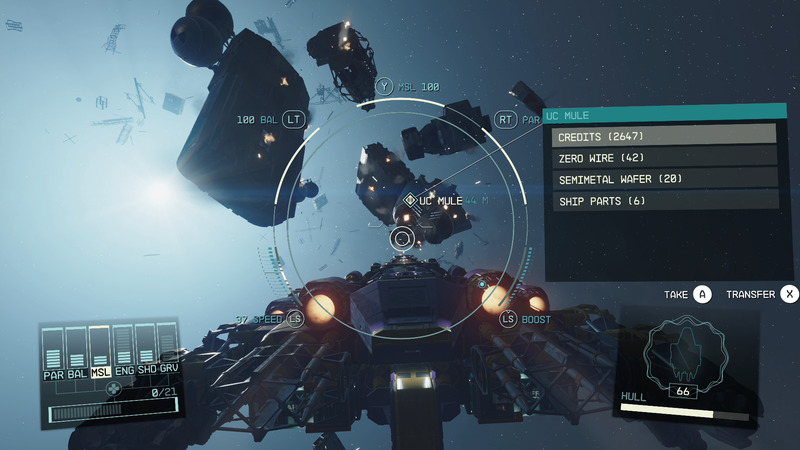
To loot destroyed ships in Starfield, you must fly up to the space vehicle, target, and search it. To do this, you only need to press A on Xbox or the corresponding button on PC (you will see a hint on the right side of the screen). In this case, you must be within 500 meters of the ship. But it is worth noting that not every fragment of destroyed ships can contain loot. And if you can’t find the cargo among his remains, press A to make the search process faster.

Once you have found the cargo and opened it, the cargo’s inventory will appear on the screen, and you can press A again to grab the contents. As we said earlier, ships are a great source of income and rare valuable items. After all, in addition to Credits and Ship Parts, you can find many valuables you can use or sell. You can find different rewards depending on the level of the ship and who owns it. For example, you can see the approximate contents of a level 2 ship in the image above.

If you collect some Ship Parts, use them to repair your ship before the enemy’s next attack. Space is a dangerous place, so you should maximize your protection in advance.

It’s worth noting that you don’t have to destroy the ship to get its contents. After playing for a while, you can unlock the Targeting Control Systems ability, which allows you to destroy the ship engine.

After that, the ship will not be able to move, and you can dock with it. Once inside, you only need to kill all the enemies and take their supplies and money. This method is a little more hard than the previous one, but you can repair the ship and keep it for yourself.

Related:

Starfield: How To Use Cheats With Console Commands

Starfield will be available on Xbox Series X|S and PC on September 6.

Related Topics
Guide Starfield
Share. Facebook Twitter LinkedIn Reddit Email
Artur Novichenko
  • Website

Artur is a copywriter and SEO specialist, as well as a small business owner. In his free time, he loves to play computer games and is glad that he was able to connect his professional career with his hobby.

SUGGESTED READS

Path of Exile 2 The Last of the Druids Update Preview
Features

One Of the Most Unique Druid Archetypes Is Ready to Land on Path of Exile 2: The Last of the Druids

Avatar TLA Fans Are Finally Getting the Open-World Game They've Been Waiting For: 'We Got Avatar's Creed Before GTA 6'
Game News

Avatar TLA Fans Are Finally Getting the Open-World Game They’ve Been Waiting For: ‘We Got Avatar’s Creed Before GTA 6’

Best Augments in Black Ops 7 Zombies
Game Guides

Best Augments You Need To Fully Research In Call of Duty: Black Ops 7 Zombies

All Steps in the Destiny 2 Renegades Campaign
Game Guides

How To Complete the Renegades Campaign in Destiny 2

Octopath Traveler 0 PS5 Review
9
Features

Octopath Traveler 0 Review – A Tale of Revenge and Restoration

Destiny 2 Renegades Eververse Store Items
Game Guides

All Destiny 2: Renegades Eververse Cosmetics

Trending
Path of Exile 2 The Last of the Druids Update Preview

One Of the Most Unique Druid Archetypes Is Ready to Land on Path of Exile 2: The Last of the Druids

Avatar TLA Fans Are Finally Getting the Open-World Game They've Been Waiting For: 'We Got Avatar's Creed Before GTA 6'

Avatar TLA Fans Are Finally Getting the Open-World Game They’ve Been Waiting For: ‘We Got Avatar’s Creed Before GTA 6’

Best Augments in Black Ops 7 Zombies

Best Augments You Need To Fully Research In Call of Duty: Black Ops 7 Zombies

All Steps in the Destiny 2 Renegades Campaign

How To Complete the Renegades Campaign in Destiny 2

The Nerd Stash
Facebook X (Twitter) Instagram YouTube LinkedIn
  • About Us
  • Join Our Team
  • Meet the Team
  • Privacy Policy
  • DMCA Policy
  • Contact Us
  • Terms of Use
  • Sitemap
  • Editorial Guidelines
  • Advertising Policy
© 2025 The Nerd Stash. All Rights Reserved.

Type above and press Enter to search. Press Esc to cancel.





