Close Menu
  • Gaming
    • Platforms
      • Nintendo
      • PC
      • PlayStation
      • Xbox
  • Entertainment
    • Movies
    • TV
    • Royals
  • Celebrity
    • Hollywood
  • Human Interest
  • Astrology
  • More
    • Reviews
Facebook X (Twitter) Instagram LinkedIn YouTube
  • About Us
  • Join Our Team
  • Meet the Team
  • Privacy Policy
  • DMCA Policy
  • Contact Us
  • Terms of Use
  • Sitemap
  • Editorial Guidelines
  • Advertising Policy
The Nerd Stash
  • Gaming
  • Celebrity
  • Hollywood
  • Human Interest
The Nerd Stash
Home»Gaming»How To Make Ghostly Fish Steak in Disney Dreamlight Valley

How To Make Ghostly Fish Steak in Disney Dreamlight Valley

Master chef time! Learn how to make Ghostly Fish Steak in Disney Dreamlight Valley with our step-by-step guide.  Disney Dreamlight Valley offers players a variety of delicious…

Cande MaldonadoBy Cande MaldonadoApril 6, 20232 Mins Read
Make Ghostly Fish Steak in Disney Dreamlight Valley
This article is over 3 years old and may contain outdated information.

Master chef time! Learn how to make Ghostly Fish Steak in Disney Dreamlight Valley with our step-by-step guide. 

Disney Dreamlight Valley offers players a variety of delicious dishes to cook. One of the most sought-after is the Ghostly Fish Steak. This 5-star dish provides a valuable boost of energy for players. Want to hear some even better news? You can also sell it for a significant amount of resources. 

How to Make Ghostly Fish Steak in Disney Dreamlight Valley

Make Ghostly Fish Steak in Disney Dreamlight Valley

Before catching the critical ingredient for Ghostly Fish Steak, you must complete Nala’s Friendship Quest and reach level 10 of your friendship with her. This will unlock the ability to catch the elusive Here and There Fish, which is essential to make Ghostly Fish Steak in Disney Dreamlight Valley.

To make Ghostly Fish Steak, you will need the following ingredients:

  • 1 Here and There Fish
  • 1 Bell Pepper
  • 1 Lemon
  • 1 Asparagus
  • Oregano

Bell Pepper, Lemon, Asparagus, and Oregano can be easily found at the stores in the game or gathered from trees and branches to make Ghostly Fish Steak. However, you can only catch the Here and There Fish in fishing spots in the game during the morning or evening after you have completed Nala’s Friendship Quest.

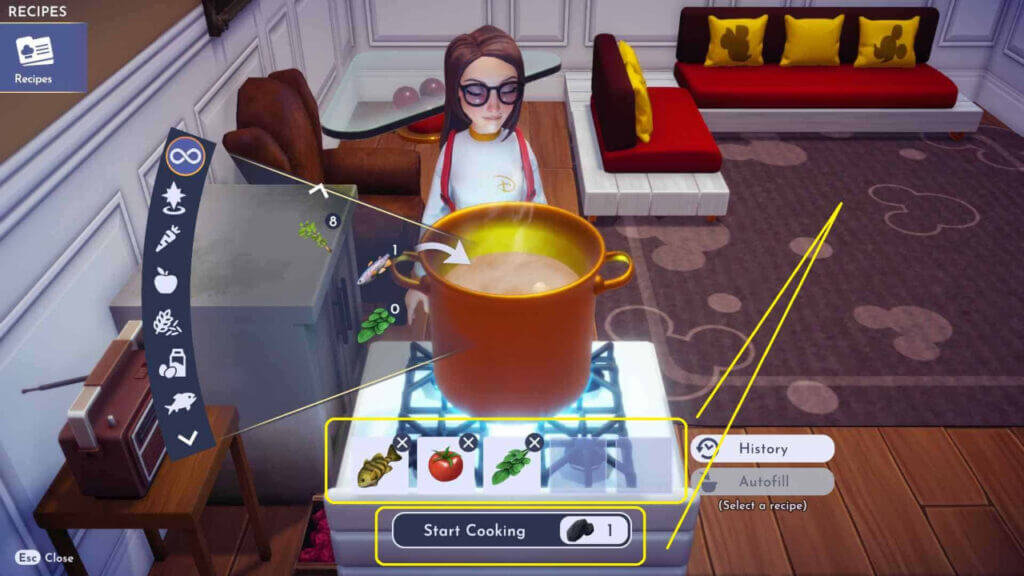
Once you have gathered all the necessary ingredients, head to any cooking spot in Disney Dreamlight Valley. You can find cooking spots throughout the game. They are usually marked with a pot or stove icon on the map.

Interact with the cooking spot and select the Ghostly Fish Steak recipe from the list of available dishes. Then, follow the on-screen prompts to add the Here and There Fish, Bell Pepper, Lemon, Asparagus, and Oregano to the cooking pot. Once you make Ghostly Fish Steak in Disney Dreamlight Valley, it will be added to your inventory.

Disney Dreamlight Valley is available on PC, Xbox, PlayStation, and Nintendo.

Related Topics
disney dreamlight valley Guide
Share. Facebook Twitter LinkedIn Reddit Email
Cande Maldonado
  • Website

Pot-smasher, NPC-annoyer, side quest-completionist. Oh, there's that writing gig, too.

SUGGESTED READS

The Blood of Dawnwalker PS5 Review
9
Gaming

The Blood of Dawnwalker Review – Dark Fantasy Done Right

Onimusha Way of the Sword PS5 Review
9.5
Gaming

Onimusha: Way of the Sword Review – A Flawless Samurai Tale

GTA 6's Lucia Shows How Far Latina Representation in Games Has Come
Gaming

GTA 6’s Lucia Shows How Far Latina Representation in Games Has Come

Rogue Fortune Reveal
Gaming

Rogue Fortune Approaches Roguelikes With In-Depth Build-Crafting and Puzzle-Solving Systems

GTA 6 Extended Look Netflix
Gaming

How & Where to Watch the GTA 6 Extended Look

Resonance A Plague Tale Legacy PC Review
8
Gaming

Resonance: A Plague Tale Legacy Review – Bold Ideas, Predictable Story

The Nerd Stash
Facebook X (Twitter) Instagram YouTube LinkedIn
  • About Us
  • Join Our Team
  • Meet the Team
  • Privacy Policy
  • DMCA Policy
  • Contact Us
  • Terms of Use
  • Sitemap
  • Editorial Guidelines
  • Advertising Policy
© 2026 The Nerd Stash. All Rights Reserved.

Type above and press Enter to search. Press Esc to cancel.