Close Menu
  • Gaming
    • Platforms
      • Nintendo
      • PC
      • PlayStation
      • Xbox
  • Entertainment
    • Movies
    • TV
    • Royals
  • Celebrity
    • Hollywood
  • Human Interest
  • Astrology
  • More
    • Reviews
Facebook X (Twitter) Instagram LinkedIn YouTube
  • About Us
  • Join Our Team
  • Meet the Team
  • Privacy Policy
  • DMCA Policy
  • Contact Us
  • Terms of Use
  • Sitemap
  • Editorial Guidelines
  • Advertising Policy
The Nerd Stash
  • Gaming
  • Celebrity
  • Hollywood
  • Human Interest
The Nerd Stash
Home»Gaming»How to Make Tasty Veggies in Disney Dreamlight Valley

How to Make Tasty Veggies in Disney Dreamlight Valley

Disney Dreamlight Valley is filled with different and unique dishes that you can make an unlock by progressing through the game. As you progress further,…

Masoud KazemiBy Masoud KazemiOctober 5, 20222 Mins Read
how to make tasty veggies in disney dreamlight valley
This article is over 3 years old and may contain outdated information.

Disney Dreamlight Valley is filled with different and unique dishes that you can make an unlock by progressing through the game. As you progress further, you will unlock new biomes and gain access to new ingredients that you can use to make new dishes. One of the best dishes you can make in Disney Dreamlight Valley is the Tasty Veggies and here is how to make it.

How to Make Tasty Veggies in Disney Dreamlight Valley

There is a total of 160 different dishes in Disney Dreamlight Valley you can make with different ingredients, each having its unique attributes. Tasty Veggies is one of the best dishes among the 160 meals you can make because it doesn’t require many ingredients or any rare ones.

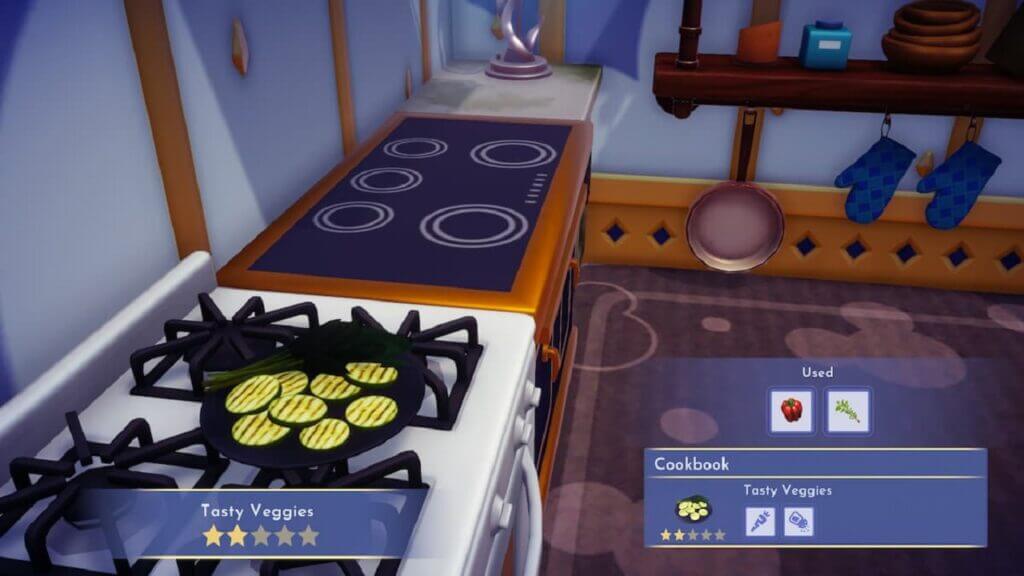
The first step of making yourself a Tasty Veggie is to know its ingredients. This is a two-star dish which means it only requires two ingredients for cooking. The ingredients for this dish are 1 Vegetable of any kind and 1 Herb of any kind.

how to make tasty veggies in disney dreamlight valley

This is the reason why this is one of the best dishes you can make, especially at the beginning of your journey. You can tons of vegetables and herbs by just looking around. You can also buy them from Goofy’s Stall.

Related:

Disney Dreamlight Valley: How to Make Vanilla Ice Cream

Once you’ve gathered the ingredients required, all you have to do is find a cooking station and then start cooking. From the menu that appears select the vegetable and herb you want to use Tasty Veggies will be added to your inventory.

Consuming this dish will give you 345 Energy points, which is not much. So it is best to either sell this dish for 68 Star Coins or gift it to another character and increase your level of friendship with them.

Disney Dreamlight Valley is available for PS4, PS5, Xbox One, Xbox Series X|S, PC, and Nintendo Switch.

Related Topics
disney dreamlight valley Guide
Share. Facebook Twitter LinkedIn Reddit Email
Masoud Kazemi
  • Website
  • X (Twitter)

I don't care about the real world. I cared only about the world of fiction. -Woody Allen

SUGGESTED READS

Where to Find All Echobones & Catch Panthalus in Palworld 1.0
Gaming

Where to Find All Echobones & Catch Panthalus in Palworld 1.0

Transport Fever 3 Features
Gaming

Transport Fever 3 Is Gearing Up for Launch With New Footage Showcasing Several Features for Transport Tycoon Fans

9.5
Gaming

Rhythm Heaven Groove Review – Harmonic Perfection

Marvel Rivals Season 9 Hands-On Preview
Gaming

Marvel Rivals Season 9 Hands-On Impressions: Feels Like a Whole New Game

Diablo 4 x Overwatch Collab
Gaming

Diablo 4 x Overwatch Impressions: Something of an Inconsistent Bag

Late game blink theory in Dota 2
Gaming

Why Dota 2 Modern Late Game Doesn’t Forgive A Single Blink

The Nerd Stash
Facebook X (Twitter) Instagram YouTube LinkedIn
  • About Us
  • Join Our Team
  • Meet the Team
  • Privacy Policy
  • DMCA Policy
  • Contact Us
  • Terms of Use
  • Sitemap
  • Editorial Guidelines
  • Advertising Policy
© 2026 The Nerd Stash. All Rights Reserved.

Type above and press Enter to search. Press Esc to cancel.