Close Menu
  • Gaming
    • Platforms
      • Nintendo
      • PC
      • PlayStation
      • Xbox
  • Entertainment
    • Movies
    • TV
    • Royals
  • Celebrity
    • Hollywood
  • Human Interest
  • Astrology
  • More
    • Reviews
Facebook X (Twitter) Instagram LinkedIn YouTube
  • About Us
  • Join Our Team
  • Meet the Team
  • Privacy Policy
  • DMCA Policy
  • Contact Us
  • Terms of Use
  • Sitemap
  • Editorial Guidelines
  • Advertising Policy
The Nerd Stash
  • Gaming
  • Celebrity
  • Hollywood
  • Human Interest
The Nerd Stash
Home»Gaming»How To Secure Forecast Data From Forecast Towers in Fortnite

How To Secure Forecast Data From Forecast Towers in Fortnite

Do you want to know how to secure forecast data from Forecast Towers in Fortnite? With the game’s new season, players got many new features…

Asanga WijeratneBy Asanga WijeratneAugust 29, 20232 Mins Read
How To Secure Forecast Data From Forecast Towers in Fortnite
Image Source: Epic Games via HarryNinetyFour Screenshot
This article is over 2 years old and may contain outdated information.

Do you want to know how to secure forecast data from Forecast Towers in Fortnite? With the game’s new season, players got many new features and cosmetics, such as Buff Fishstick and Khaby Lame skins. Forecast Towers are also one of the game’s latest features in chapter 4, season 4. These towers can forecast the next storm cycles once activated. Also, securing forecast data from Forecast Towers is a challenge for the new season.

Fortnite: Securing forecast data from Forecast Towers
Fortnite Forecast Tower Locations
Image Source: Epic Games via The Nerd Stash

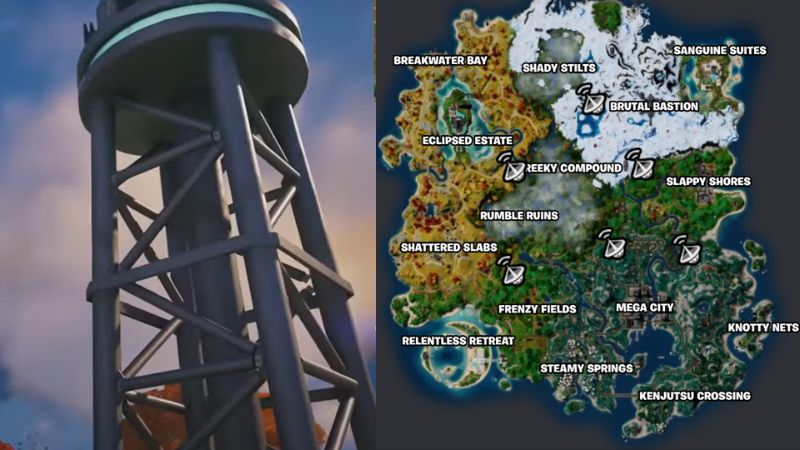
You can secure forecast data from Forecast Towers in Fortnite by obtaining the tower keycard from the guard and activating the tower. There are six Forecast Towers scattered around the map. All locations of the Forecast Towers are shown on the above map.

Obtaining the Keycard From the Guard

The tower guard is roaming around it, and you can easily find him once you approach the area. Eliminate him and obtain the keycard.

Securing Forecast Data From Forecast Towers

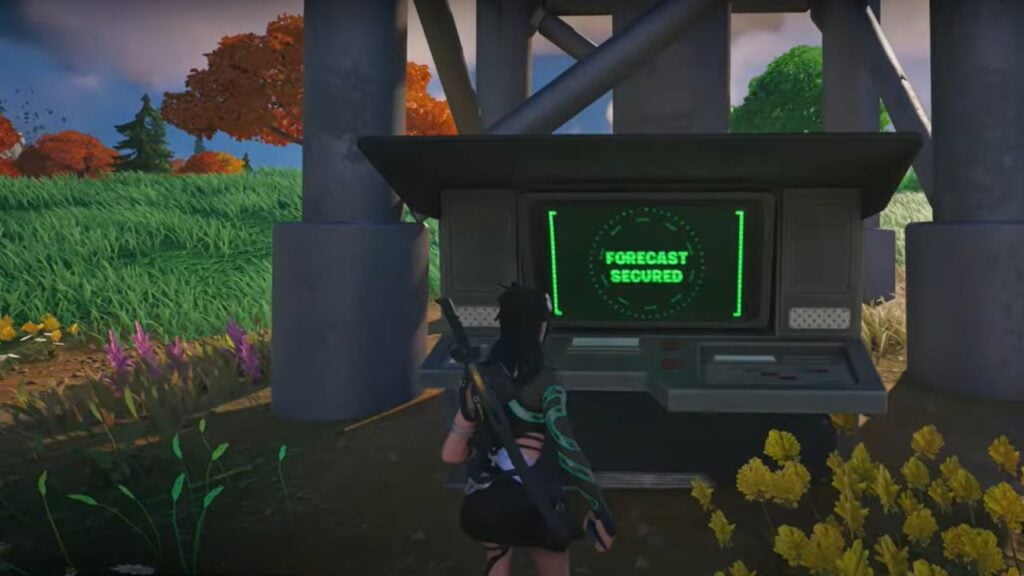
Once you obtain the keycard, wait until the first storm is over since you cannot activate the tower before that. Once the storm cycle is over, then you can activate the tower. Remember to keep away from enemies until you activate the tower. Once you reach the tower, interact with it, have secured forecast data from Forecast Towers, and you will be able to see future storm circles.

Related:
Fortnite: How To Get Refined Kinetic Ore Schematic From Lonely Labyrinth and Escape

To complete this challenge in Fortnite, you must secure forecast data from two Forecast Towers.  This weekly challenge is straightforward to complete if you know the exact locations of the Forecast Towers. Once you complete the challenge, you will receive 35,000 XP, which will help you level up faster in Battle Pass. If you still need visual guidance, the video below from Bodil40 will help.


Related Topics
Fortnite Guide
Share. Facebook Twitter LinkedIn Reddit Email
Asanga Wijeratne
  • Website

SUGGESTED READS

Resonance A Plague Tale Legacy PC Review
8
Gaming

Resonance: A Plague Tale Legacy Review – Bold Ideas, Predictable Story

Heroes of Might and Magic 3 Remake Preview
Gaming

Heroes of Might & Magic 3 Remake Hands-On Preview – Bigger, Bolder, and Better

9.5
Gaming

Star Wars Zero Company Review – My Turn Is One With the Force, and the Force Is With My Turn

Blue Prince and Amir Satvat Among Winners at gamescom dev Awards 2026
Gaming

Blue Prince and Amir Satvat Among Winners at gamescom dev Awards 2026

Gamescom 2026 Game Reveals
Gaming

5 Biggest Reveals of Gamescom 2026

Silver Palace Gamescom
Gaming

Silver Palace Debuts New Trailer During Gamescom 2026

The Nerd Stash
Facebook X (Twitter) Instagram YouTube LinkedIn
  • About Us
  • Join Our Team
  • Meet the Team
  • Privacy Policy
  • DMCA Policy
  • Contact Us
  • Terms of Use
  • Sitemap
  • Editorial Guidelines
  • Advertising Policy
© 2026 The Nerd Stash. All Rights Reserved.

Type above and press Enter to search. Press Esc to cancel.