Close Menu
  • Gaming
    • Platforms
      • Nintendo
      • PC
      • PlayStation
      • Xbox
  • Entertainment
    • Movies
    • TV
    • Royals
  • Celebrity
    • Hollywood
  • Human Interest
  • Astrology
  • More
    • Reviews
Facebook X (Twitter) Instagram LinkedIn YouTube
  • About Us
  • Join Our Team
  • Meet the Team
  • Privacy Policy
  • DMCA Policy
  • Contact Us
  • Terms of Use
  • Sitemap
  • Editorial Guidelines
  • Advertising Policy
The Nerd Stash
  • Gaming
  • Celebrity
  • Hollywood
  • Human Interest
The Nerd Stash
Home»Gaming»How to Tame a Grasshopper in Smalland: Survive the Wilds

How to Tame a Grasshopper in Smalland: Survive the Wilds

Smalland: Survive the Wilds, like Obsidian Entertainment’s Grounded, is a survival game where we play as a minuscule humanoid character the size of small, crawly…

Sidharta F. RasidiBy Sidharta F. RasidiMarch 31, 20232 Mins Read
How to Tame a Grasshopper in Smalland: Survive the Wilds
This article is over 3 years old and may contain outdated information.

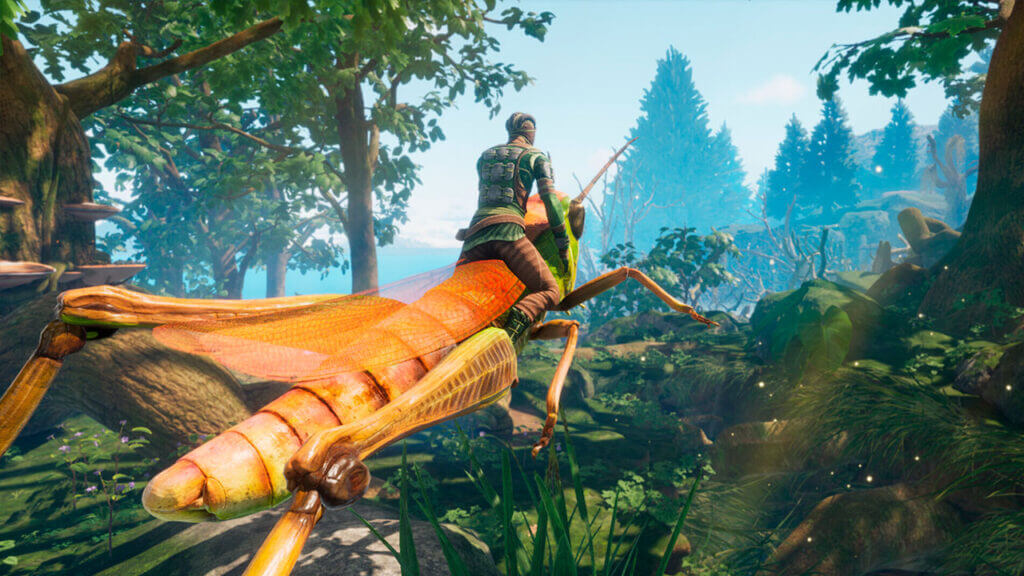
Smalland: Survive the Wilds, like Obsidian Entertainment’s Grounded, is a survival game where we play as a minuscule humanoid character the size of small, crawly bugs like ants. Obviously, trekking the huge world will be a huge problem when we’re that small. Thankfully, you can tame and mount a number of different creatures which makes exploring the area much faster. This Smalland: Survive the Wilds guide will help you how to tame one of the mounts in the game, a Grasshopper.

Smalland: Survive the Wilds – How to Tame a Grasshopper

Video courtesy of DibuckTV.

In order to tame a Grasshopper, you will need a Grasshopper Treat, which can be crafted with the Cauldron. The Grasshopper Treat can be unlocked once you have put a Cauldron down and the insect bait can be crafted using:

  • Petal x1
  • Seed Oil x2
  • Insect Eggs x3

Afterward, you will have to weaken a Grasshopper until below 50% health. If you are carrying a Grasshopper Treat, then a prompt to tame it will show up when you hover your mouse over the target. Simply press the appropriate key, the F key, and now you own yourself a Grasshopper mount, congratulations!

Don’t be afraid of losing a mount when you log out of the game. A tamed bug or Gecko will spawn with you in the base when you log in back into the game. This taming method works for other creatures as well — of course, you will need appropriate Treats for each of them. Once tamed, you can order them using three commands: Mount to ride it, Stay to make it stay put, and Release it back into the wild. Each creature will have different abilities, so you will need to use them properly depending on what task you need to accomplish at the moment:

  • Ladybug: Store items.
  • Grasshopper: Jump long distances.
  • Wolf Spider: Attack while mounted.
  • Damselfly: Fly but eats stamina.
  • Gecko: Climb surfaces.

At the time of writing though, players can only have one tamed creature. Thankfully, Smalland‘s future road map update mentioned that the game will eventually let us craft a Stable and will definitely let us store more than one mount down the road.

Smalland: Survive the Wilds is available on PC, PlayStation, Xbox, and Nintendo Switch.

Related Topics
Guide Smalland: Survive the Wilds
Share. Facebook Twitter LinkedIn Reddit Email
Sidharta F. Rasidi
  • Website

Since middle school, Sidharta has used his video game blog as a handy excuse to avoid studying. After graduating with a degree in Management Information Systems from Bina Nusantara University, he spent years honing his skills as a games journalist, working as an editor for a local gaming site and freelancing elsewhere. Nowadays, when he’s not busy crafting outrageous plots for his serialized comic, Sidharta covers niche games on his personal blog, StoPlayinGame.com. His favorite game series includes Monster Hunter, Earth Defense Force, THE iDOLM@STER, Road Trip Adventure, and KOEI Tecmo's Warriors.

SUGGESTED READS

XBOX Reportedly 'Wanted to Ensure' Physical Games Were Still Playable on Project Helix Before Company Reset
Gaming

XBOX Reportedly ‘Wanted to Ensure’ Physical Games Were Still Playable on Its Next Console Before Company Reset

Gears of War E-Day Multiplayer PC Preview
Gaming

Gears of War: E-Day Multiplayer Preview – The Legendary Shooter is Back

Final Fantasy 7 Revelation Director Isn't Sure the Game Could Get a Physical Edition: "We're Still Having Discussions"
Gaming

Final Fantasy 7 Revelation Director Isn’t Sure the Game Could Get a Physical Edition: ‘We’re Still Having Discussions’

XBOX is Giving Away 13 Ubisoft Games on PC for Free
Gaming

XBOX is Giving Away 13 Ubisoft Games on PC for Free

Endless Ragnarok PC Review
9
Gaming

Granblue Fantasy Relink: Endless Ragnarok Review – Once More Into Zegagrande

CS2 weapon skin collection
Gaming

The Smartest Ways to Start a CS2 Collection from Scratch

The Nerd Stash
Facebook X (Twitter) Instagram YouTube LinkedIn
  • About Us
  • Join Our Team
  • Meet the Team
  • Privacy Policy
  • DMCA Policy
  • Contact Us
  • Terms of Use
  • Sitemap
  • Editorial Guidelines
  • Advertising Policy
© 2026 The Nerd Stash. All Rights Reserved.

Type above and press Enter to search. Press Esc to cancel.