Close Menu
  • Gaming
    • Game Guides
    • Codes
    • Game News
    • Game Previews
    • Game Reviews
    • Game Features
    • Game Lists
    • Platforms
      • Nintendo
      • PC
      • PlayStation
      • Xbox
      • Mobile
  • Entertainment
    • Movies
    • Movie Features
    • Movie Reviews
    • TV
    • Reality TV
    • Royals
  • Celebrity
    • Hollywood
  • Human Interest
  • Astrology
  • Videos
  • More
    • Anime
    • Lists
    • Podcasts
    • Reviews
Facebook X (Twitter) Instagram LinkedIn YouTube
  • About Us
  • Join Our Team
  • Meet the Team
  • Privacy Policy
  • DMCA Policy
  • Contact Us
  • Terms of Use
  • Sitemap
  • Editorial Guidelines
  • Advertising Policy
The Nerd Stash
  • Gaming
  • Celebrity
    • Hollywood
  • Human Interest
  • Videos
The Nerd Stash
Home»Game Guides»How to Tune Weapon Attachments in Modern Warfare 2

How to Tune Weapon Attachments in Modern Warfare 2

The weapon tuning option is one of the new features introduced in Modern Warfare 2. It allows you to change the look and performance of…

Asanga WijeratneBy Asanga WijeratneNovember 4, 20223 Mins Read
Modern Warfare 2 Weapon Attachments
This article is over 3 years old and may contain outdated information.

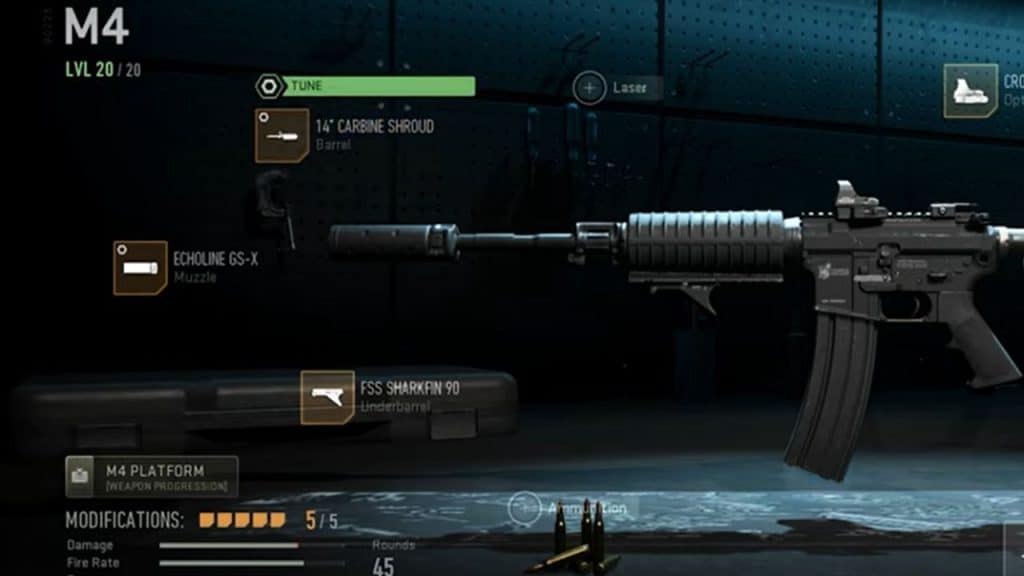
The weapon tuning option is one of the new features introduced in Modern Warfare 2. It allows you to change the look and performance of your weapons in the game, so if you are looking to master the battle in no time, you need to know how Modern Warfare 2 weapon attachments work.

[Updated August 24, 2024 – Updated links]

What is Weapon Tuning in Modern Warfare 2?

Weapon Tuning is a new feature that allows you to change how your weapons look, feel, and perform in Modern Warfare 2. Usually, the game will enable you to choose up to nine attachments: Underbarrel, Muzzle, Barrel, Laser, Optic, Stack, Rear Grip, Ammunition, and Magazine. You can tune up each of these attachments to maximize its performance.

For example, you can Tune your Rear Grip for Recoild Steadiness or Aim Down Sight Speed as well as Sprint to Fire Speed or Aiming Idle Stability. When you max out the  Recoil Steadiness, the Aim Down Sight Speed of the Weapon is reduced. Similarly, When you max out the Sprint to Fire Speed, the Aiming Idle Stability of the Weapon is diminished.

Remember, to unlock any weapon’s Tuning Ability, you must reach the maximum weapon level. In most cases, this is Level 20 in the current Modern Warfare 2 game.

Related:

Modern Warfare 2: How to fix ‘timed out while signing into the online platform.’

How to Tune Weapon Attachments in Modern Warfare 2

Weapon Attachments in Modern Warfare 2

You can Tune Weapon Attachments in Modern Warfare 2 by selecting the particular Attachment and clicking on the Tune Button at the top of the Attachment. Here are the steps you need to follow.

  1. Go to ‘Gunsmith Menu’
  2. Click on the ‘Weapons’ Tab
  3. Select ‘Multiplayer Loadout’
  4. Pick the Weapon you need to Tune up and select the Loadout as per your wish.
  5. Select the Customize weapon
  6. Select your attachments
  7. Click on the green ‘Tune’ button at the top of the Attachment. Now you can tune the Attachment according to your preference.
  8. There are different options for tuning each Attachment. You can see the description of each option by hovering over it with your mouse cursor.
  9. Once you have done this, Check the Weapon in the Indoor Shooting range to see if the Tuning options are working as intended.

After the Tuning Weapon Attachments in Modern Warfare 2, well, congratulations, you are one step closer to being the most lethal enemy on the battlefield.


Related Topics
Guide Modern Warfare 2
Share. Facebook Twitter LinkedIn Reddit Email
Asanga Wijeratne
  • Website

SUGGESTED READS

What is Honey Candy in Adopt Me? How to Get It and What It's For
Game Guides

What is Honey Candy in Adopt Me on Roblox? How to Get It and What It’s For

Honkai Star Rail Version 4.1
Game News

The Phantasmoon Games Continue in Honkai: Star Rail Version 4.1

All 100 Poogie Locations in Monster Hunter Stories 3
Game Guides

All 100 Poogie Locations in Monster Hunter Stories 3

Are There References to the Older Games in Monster Hunter Stories 3?
Game Guides

How to Defeat Monster Hunter Stories 3 Final Boss – All Parts, Spoiler Alert

Spoiler-free Monster Hunter Stories 3 Side Stories Guide & What Do They Unlock
Game Guides

Monster Hunter Stories 3 Complete Side Stories Guide & What Do They Unlock

How to Beat Arkveld and Charge Ratha's Power in Monster Hunter Stories 3
Game Guides

How to Beat Arkveld and Charge Ratha’s Power in Monster Hunter Stories 3

The Nerd Stash
Facebook X (Twitter) Instagram YouTube LinkedIn
  • About Us
  • Join Our Team
  • Meet the Team
  • Privacy Policy
  • DMCA Policy
  • Contact Us
  • Terms of Use
  • Sitemap
  • Editorial Guidelines
  • Advertising Policy
© 2026 The Nerd Stash. All Rights Reserved.

Type above and press Enter to search. Press Esc to cancel.