
Close Menu
  • Gaming
    • Platforms
      • Nintendo
      • PC
      • PlayStation
      • Xbox
  • Entertainment
    • Movies
    • TV
    • Royals
  • Celebrity
    • Hollywood
  • Human Interest
  • Astrology
  • More
    • Reviews
Facebook X (Twitter) Instagram LinkedIn YouTube
  • About Us
  • Join Our Team
  • Meet the Team
  • Privacy Policy
  • DMCA Policy
  • Contact Us
  • Terms of Use
  • Sitemap
  • Editorial Guidelines
  • Advertising Policy
The Nerd Stash
  • Gaming
  • Celebrity
  • Hollywood
  • Human Interest
The Nerd Stash
Home»Gaming»How to Upgrade Your House in Disney Dreamlight Valley

How to Upgrade Your House in Disney Dreamlight Valley

While the player house in Disney Dreamlight Valley initially offers enough room for a cooking stove and storage chest, Dreamers will eventually wish to upgrade their home’s…

AugustBy AugustOctober 27, 20222 Mins Read
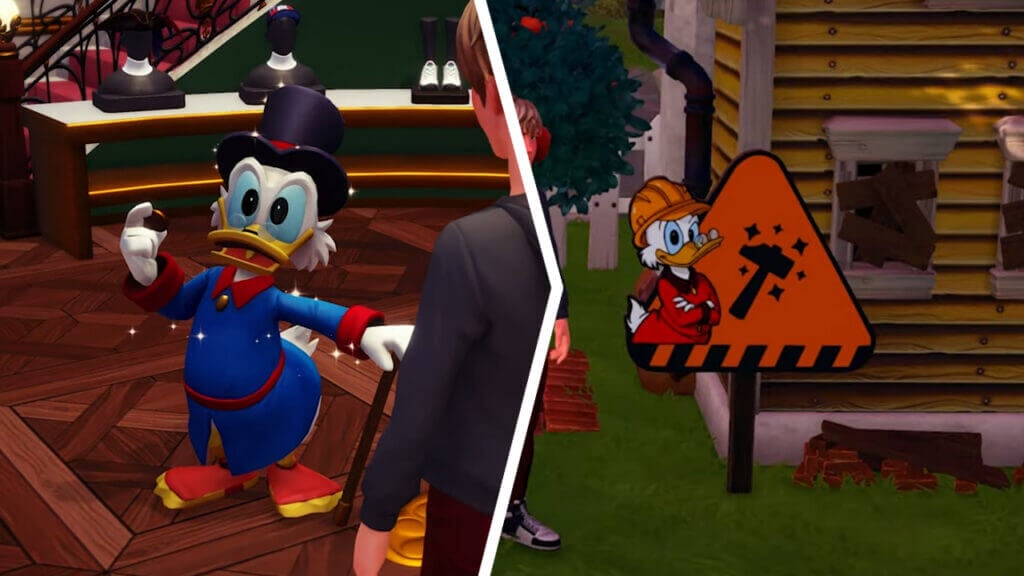
Speaking with Scrooge McDuck to to Upgrade Your House in Disney Dreamlight Valley
This article is over 3 years old and may contain outdated information.

While the player house in Disney Dreamlight Valley initially offers enough room for a cooking stove and storage chest, Dreamers will eventually wish to upgrade their home’s size to fit more furnishings. After all, the game continuously showers adventurers with Furniture pieces that would best suit an interior setting. However, the option to expand one’s home is not available from the start of the game. Players must foremost become acquainted with Scrooge McDuck, Donald Duck’s penny-pinching uncle. Dreamers will first encounter Scrooge in front of his shop in the Village at the start of the game.

[Updated August 12, 2024 – Updated links]

Upgrading the Player House in Disney Dreamlight Valley

Upgrading One's House via House Expansion in Dreamlight Valley

To upgrade the player character’s house in Disney Dreamlight Valley, fans must complete the Friendship Quest “Dreamlight Valley Economy 101.” This quest becomes available once players have reached Friendship Level 2 with Scrooge McDuck. One of the fastest ways to increase any Villager’s Friendship is by gifting them Flowers that can be gathered from every biome in the Valley.

Related: 

How to Complete The Final Trial Quest in Disney Dreamlight Valley

After reaching Friendship Level 2 with Scrooge McDuck, speak with him to receive the “Dreamlight Valley Economy 101” quest. According to YouTuber PepperHomie Game Reviews and Guides, players can complete this quest by gathering seven Gems and selling them at one of Goofy’s Stalls. Gems in Disney Dreamlight Valley can be mined from the black mineral nodes located on the rocky walls that border every biome in the Valley. They will not always drop Gems, but players can know that a node contains a guaranteed gemstone drop if it has colorful shards poking out of its surface. 

It does not matter which Gems are sold to Goofy, as any gemstone can be used to complete “Dreamlight Valley Economy 101.” Speak to Scrooge McDuck one last time to unlock the option to upgrade the player’s home in Disney Dreamlight Valley. To perform home expansion for the first time, enter the house and interact with the elevator platform next to the front door. This action will open a window where players must spend Star Coins to upgrade their homes. Once the first expansion has been carried out, a sign will appear in front of the player house that can be used to perform upgrades in the future.

Related Topics
disney dreamlight valley Guide
Share. Facebook Twitter LinkedIn Reddit Email
August

August Webb is a Staff Writer and former Lead Guide Editor of TNS. When not working, she's playing a visual novel, fanning over an indie gem, or lost in the world of VR.

SUGGESTED READS

Where to Mine Soralite and Paloxite in Palworld
Gaming

Where to Mine Soralite and Paloxite in Palworld

Beast of Reincarnation Game Previews
Gaming

Beast of Reincarnation Previews Just Made It One of the Most Anticipated Games of 2026

Palworld 1.0 Patched the Tower Boss Glitch, but You Can Recruit Them Instead
Gaming

Palworld 1.0 Patched the Tower Boss Glitch, but You Can Recruit Them Instead

Sony’s President Sees No Issues With PS5 Pro’s $700 Price Tag: ‘Hardcore Users Are the Target'
Gaming

PlayStation Store’s Massive Summer Sale Starts Tomorrow: Here’s The Full List of Games Getting Massive Discounts

How to get to the World Tree in Palworld 1.0
Gaming

How to get to the World Tree in Palworld 1.0

How To Keep Pals in Good Working Condition in Palworld 1.0
Gaming

How To Keep Pals in Good Working Condition in Palworld 1.0

The Nerd Stash
Facebook X (Twitter) Instagram YouTube LinkedIn
  • About Us
  • Join Our Team
  • Meet the Team
  • Privacy Policy
  • DMCA Policy
  • Contact Us
  • Terms of Use
  • Sitemap
  • Editorial Guidelines
  • Advertising Policy
© 2026 The Nerd Stash. All Rights Reserved.

Type above and press Enter to search. Press Esc to cancel.