

Close Menu
  • Gaming
    • Platforms
      • Nintendo
      • PC
      • PlayStation
      • Xbox
  • Entertainment
    • Movies
    • TV
    • Royals
  • Celebrity
    • Hollywood
  • Human Interest
  • Astrology
  • More
    • Anime
    • Reviews
Facebook X (Twitter) Instagram LinkedIn YouTube
  • About Us
  • Join Our Team
  • Meet the Team
  • Privacy Policy
  • DMCA Policy
  • Contact Us
  • Terms of Use
  • Sitemap
  • Editorial Guidelines
  • Advertising Policy
The Nerd Stash
  • Gaming
  • Celebrity
  • Hollywood
  • Human Interest
The Nerd Stash
Home»Gaming»How To Use the Build Planner in Path of Exile 2

How To Use the Build Planner in Path of Exile 2

An easier path

Julio La PineBy Julio La PineMay 29, 20263 Mins Read
Path of Exiles 2 Build Planner Guide
Image Source: GGG

After a very long wait, everyone in Path of Exile 2 is ready to jump into Return of the Ancients. As many know, this is the game’s biggest update yet, and one that will pave the way to the imminent 1.0 release. And while some already know what features come with it, one of the biggest yet not-so-talked-about by the community is the brand-new in-game build planner of Path of Exile 2. Despite how easy it is to use, it can be a bit confusing to get it going, so we’ve made a quick guide to show how to activate it, so you can start using some community-made builds for your character.

Build Planner Guide for Path of Exile 2
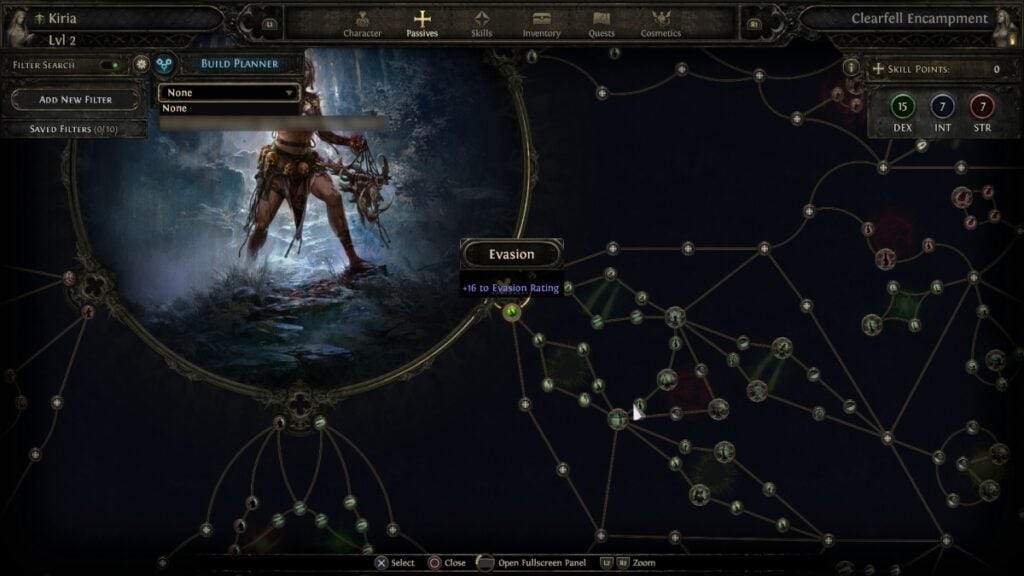
Path of Exile 2 In-game Build Planner
Image Source: GGG via The Nerd Stash

To get started with the build planner of Path of Exile 2, you’ll actually have to do some work outside of the game, ironic as that may sound. First, you need to locate your favorite website that contains character builds, and download the .build file from it. There are several out there, so pick the one you like the most.

Once you have it, follow the next steps:

  1. Locate the .build file in your Downloads folder (or wherever you download files from your browser).
  2. Copy it and head to Documents\My Games\Path of Exile 2\BuildPlanner\
  3. Drop the file inside the folder.
  4. Go back to your game (you can do all the above steps while the game is open) and head to your skills tab.
  5. Go to where the filter option is, and you’ll see a new build planner icon. Select it and choose any of the builds from the drop-down menu.

To make sure it worked, just take a look at the skill tree, which will now have skills you need to unlock highlighted. Just like the image below.
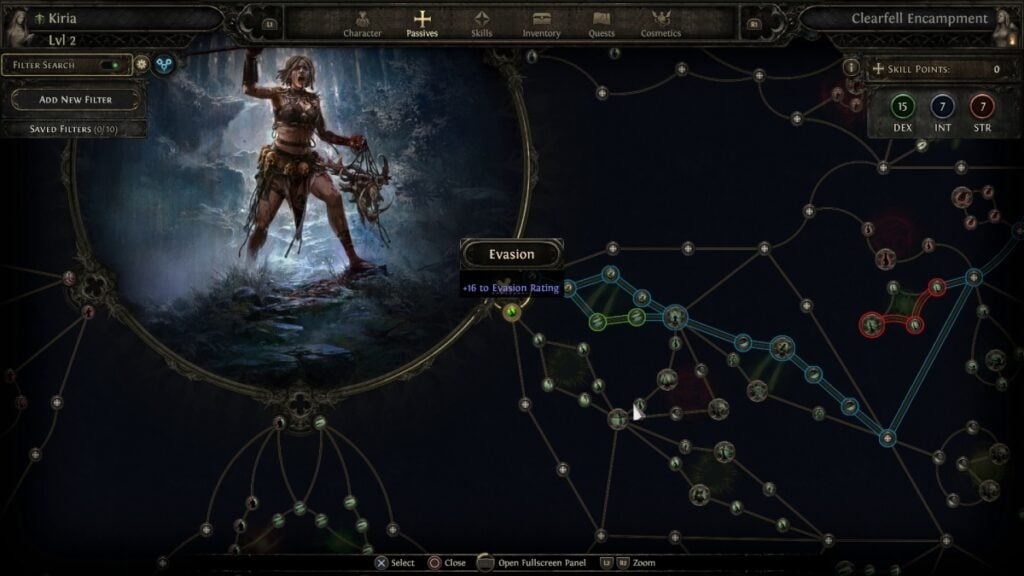
Build Planner
Image Source: GGG via The Nerd Stash

It is important to note that some builds may vary depending on the author. The in-game build planner in Path of Exile 2 lets authors add a few notes to help players, but if some of them don’t appear, you can always check the website where the author first uploaded the build to see the order of skills you should take.
Ultimate Druid Starter Guide for Path of Exile 2
Related: Ultimate Druid Starter Guide for Path of Exile 2

Still, even without notes, the build planner is an excellent addition to the game, and one that will make navigating through this daunting skill tree a much easier task, especially for new players.

Related Topics
Guide Path of Exile 2
Share. Facebook Twitter LinkedIn Reddit Email
Julio La Pine
  • Website

Been gaming since '99! I am a huge JRPG fan and my favorite franchise is Final Fantasy. I love writing about games and I hope I can do it for the rest of my days!

SUGGESTED READS

Adopt Me Kicks Off Summer With Journey to Summer Camp Update, Here's All The New Week 1 Pets & Rewards
Gaming

Roblox Adopt Me Launches Journey to Summer Camp Update, Here’s All the Week 1 Pets & Rewards

LEGO Batman Legacy of the Dark Knight PC Review
9
Gaming

LEGO Batman: Legacy of the Dark Knight Review – A Hero Rises

Call of Duty: Modern Warfare 4 Launching This October on Next-Gen Consoles & Switch 2, But Not Game Pass
Gaming

Call of Duty: Modern Warfare 4 Launching This October on Next-Gen Consoles & Switch 2, But Not Game Pass

Hideo Kojima Teams Up With Prada for an AI Film, And Fans Aren't Happy: 'Beyond Incredibly Disappointing'
Gaming

Hideo Kojima Teams Up With Prada for an AI Film, And Fans Aren’t Happy: ‘Beyond Incredibly Disappointing’

The Witcher 3 Songs of the Past expansion
Gaming

A Witcher 3 Leak Just Forced CD Projekt Red to Announce a Brand-New Expansion: Songs of the Past

CDPR Announces The Witcher 3 'Special Anniversary Stream' Amid New Massive DLC Rumor
Gaming

CDPR Announces The Witcher 3 ‘Special Anniversary Stream’ Amid New Massive DLC Expansion Rumor

The Nerd Stash
Facebook X (Twitter) Instagram YouTube LinkedIn
  • About Us
  • Join Our Team
  • Meet the Team
  • Privacy Policy
  • DMCA Policy
  • Contact Us
  • Terms of Use
  • Sitemap
  • Editorial Guidelines
  • Advertising Policy
© 2026 The Nerd Stash. All Rights Reserved.

Type above and press Enter to search. Press Esc to cancel.





