
Close Menu
  • Gaming
    • Platforms
      • Nintendo
      • PC
      • PlayStation
      • Xbox
  • Entertainment
    • Movies
    • TV
    • Royals
  • Celebrity
    • Hollywood
  • Human Interest
  • Astrology
  • More
    • Anime
    • Reviews
Facebook X (Twitter) Instagram LinkedIn YouTube
  • About Us
  • Join Our Team
  • Meet the Team
  • Privacy Policy
  • DMCA Policy
  • Contact Us
  • Terms of Use
  • Sitemap
  • Editorial Guidelines
  • Advertising Policy
The Nerd Stash
  • Gaming
  • Celebrity
  • Hollywood
  • Human Interest
The Nerd Stash
Home»Gaming»Minecraft Hanging Signs Recipe Guide

Minecraft Hanging Signs Recipe Guide

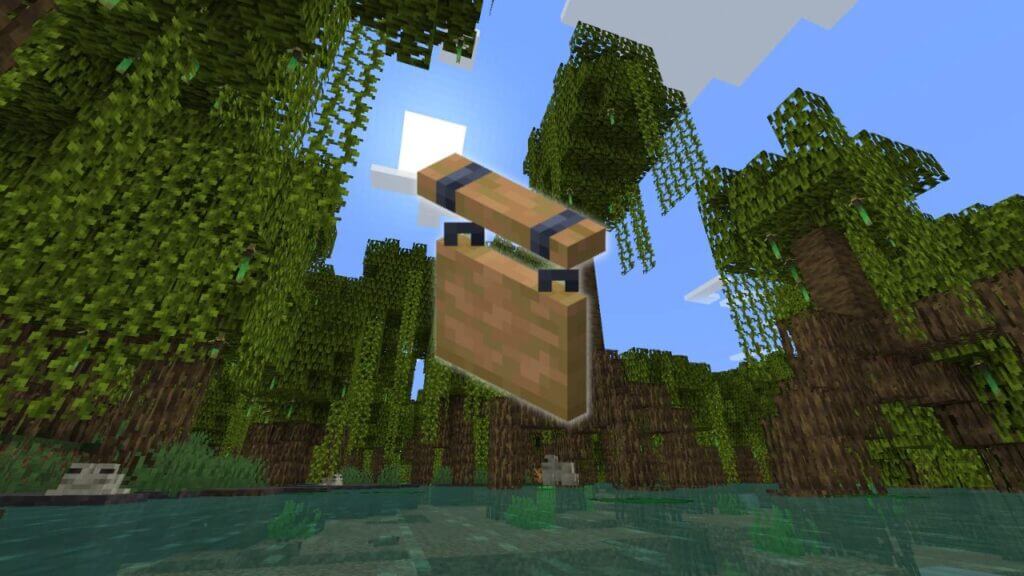
In the new 1.20 version of Minecraft, there are many new things, including a new biome and Hanging Signs that have replaced the usual signs.…

Vladyslav PetrenkoBy Vladyslav PetrenkoJune 24, 20233 Mins Read
Minecraft Hanging Signs
Image Source: Mojang Studios
This article is over 2 years old and may contain outdated information.

In the new 1.20 version of Minecraft, there are many new things, including a new biome and Hanging Signs that have replaced the usual signs. Since they have appeared recently, players may not know how to make them, so we have a Minecraft Hanging Signs recipe guide for you. Signs, although very useful, are inconvenient to use because they must always be attached to the block. New Hanging Signs can be placed anywhere you can attach chains. Although their recipe is more expensive, you will definitely want to try them out, so in this guide, we will tell you exactly how to craft Hanging Signs in Minecraft.

How to Craft Hanging Signs in Minecraft
Hanging Signs in Minecraft
Image Source: Mojang Studios

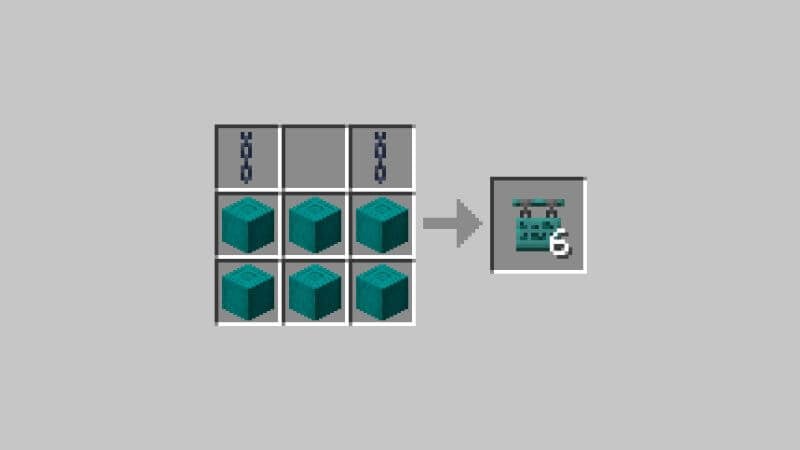
To make a Hanging Sign, you need six stripped log blocks and two iron chains. To get the stripped log blocks, you will need an axe. Just go with it to the tree you need, and instead of breaking the block, right-click on it to make a stripped log. You can also make a sign out of bamboo, but it doesn’t grow as blocks, so you’ll have to make them.

Making chains will be a bit more difficult as you will have to get iron ore. One chain needs one iron ingot and two iron nuggets, so take enough ore to make three ingots and melt them in the furnace. After that, take one ingot and place it on the crafting table to get nine iron nuggets. Now, to make a chain, place one iron nugget in the middle cell on the crafting table at the top and bottom, and then place one iron ingot between them. When you have made two chains, you can make a Hanging Sign.

To make a Hanging Sign, place a chain in the upper right and left corners and then fill in the two rows below with stripped log blocks.

How to Use Hanging Signs in Minecraft

You can place Hanging Signs under the block or attach them to the bottom of another sign. You can also place such a sign on the side of the block. But it also has a drawback because, in addition to the fact that the recipe is more expensive, Hanging Signs has only eight characters in one line instead of fifteen.

This was a guide on how to make Hanging Signs in Minecraft. We hope you found our article useful and that you will be able to try out Hanging Sign in your world.

Minecraft is available on the PC, PlayStation, Xbox, Switch, Android, and iOS mobile devices.

Related Topics
Guide Minecraft
Share. Facebook Twitter LinkedIn Reddit Email
Vladyslav Petrenko
  • Website
  • Facebook

Vladyslav Petrenko is a freelance contributor for TNS.

SUGGESTED READS

Diablo 4 Season 13 Tier List
Gaming

Class Tier List for Diablo 4 Season 13 (Best Classes for Endgame & Leveling)

Take-Two Boss Finally Explains Why GTA 6 Is Skipping PC at Launch: 'We'll See How It Works Out'
Gaming

Take-Two Boss Finally Explains Why GTA 6 Is Skipping PC at Launch: ‘We’ll See How It Works Out’

Rockstar Employee Review Claims 'Unrealistic' Crunch as GTA 6 Development Intensifies: 'Had to Work Till 3AM'
Gaming

Rockstar Employee Review Claims ‘Unrealistic’ Crunch as GTA 6 Development Intensifies: ‘Had to Work Till 3AM’

All Rewards from Admin Abuse Eggs & Box in Roblox Adopt Me
Gaming

All Rewards from Admin Abuse Eggs & Box in Roblox Adopt Me

Gaming

World Heroes Perfect Reminds Me of the Golden Age of Fighting Games

Fatal Fury City of the Wolves Mr Karate Reveal
Gaming

Fatal Fury: City of the Wolves Unveils Its Next Season 2 Fighter, and It’s a Classic

The Nerd Stash
Facebook X (Twitter) Instagram YouTube LinkedIn
  • About Us
  • Join Our Team
  • Meet the Team
  • Privacy Policy
  • DMCA Policy
  • Contact Us
  • Terms of Use
  • Sitemap
  • Editorial Guidelines
  • Advertising Policy
© 2026 The Nerd Stash. All Rights Reserved.

Type above and press Enter to search. Press Esc to cancel.





