Close Menu
  • Gaming
    • Game Guides
    • Codes
    • Game News
    • Game Previews
    • Game Reviews
    • Game Features
    • Game Lists
    • Platforms
      • Nintendo
      • PC
      • PlayStation
      • Xbox
      • Mobile
  • Entertainment
    • Movies
    • Movie Features
    • Movie Reviews
    • TV
    • Reality TV
    • Royals
  • Celebrity
  • Human Interest
  • Astrology
  • Videos
  • More
    • Anime
    • Lists
    • Podcasts
    • Reviews
Facebook X (Twitter) Instagram LinkedIn YouTube
  • About Us
  • Join Our Team
  • Meet the Team
  • Privacy Policy
  • DMCA Policy
  • Contact Us
  • Terms of Use
  • Sitemap
  • Editorial Guidelines
  • Advertising Policy
The Nerd Stash
  • Gaming
  • Celebrity
  • Human Interest
  • Videos
The Nerd Stash
Home»Game Guides»How To Make a Refiner in My Time at Sandrock

How To Make a Refiner in My Time at Sandrock

A person of refinement.

Patrick ArmstrongBy Patrick ArmstrongNovember 10, 20233 Mins Read
A Refiner in My Time At Sandrock
Image Source: Pathea Games via The Nerd Stash

Skip To...

  • Research the Blueprint
  • How To Make a Refiner in My Time at Sandrock
This article is over 2 years old and may contain outdated information.

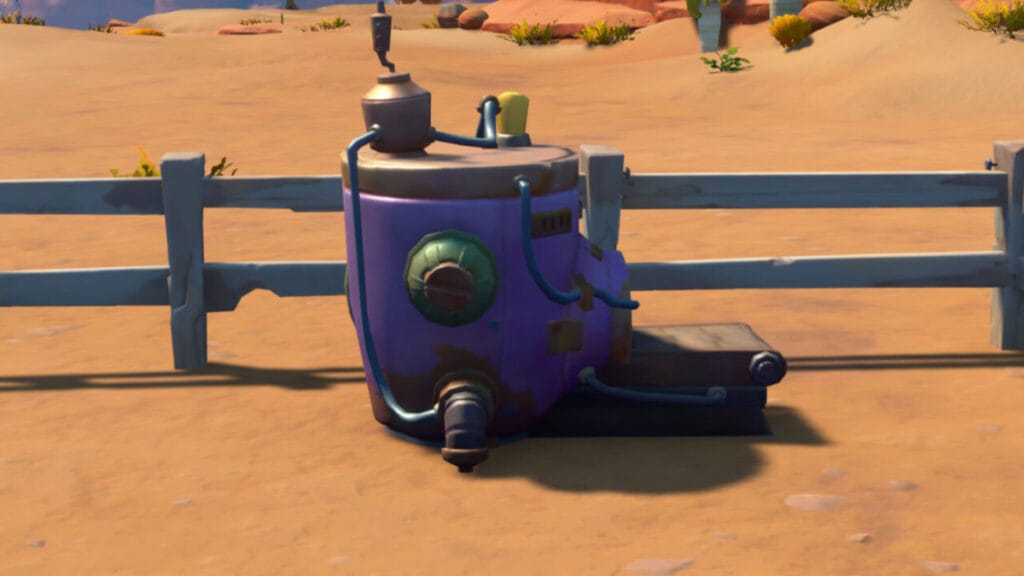
Sandrock is in need of a talented Builder, and you’re just the person to revitalize this struggling desert town. In a crafting sim like My Time at Sandrock, the quantity of products isn’t the only thing that matters. You have to worry about quality too. The higher the quality of the items you manufacture, the more valuable they are to you and your clients. That means you’ll make more money and form stronger relationships with the townsfolk. If you’re struggling to maintain a high level of quality, the Refiner is your new best friend. With this machine, you can improve the quality of any item you produce. Here’s how to make a Refiner in My Time at Sandrock.

Research the Blueprint

Qi in his research lab in My Time at Sandrock
Image Source: Pathea Games via The Nerd Stash

Like most complex machines in My Time at Sandrock, you won’t be able to make a Refiner until you have its blueprint. The first step to getting this valuable item is to head to the Research Center in town. Inside you’ll be able to trade Data Discs for blueprints. The Refiner blueprint requires Data Discs x8, but it also takes three days to research. You’ll then receive the blueprint in your mailbox, so keep an eye out. You don’t have to just stand around waiting for your research to finish, however. Use the time to gather any components for the Refiner that you don’t already possess.

How To Make a Refiner in My Time at Sandrock

A diagram for a Refiner in the new crafting sim by Pathea Games
Image Source: Pathea Games via The Nerd Stash

Once you have the blueprint, it’s time to put the Refiner together. Head to the Assembly Area outside your workshop and select the Refiner blueprint. Click “Assemble” to place it on the Assembly Area platform. You can now Interact with it by pressing “E” to place the components. You’ll need the following components to make a Refiner in My Time at Sandrock:

  • Bronze Blade x1 – Craft these at your Worktable using Bronze Bars x4 and Copper Gears x2.
  • Copper Screw x12 – Use Copper Bars x6 in a Grinder.
  • Marble Slab x2 – Obtained by using Marble Brick x4 in a Processor.
  • Rubber Shell x3 – Recycle Rubber Scrap or use Rubber x12 in a Processor.
  • Hardwood Stick x2 – Obtained by recycling Fine Wood Scraps or processing Hard Wood x8 in a Processor.

Related:

My Time at Sandrock: Starter Guide

If you don’t already have those components, you can create them by using a Furnace, Recycler, Processor, and Grinder. After adding the final component, Interact with the completed Refiner to add it to your inventory. Now that you have access to a Refiner, you can improve the quality of many items, making far better profits from commissions as a result. There a lot of ways to advance in My Time at Sandrock, but refining your goods is one of the best.

My Time at Sandrock is available for PC.

Related Topics
Guide My Time at Sandrock
Share. Facebook Twitter LinkedIn Reddit Email
Patrick Armstrong
  • Website

Artist and writer with a lifelong love of video games. Their favorite games include Dead by Daylight, Meet Your Maker, and Project Zomboid.

SUGGESTED READS

Astra Malorum Zombies easter egg song
Game Guides

Where To Find Astra Malorum Easter Egg Song In Black Ops 7 Zombies

Path of Exile 2 The Last of the Druids Update Preview
Features

One Of the Most Unique Druid Archetypes Is Ready to Land on Path of Exile 2: The Last of the Druids

Avatar TLA Fans Are Finally Getting the Open-World Game They've Been Waiting For: 'We Got Avatar's Creed Before GTA 6'
Game News

Avatar TLA Fans Are Finally Getting the Open-World Game They’ve Been Waiting For: ‘We Got Avatar’s Creed Before GTA 6’

Best Augments in Black Ops 7 Zombies
Game Guides

Best Augments You Need To Fully Research In Call of Duty: Black Ops 7 Zombies

All Steps in the Destiny 2 Renegades Campaign
Game Guides

How To Complete the Renegades Campaign in Destiny 2

Octopath Traveler 0 PS5 Review
9
Features

Octopath Traveler 0 Review – A Tale of Revenge and Restoration

Trending
Astra Malorum Zombies easter egg song

Where To Find Astra Malorum Easter Egg Song In Black Ops 7 Zombies

Path of Exile 2 The Last of the Druids Update Preview

One Of the Most Unique Druid Archetypes Is Ready to Land on Path of Exile 2: The Last of the Druids

Avatar TLA Fans Are Finally Getting the Open-World Game They've Been Waiting For: 'We Got Avatar's Creed Before GTA 6'

Avatar TLA Fans Are Finally Getting the Open-World Game They’ve Been Waiting For: ‘We Got Avatar’s Creed Before GTA 6’

Best Augments in Black Ops 7 Zombies

Best Augments You Need To Fully Research In Call of Duty: Black Ops 7 Zombies

The Nerd Stash
Facebook X (Twitter) Instagram YouTube LinkedIn
  • About Us
  • Join Our Team
  • Meet the Team
  • Privacy Policy
  • DMCA Policy
  • Contact Us
  • Terms of Use
  • Sitemap
  • Editorial Guidelines
  • Advertising Policy
© 2025 The Nerd Stash. All Rights Reserved.

Type above and press Enter to search. Press Esc to cancel.