

Close Menu
  • Gaming
    • Platforms
      • Nintendo
      • PC
      • PlayStation
      • Xbox
  • Entertainment
    • Movies
    • TV
    • Royals
  • Celebrity
    • Hollywood
  • Human Interest
  • Astrology
  • More
    • Reviews
Facebook X (Twitter) Instagram LinkedIn YouTube
  • About Us
  • Join Our Team
  • Meet the Team
  • Privacy Policy
  • DMCA Policy
  • Contact Us
  • Terms of Use
  • Sitemap
  • Editorial Guidelines
  • Advertising Policy
The Nerd Stash
  • Gaming
  • Celebrity
  • Hollywood
  • Human Interest
The Nerd Stash
Home»Features»Pokémon Legends: Arceus – How to Unlock The Shiny Baneful Fox Mask

Pokémon Legends: Arceus – How to Unlock The Shiny Baneful Fox Mask

The Shiny Baneful Fox Mask is a cosmetic head item in Pokémon Legends: Arceus that has been recently added to the game in celebration of the final…

AugustBy AugustJune 30, 20222 Mins Read
Unlocking the Shiny Baneful Fox Mask in Pokémon Legends Arceus
This article is over 4 years old and may contain outdated information.

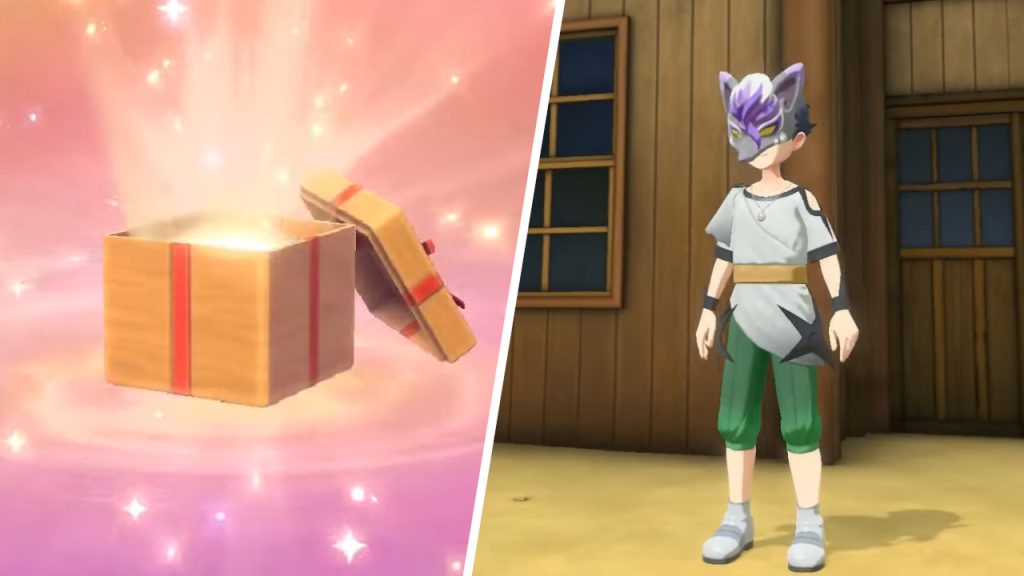
The Shiny Baneful Fox Mask is a cosmetic head item in Pokémon Legends: Arceus that has been recently added to the game in celebration of the final episode of Hisuian Snow. For those unfamiliar with Hisuian Snow, it is a short three-part series available on The Official Pokémon YouTube channel that features a story in Arceus, the same region of the Pokémon Legends: Arceus. Despite its short length, many fans have come to love this additional content that expands on the world and lore they’ve enjoyed in Arceus. Accordingly, the Shiny Baneful Fox Mask is a small promotion gift for players to express their appreciation for the show inspired by Pokémon Legends: Arceus.

Unlocking the Shiny Baneful Fox Mask in Pokémon Legends: Arceus

Pokémon Legends Arceus How to Unlock The Shiny Baneful Fox Mask

To unlock and claim the Shiny Baneful Fox Mask in Pokémon Legends: Arceus, Trainers must launch their game and open the pause menu. Go to the Communications tab and select Mystery Gifts. Choose “Get via Internet” and then pick “Clothing Gift.” After a short gift-opening cutscene, players will receive their new Shiny Baneful Fox Mask. 

Related: 

Pokémon Legends Arceus: Who is Ingo?

For clarification, the Communications tab is the third icon resembling a “wi-fi signal” symbol. After choosing Mystery Gifts and Get via Internet, Trainers must ensure their Nintendo Switch is connected to the Internet to receive the gift. After claiming the Shiny Baneful Fox Mask, head to Jubilife Village and enter Your Quarters. Inside, walk to the back and interact with the tall mirror and select the clothing options for headwear. The mask should appear within the list of available items. Alternatively, players can visit the Clothier shop in Jubilife Village and speak to Anthe. In the dialogue options, select Change Clothing, and the new item should be available within the “hat” section.

It should be mentioned that the Shiny Baneful Fox Mask in Arceus will only be available until May 31, 2023. Needless to say, there’s no rush to obtain the gift. Still, it is ideal to claim it as soon as possible since fans might get distracted with all the new and upcoming titles in events like Nintendo Direct and eventually forget about unlocking the mask. Additionally, those who’ve just begun their journey in Arceus will not be able to acquire the gift right away. Instead, they will need to reach the fifth mission in the game, “A Request from Mai,” after which they can speak with Anthe to receive their new mask.

Pokémon Legends: Arceus is available on Nintendo Switch.

Related Topics
Guide Pokémon legends: arceus
Share. Facebook Twitter LinkedIn Reddit Email
August

August Webb is a Staff Writer and former Lead Guide Editor of TNS. When not working, she's playing a visual novel, fanning over an indie gem, or lost in the world of VR.

SUGGESTED READS

Emberville PC Preview
Gaming

Emberville Preview – An RPG Adventure That Has It All

PUBG DED.NET Is Weird, Loud, Gross, and Everything I Could Have Wanted
Gaming

PUBG: DED.NET Is Weird, Loud, Gross, and Everything I Could Have Wanted

Hideo Kojima's Physint Moves From PlayStation to Xbox After Sony Tried to Cancel It: 'That Didn't Take Long'
Gaming

Hideo Kojima’s Physint Moves From PlayStation to Xbox After Sony Tried to Cancel It: ‘That Didn’t Take Long’

Valheim 1.0 Co-op guide
Gaming

Valheim 1.0 Co-Op Guide – How to Play With Friends

Zelda: Ocarina of Time Remake Digital Price Confirmed at $59.99, $10 Cheaper Than Physical
Gaming

Zelda: Ocarina of Time Remake Digital Price Confirmed at $59.99, $10 Cheaper Than Physical

The Expanse Osiris Reborn Feels Like More Than the Next Mass Effect
Gaming

The Expanse: Osiris Reborn Feels Is Far More Than the Next Mass Effect

The Nerd Stash
Facebook X (Twitter) Instagram YouTube LinkedIn
  • About Us
  • Join Our Team
  • Meet the Team
  • Privacy Policy
  • DMCA Policy
  • Contact Us
  • Terms of Use
  • Sitemap
  • Editorial Guidelines
  • Advertising Policy
© 2026 The Nerd Stash. All Rights Reserved.

Type above and press Enter to search. Press Esc to cancel.




