Close Menu
  • Gaming
    • Platforms
      • Nintendo
      • PC
      • PlayStation
      • Xbox
  • Entertainment
    • Movies
    • TV
    • Royals
  • Celebrity
    • Hollywood
  • Human Interest
  • Astrology
  • More
    • Reviews
Facebook X (Twitter) Instagram LinkedIn YouTube
  • About Us
  • Join Our Team
  • Meet the Team
  • Privacy Policy
  • DMCA Policy
  • Contact Us
  • Terms of Use
  • Sitemap
  • Editorial Guidelines
  • Advertising Policy
The Nerd Stash
  • Gaming
  • Celebrity
  • Hollywood
  • Human Interest
The Nerd Stash
Home»Features»Apex Legends: How to Fix Currency Not Loading

Apex Legends: How to Fix Currency Not Loading

Apex Legends has a very annoying bug; sometimes, the currency doesn’t load. This can be super frustrating considering that you need it to accomplish tons…

Mathew NgatiaBy Mathew NgatiaAugust 17, 20222 Mins Read
Apex Legends: How to Fix Currency Not Loading
This article is over 4 years old and may contain outdated information.

Apex Legends has a very annoying bug; sometimes, the currency doesn’t load. This can be super frustrating considering that you need it to accomplish tons of things like buying new skins, and characters. If you are experiencing this problem — which seems to mostly occur during shop changes —, you have come to the right place because this guide will show you how to fix currency not loading in Apex Legends. You have no reason to stop playing one of the most exciting games of our time.

Apex Legends: How to Fix Currency Not Loading
How to Fix Currency Not Loading

There are only three known fixes to the currency not loading bug:

  • Quit and relaunch the game
  • Restart your console or PC
  • Wait for 24 hours

Some of these fixes like waiting 24 hours are annoying, but these are the currently available solutions. Otherwise, we will have to wait for the game developers to come up with a permanent solution which won’t take long given how popular the game is. In the meantime, you can familiarize yourself with the different in-game currencies.

Apex of Legends currency comes in three different flavors: Crafting Metals, Legend Tokens, and Apex Coins.

Crafting Metals

Crafting Metals are used to specifically unlock cosmetics and you get them by opening Apex Packs. The amount of Crafting Metals you need to buy an item depends on its rarity.

Legend Tokens

Legend Tokens are the only free Apex of Legends currency. You will earn them from every match you play. You can use them to unlock characters and store-exclusive cosmetics.  But compared to other in-game characters, their utility is highly limited.

Apex Coins

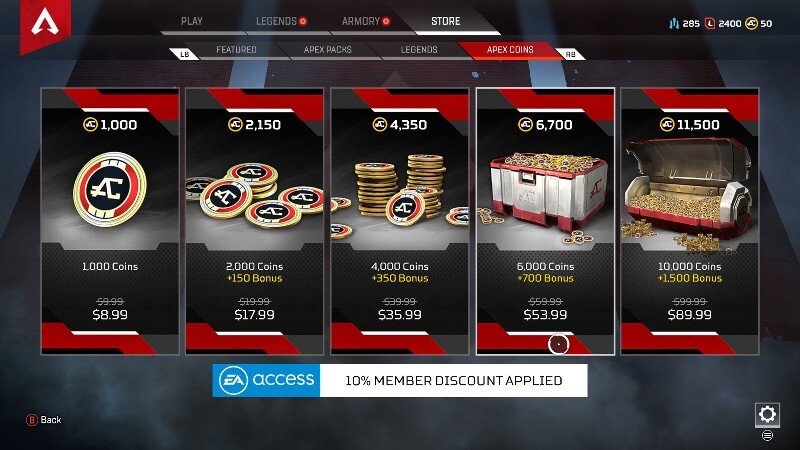
Apex Coins are Apex Legend’s real-money in-game currency. You can get 1,000 AC for $9.99. Also, the more you spend, the higher the number of ACs you receive. For example, $19.99 gives you 2,150 ACs while $39.99 grants you 4,350 ACs. You can use the Apex items to buy Apex Packs, specific loot items, and characters.

Apex Legends is available on PlayStation 5, PlayStation 4, Xbox Series X|S, Xbox One, Nintendo Switch, IOS, Android, and PC.

Related Topics
Guide
Share. Facebook Twitter LinkedIn Reddit Email
Mathew Ngatia
  • Website

SUGGESTED READS

Gamers are Mad That $400 GTA 6 Collector's Edition Includes 'Ugly Statues' with No Games: 'Get The #@%& Out of Here'
Gaming

Gamers are Mad That $400 GTA 6 Collector’s Edition Includes ‘Ugly Statues’ with No Games: ‘Get The #@%& Out of Here’

Warframe narin farming guide
Gaming

How to Get Narin in Warframe Fast & Free (Warframe Narin Farming Guide)

Fatal Fury Kim Kaphwan
Gaming

Fatal Fury: City of the Wolves Kim Kaphwan Hands-On Impressions – The True Martial Artist

World of Warcraft Forever Beta Preview
Gaming

World of Warcraft: Forever Beta Impressions – The Fresh Start We Needed

Richard's Box Puzzle code in Silent Hill: Townfall
Gaming

How to Find Richard’s Box and Get the Code in Silent Hill: Townfall

How to solve the Pharmacy Locker code in Silent Hill Townfall
Gaming

How to Unlock the Pharmacy Locker in Silent Hill: Townfall

The Nerd Stash
Facebook X (Twitter) Instagram YouTube LinkedIn
  • About Us
  • Join Our Team
  • Meet the Team
  • Privacy Policy
  • DMCA Policy
  • Contact Us
  • Terms of Use
  • Sitemap
  • Editorial Guidelines
  • Advertising Policy
© 2026 The Nerd Stash. All Rights Reserved.

Type above and press Enter to search. Press Esc to cancel.