Close Menu
  • Gaming
    • Platforms
      • Nintendo
      • PC
      • PlayStation
      • Xbox
  • Entertainment
    • Movies
    • TV
    • Royals
  • Celebrity
    • Hollywood
  • Human Interest
  • Astrology
  • More
    • Reviews
Facebook X (Twitter) Instagram LinkedIn YouTube
  • About Us
  • Join Our Team
  • Meet the Team
  • Privacy Policy
  • DMCA Policy
  • Contact Us
  • Terms of Use
  • Sitemap
  • Editorial Guidelines
  • Advertising Policy
The Nerd Stash
  • Gaming
  • Celebrity
  • Hollywood
  • Human Interest
The Nerd Stash
Home»Gaming»Diablo 4: How to Solve the Note’s Riddle in Travelers Superstition

Diablo 4: How to Solve the Note’s Riddle in Travelers Superstition

Time to solve a riddle!

Cande MaldonadoBy Cande MaldonadoJune 10, 20232 Mins Read
Note Riddle Diablo 4
Image Source: Blizzard via The Nerd Stash
This article is over 3 years old and may contain outdated information.

[Updated on August 26, 2024, to revise outdated formatting and improve readability.]

Riddle quests can be confusing, but you can successfully complete the Note’s Riddle in Traveler’s Superstition in Diablo 4 with the proper steps. To start Traveler’s Superstition:

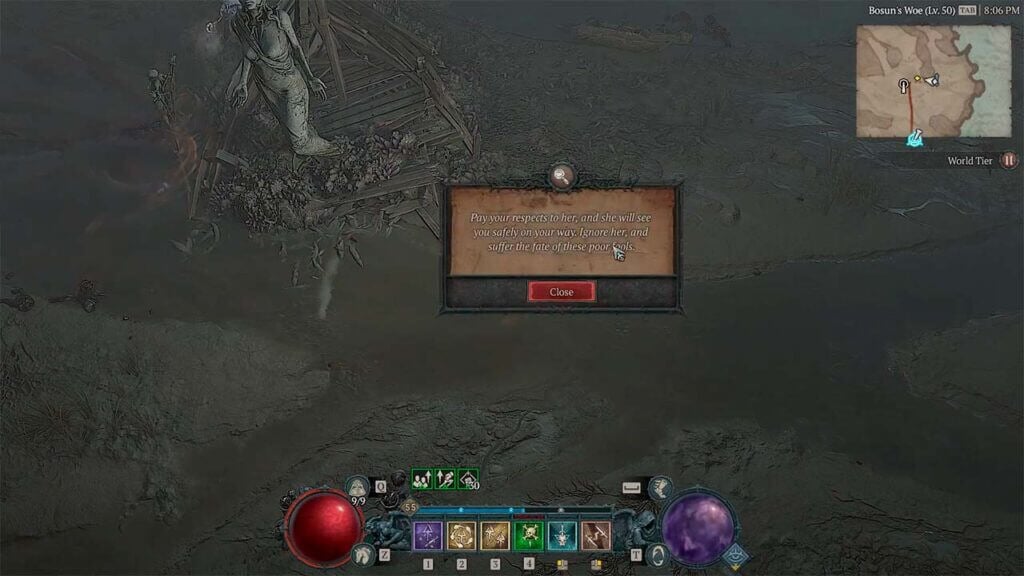
  1. Locate the Hastily Scrawled Note. This note can be found beside a giant statue and the shell of a crashed wooden wagon known as Traveler’s Superstition in Diablo 4.
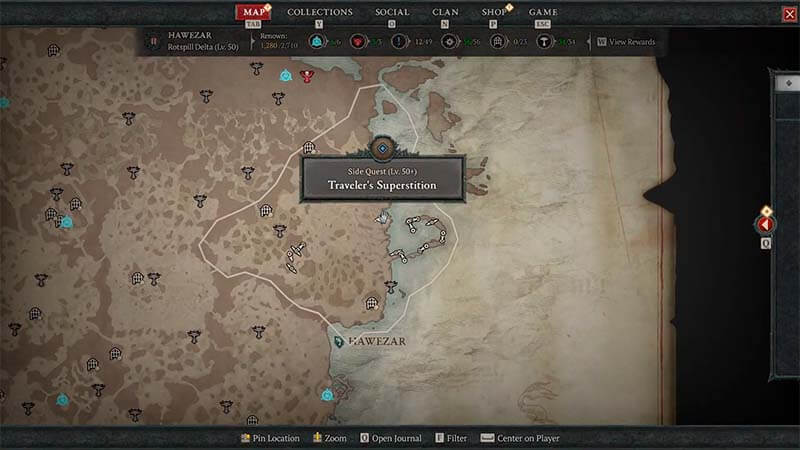
  2. Make your way to Bosun’s Woe in the Rotspill Delta area of the Hawezar region.
  3. Look for the statue in the northeastern part of the Rotspill Delta along the eastern coast of Sanctuary.

Related:

How To Bind And Use Skills in Diablo 4

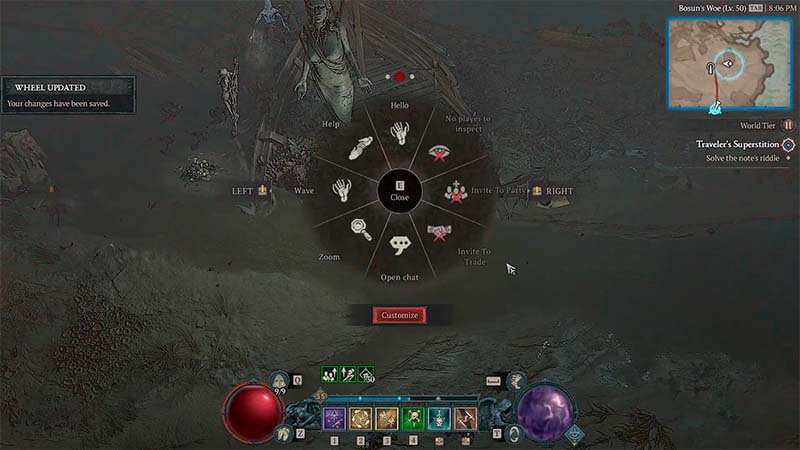
Once you have found the Hastily Scrawled Note, position yourself before the Traveler’s Superstition statue. On PC, press the E key to open the Emote Wheel. This will allow you to choose and perform different emotes.
Note Riddle Location
Image Source: Blizzard via The Nerd Stash

From the Emote Wheel, select the ‘Hello’ emote. This emote is crucial to solving the riddle. Execute the ‘Hello’ emote while standing in front of the statue. This action will trigger a response and initiate the appearance of a chest. Once the chest appears, approach and interact with it to loot its contents.
Emote Wheel Diablo 4
Image Source: Blizzard via The Nerd Stash

To spice up your emote wheel in Diablo 4 and solve the Note’s Riddle, follow these quick steps: 

  1. Press the “E” key (PC) or the “Up” button (consoles) to pop up the wheel.
  2. Hit “Customize” and drag your desired emote to an open spot. 
  3. Repeat for more emotes, or fine-tune the wheel to your liking. 
Related Topics
Diablo 4 Guide
Share. Facebook Twitter LinkedIn Reddit Email
Cande Maldonado
  • Website

Pot-smasher, NPC-annoyer, side quest-completionist. Oh, there's that writing gig, too.

SUGGESTED READS

Zelda: Ocarina of Time Remake Digital Price Confirmed at $59.99, $10 Cheaper Than Physical
Gaming

Zelda: Ocarina of Time Remake Digital Price Confirmed at $59.99, $10 Cheaper Than Physical

The Expanse Osiris Reborn Feels Like More Than the Next Mass Effect
Gaming

The Expanse: Osiris Reborn Feels Is Far More Than the Next Mass Effect

Monster Hunter Outlanders Might Finally Be the Mobile Monster Hunter I've Wanted
Gaming

Monster Hunter Outlanders Might Finally Be the Mobile Monster Hunter I’ve Wanted

Atelier Karia Release Date Announcement
Gaming

Atelier Karia: The Night Kingdom & The Guide of Memories Unveils Its Release Date, More Gameplay Details, and Cast Members

The Legend of Zelda 40th Anniversary Announcements
Gaming

Everything Announced at the Zelda 40th Anniversary Direct

The Most Fun I Had at Gamescom Came From These 2 Ridiculous Indie Games
Gaming

The Most Fun I Had at Gamescom Came From These 2 Ridiculous Indie Games

The Nerd Stash
Facebook X (Twitter) Instagram YouTube LinkedIn
  • About Us
  • Join Our Team
  • Meet the Team
  • Privacy Policy
  • DMCA Policy
  • Contact Us
  • Terms of Use
  • Sitemap
  • Editorial Guidelines
  • Advertising Policy
© 2026 The Nerd Stash. All Rights Reserved.

Type above and press Enter to search. Press Esc to cancel.