
Close Menu
  • Gaming
    • Game Guides
    • Codes
    • Game News
    • Game Previews
    • Game Reviews
    • Game Features
    • Game Lists
    • Platforms
      • Nintendo
      • PC
      • PlayStation
      • Xbox
      • Mobile
  • Entertainment
    • Movies
    • Movie Features
    • Movie Reviews
    • TV
    • Reality TV
    • Royals
  • Celebrity
    • Hollywood
  • Human Interest
  • Astrology
  • Videos
  • More
    • Anime
    • Lists
    • Podcasts
    • Reviews
Facebook X (Twitter) Instagram LinkedIn YouTube
  • About Us
  • Join Our Team
  • Meet the Team
  • Privacy Policy
  • DMCA Policy
  • Contact Us
  • Terms of Use
  • Sitemap
  • Editorial Guidelines
  • Advertising Policy
The Nerd Stash
  • Gaming
  • Celebrity
    • Hollywood
  • Human Interest
  • Videos
The Nerd Stash
Home»Game Guides»How To Enable Ultrawide Support in Dave The Diver

How To Enable Ultrawide Support in Dave The Diver

Dave The Diver was released at the end of June 2023 and won the hearts of fans in just a couple of weeks. The game…

Alina NovichenkoBy Alina NovichenkoJuly 11, 20233 Mins Read
How To Enable Ultrawide Support in Dave The Diver
Image Source: Mintrocket

Skip To...

  • How to Setup Ultrawide Resolution for Dave the Diver
  • Dave The Diver Ultrawide Mode
This article is over 2 years old and may contain outdated information.

Dave The Diver was released at the end of June 2023 and won the hearts of fans in just a couple of weeks. The game has simple but addictive gameplay, cute pixel 3D graphics, various quests, and jokes. However, Dave The Diver does not support Ultrawide monitors, causing some gamers to find themselves diving into the depths of the sea with annoying black bars on the sides of the screen. Luckily, this can be fixed relatively easily. So read on to find out how to setup Ultrawide Resolution for Dave The Diver.

How to Setup Ultrawide Resolution for Dave the Diver

dave the diver ultrawide
Image Source: Mintrocket

As with other non-UW games, you can use third-party apps to enjoy Dave The Diver in full resolution. One of the best apps for this is Borderless Gaming. Moreover, this tool is free. So follow these simple steps to set up Ultrawide Resolution for Dave The Diver:

  • Download Borderless Gaming from GitHub. (If you want to support the developers, you can buy the app on Steam)
  • Install Borderless Gaming on your PC. Before running it, you must run Dave The Diver.
  • In the opened Borderless Gaming, find Dave The Diver and drag it to the right box.
  • Then right-click on it and select the Full Screen and Auto-Maximize options.
  • After that, you must open Dave The Diver, select 16:9 resolution in the settings, and restart the game.

That’s all you need to know about how to enable Ultrawide Support in Dave The Diver. Unfortunately, you can only enjoy the game in UW resolution using third-party applications. But perhaps in the future, the developers will add this feature to the game.

Dave The Diver Ultrawide Mode
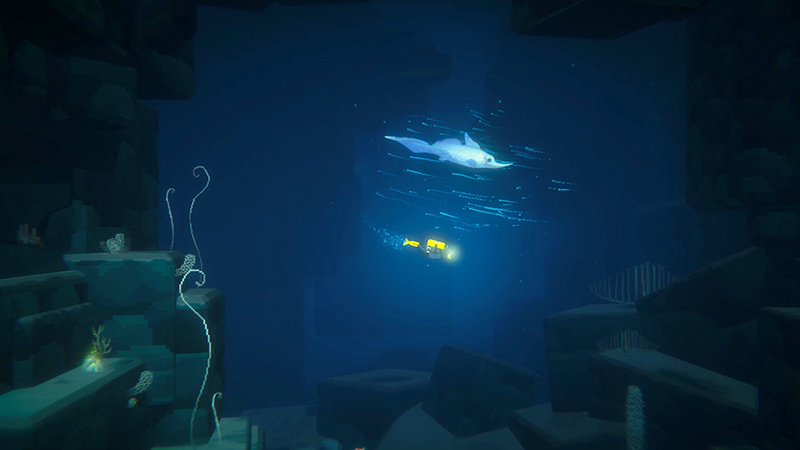
Ultrawide Resolution in Dave the Diver
Image Source: Mintrocket

The gameplay of Dave The Diver has two parts, managing a sushi restaurant and searching for different ingredients while diving in the sea. The latter is not only more exciting but also very beautiful. And it could look even better on Ultrawide monitors. But as we said, the game doesn’t have Ultrawide support.

It is frustrating that many games don’t have this feature. Moreover, it looks like the developers were considering adding Ultrawide Resolution for Dave The Diver since you will see an image on UW monitors instead of black bars. Therefore, we can assume that the developers will add this feature in future updates. Until then, you can still enjoy the game with Ultrawide Resolution with our custom fix above.

Related:

Dave The Diver 7/10 Hotfix Patch Notes Fix Annoying Boss Fight Issues

Dave The Diver is available now on PC.

Related Topics
Dave the Diver Guide
Share. Facebook Twitter LinkedIn Reddit Email
Alina Novichenko
  • Website

Alina is a professional freelance game guides writer, with 2 years experience in this industry. She joined TheNerdStash in 2022 and is glad to be part of a friendly team of writers.

SUGGESTED READS

StarRupture Early Acces
Features

StarRupture Early Access Impressions – The Most Cohesive Base-Builder

PS6 and Next-Gen Xbox Launches May Be Delayed by AI-Driven RAM Demand: 'This Delay is a Blessing in Disguise'
Game News

PS6 and Next-Gen Xbox Launches May Be Delayed by AI-Driven RAM Demand: ‘This Delay is a Blessing in Disguise’

Konami Plans Yearly Silent Hill Releases, Said Series Producer: 'I Hope the Excitement Around It Remains High'
Game News

Konami Plans Yearly Silent Hill Releases, Said Series Producer: ‘I Hope the Excitement Around It Remains High’

New Dad's Viral Delivery Room Xbox Setup Divides the Internet: 'Most Diabolical Move I’ve Seen'
Game News

New Dad’s Viral Delivery Room Xbox Setup Divides the Internet: ‘Most Diabolical Move I’ve Seen’

Games to Pre-order With Your Holiday Gift Cards
Features

Top 2026 Games to Save Your Holiday Gift Cards For

Best Steam Winter Sale Deals of 2025
Features

Best Holiday Steam Deals of 2025

Trending
StarRupture Early Acces

StarRupture Early Access Impressions – The Most Cohesive Base-Builder

PS6 and Next-Gen Xbox Launches May Be Delayed by AI-Driven RAM Demand: 'This Delay is a Blessing in Disguise'

PS6 and Next-Gen Xbox Launches May Be Delayed by AI-Driven RAM Demand: ‘This Delay is a Blessing in Disguise’

Konami Plans Yearly Silent Hill Releases, Said Series Producer: 'I Hope the Excitement Around It Remains High'

Konami Plans Yearly Silent Hill Releases, Said Series Producer: ‘I Hope the Excitement Around It Remains High’

New Dad's Viral Delivery Room Xbox Setup Divides the Internet: 'Most Diabolical Move I’ve Seen'

New Dad’s Viral Delivery Room Xbox Setup Divides the Internet: ‘Most Diabolical Move I’ve Seen’

The Nerd Stash
Facebook X (Twitter) Instagram YouTube LinkedIn
  • About Us
  • Join Our Team
  • Meet the Team
  • Privacy Policy
  • DMCA Policy
  • Contact Us
  • Terms of Use
  • Sitemap
  • Editorial Guidelines
  • Advertising Policy
© 2026 The Nerd Stash. All Rights Reserved.

Type above and press Enter to search. Press Esc to cancel.





