
As many of you know already, Palworld 1.0 is finally here, and while some might just want to continue with their existing worlds, it might be a better idea to start fresh and see everything that has changed for the game’s official launch. If you’re doing that, you’ll want to get your world just right, and for that reason, we’ve made a quick guide to show you what the best server settings are for Palworld 1.0.
Best Server Settings in Palworld 1.0
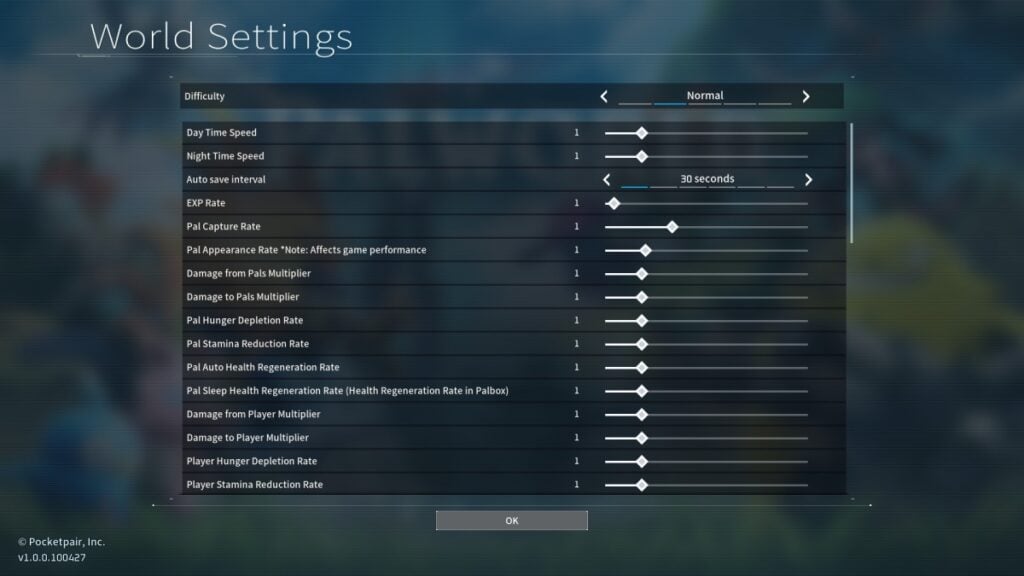
Now, before diving into the actual Server Settings you’ll want for Palworld, you should know that there are still a few presets you can grab that are perfectly fine for newcomers and veterans.
- Casual
- Pals are easier to catch, you gain more EXP, and you can gather resources and incubate eggs faster.
- Battles become much easier.
- There are no penalties when dying.
- Normal
- Standard game balance.
- Drop all materials upon death.
- Hard
- Pals are harder to catch, you gain less EXP, and gathering resources and incubating eggs takes longer.
- The player takes more damage and deals less damage.
- Drop all materials and Pals upon death.
- Hardcore
- Pals with 0 HP are lost forever. No revives.
- Players who die cannot come back.
Now, if you’re going into Palworld for the first time, we recommend grabbing any of the above server settings, especially going for either Casual or Normal. The last two should only be left for veterans, and even so, you might want to tweak a few options, which leads us to the next server setting: Custom.
Since we’re aiming for a balanced experience, be it co-op or solo, here are the ones we recommend for your world:
| Setting | Value |
|---|---|
| Day Time Speed | 1 |
| Night Time Speed | 1 |
| Auto Save Interval | 30 Seconds |
| EXP Rate | 1.3 |
| Pal Capture Rate | 1 |
| Pal Appearance Rate | 1 (Don’t increase even on co-op, as it can cause performance issues) |
| Damage from Pals Multiplier | 1 (When solo) 2 (When playing co-op) |
| Damage to Pals Multiplier | 1 |
| Pal Hunger Depletion Rate | 0.5 |
| Pal Stamina Depletion Rate | 0.5 |
| Pal Auto Health Regeneration Rate | 1 |
| Pal Sleep Health Regeneration Rate | 1 |
| Damage from Player Multiplier | 1 |
| Damage to Player Multiplier | 1 |
| Player Hunger Depletion Rate | 0.5 |
| Player Stamina Depletion Rate | 1 |
| Player Auto Health Regeneration Rate | 1 |
| Player Sleep Health Regeneration Rate | 1 |
| Work Speed Multiplier | 1 (When Solo) 1.5 (When co-op) |
| Damage to Structure Multiplier | 1 |
| Structure Deterioration Rate | 1 |
| Grazing Item Production Rate Multiplier | 1 |
| Maximum Number of Dropped Items in a World | 3,000 |
| Maximum Number of Dropped Active Items in a World | Unlimited |
| Gatherable Items Multiplier | 1 (When Solo) 2 (When co-op) |
| Gatherable Objects Health Multiplier | 1 |
| Gatherable Objects Respawn Interval | 1 |
| Dropped Items Multiplier | 1 |
| Item Weight Rate | 1 |
| Item Decay Rate Multiplier | 1 |
| Equipment Durability Loss Multiplier | 1 |
| Meteorite/Supplies Drop Interval | 180 |
| Enable Raid Events | On |
| Enable Predator Pals | On |
| Death Penalty | No Drops |
| Maximum Number of Guild Members | Depends on the Server. We usually leave it at 20 |
| Maximum Number of Bases for Each Guild | 5 |
| Maximum Number of Work Pals at the Base | 15 |
| Maximum Number of Structures per Base | No limit |
| Enable Fast Travel | Off |
| Restrict Fast Travel to Bases Only | Off |

The above server settings should be great for veteran and casual Palworld players, both in solo and co-op play. We didn’t include any hardcore options, as those are very niche and depend on your group of friends or yourself. Also, we don’t like tweaking with increasing material nodes, as that can also cause performance issues. Other than that, if you’re feeling the game is too easy or too hard, remember you can modify all settings even after creating your world.