
Close Menu
  • Gaming
    • Game Guides
    • Codes
    • Game News
    • Game Previews
    • Game Reviews
    • Game Features
    • Game Lists
    • Platforms
      • Nintendo
      • PC
      • PlayStation
      • Xbox
      • Mobile
  • Entertainment
    • Movies
    • Movie Features
    • Movie Reviews
    • TV
    • Reality TV
    • Royals
  • Celebrity
    • Hollywood
  • Human Interest
  • Astrology
  • Videos
  • More
    • Anime
    • Lists
    • Podcasts
    • Reviews
Facebook X (Twitter) Instagram LinkedIn YouTube
  • About Us
  • Join Our Team
  • Meet the Team
  • Privacy Policy
  • DMCA Policy
  • Contact Us
  • Terms of Use
  • Sitemap
  • Editorial Guidelines
  • Advertising Policy
The Nerd Stash
  • Gaming
  • Celebrity
    • Hollywood
  • Human Interest
  • Videos
The Nerd Stash
Home»Game Guides»Coral Island Enchanting Guide

Coral Island Enchanting Guide

Useful giant magic.

Nerd Stash StaffBy Nerd Stash StaffNovember 23, 20233 Mins Read
Coral Island Enchanting Guide
Image source: Stairway Games via YouTube Lady Madcrab

Skip To...

  • How to Unlock Enchanting
  • How to Enchant Tools
This article is over 2 years old and may contain outdated information.

Coral Island has many tools that all have a specific function, such as mining, cutting wood, and farming. The further you progress, the better tools you will make. However, players can create special tools using the Enchanting feature in Coral Island. It allows you to add various bonuses to your items, which will significantly increase their effectiveness.

How to Unlock Enchanting

(Updated on September 24, 2024 – updated links and format)

How To Unlock Enchanting
Image source: Stairway Games via YouTube Lady Madcrab

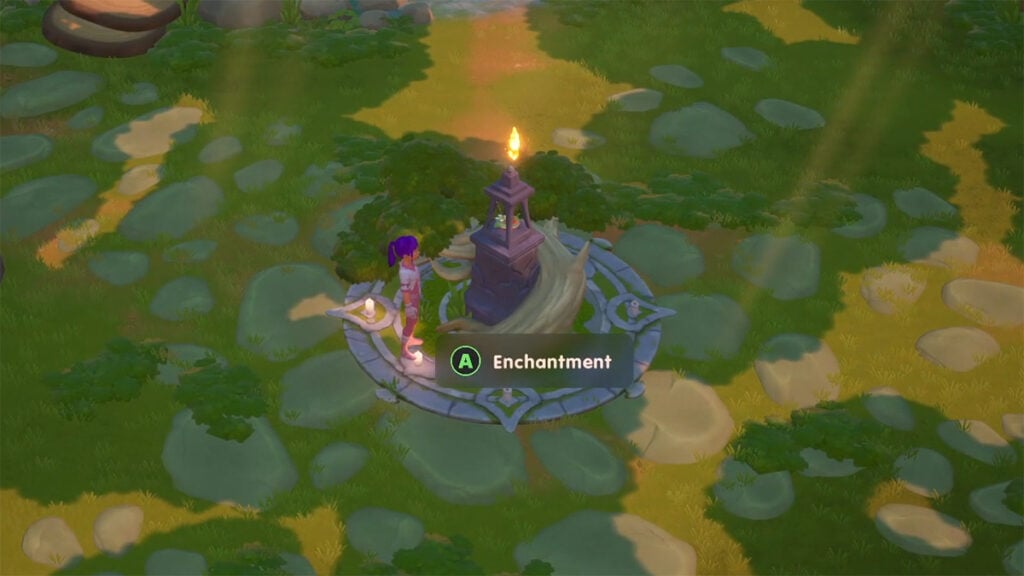
The Enchanting feature is not available to players when they first begin their Coral Island adventure. So you need to progress until you find a giant named Grog in Mines. Help him, and he will lead you to the Village of Giants. There, you will find a shrine in which you can make your tools even better.

How to Enchant Tools

Almost every tool in Coral Island has Enchantment slots. Basic ones have only one slot. So you need higher quality tools for enchanting:

  • Basic – 1
  • Bronze – 1
  • Silver – 2
  • Gold – 2
  • Osmium – 3

So, to enchant a tool in Coral Island, you need to select the desired tool and then offer various fossils, gems, and artifacts. Random enchantment costs 100 Points, so you will have to get enough resources. Also, the more Giants you free, the higher quality the enchantments you will get. And there are seven of them in total:

  • Mighty Hit (pickaxe, scythe, axe) – With a certain chance you can destroy Debris in 1 hit.
  • No Water Drain (watering can) – With a certain chance you may not drain the water.
  • No Energy Drain (all tools) – You have a certain chance of not spending energy.
  • Swift Swing (all tools) – Reduces charging or usage speed.
  • Rare Drop (pick, scythe, axe, hoe) – You have a high chance of finding a rare resource.
  • Extra Drop (pickaxe, scythe, axe, hoe) – You will be able to receive more items with a certain chance.
  • Hit Drop (pickaxe, scythe, axe) – For a hit, you can get items with a reduced chance.

Related:

How to Upgrade Your House in Coral Island

It’s also worth noting that if you get an enchantment that is already on a tool, it will increase its level. Alternatively, Players can upgrade enchantments themselves using the same items and points. However, with each upgrade, the cost will increase. Therefore, you will have to stock up on a lot of fossils, gems, and artifacts. That’s all you need to know about the Enchanting feature in Coral Island. It will help you do your daily activities more efficiently, so you should unlock it as quickly as possible.


Related Topics
Coral Island Guide
Share. Facebook Twitter LinkedIn Reddit Email
Nerd Stash Staff
  • Website

SUGGESTED READS

Persona 4 Revival Announcements
Game News

Persona Producer Just Confirmed Persona 4 Revival Is Progressing Steadily, and Teased New Announcements for The Series’ 30th Anniversary

The Witcher 3 Getting Massive Surprise Desert DLC in 2026? Polish Reports Claim It's Happening
Game News

The Witcher 3 Getting a Massive Surprise Desert DLC in 2026? Polish Reports Claim It’s Happening

007 first light system requirements
Game News

Gamers Lose It After 007 First Light Demands Hardware That Doesn’t Exist in System Requirements: ‘Remember When Games Were Optimized?’

AI That Plays Games for You? Sony and Other Gaming Giants Filed 49 Gen AI-Related Patents in the Last Three Months
Game News

AI That Plays Games for You? Sony and Other Gaming Giants Filed 49 Gen AI-Related Patents in the Last Three Months

Clair Obscur: Expedition 33 Becomes Second Most Awarded Game Ever With 330+ GOTY Wins, But Which One Is Still No. 1?
Features

Clair Obscur: Expedition 33 Becomes Second Most Awarded Game Ever With 330+ Industry Awards, But Which Game Still Holds the No. 1 Spot?

StarRupture How to Distribute Power
Game Guides

How to Manage and Distribute Power in StarRupture

Trending
Persona 4 Revival Announcements

Persona Producer Just Confirmed Persona 4 Revival Is Progressing Steadily, and Teased New Announcements for The Series’ 30th Anniversary

The Witcher 3 Getting Massive Surprise Desert DLC in 2026? Polish Reports Claim It's Happening

The Witcher 3 Getting a Massive Surprise Desert DLC in 2026? Polish Reports Claim It’s Happening

007 first light system requirements

Gamers Lose It After 007 First Light Demands Hardware That Doesn’t Exist in System Requirements: ‘Remember When Games Were Optimized?’

AI That Plays Games for You? Sony and Other Gaming Giants Filed 49 Gen AI-Related Patents in the Last Three Months

AI That Plays Games for You? Sony and Other Gaming Giants Filed 49 Gen AI-Related Patents in the Last Three Months

The Nerd Stash
Facebook X (Twitter) Instagram YouTube LinkedIn
  • About Us
  • Join Our Team
  • Meet the Team
  • Privacy Policy
  • DMCA Policy
  • Contact Us
  • Terms of Use
  • Sitemap
  • Editorial Guidelines
  • Advertising Policy
© 2026 The Nerd Stash. All Rights Reserved.

Type above and press Enter to search. Press Esc to cancel.




