

Close Menu
  • Gaming
    • Game Guides
    • Codes
    • Game News
    • Game Previews
    • Game Reviews
    • Game Features
    • Game Lists
    • Platforms
      • Nintendo
      • PC
      • PlayStation
      • Xbox
      • Mobile
  • Entertainment
    • Movies
    • Movie Features
    • Movie Reviews
    • TV
    • Reality TV
    • Royals
  • Celebrity
    • Hollywood
  • Human Interest
  • Astrology
  • Videos
  • More
    • Anime
    • Lists
    • Podcasts
    • Reviews
Facebook X (Twitter) Instagram LinkedIn YouTube
  • About Us
  • Join Our Team
  • Meet the Team
  • Privacy Policy
  • DMCA Policy
  • Contact Us
  • Terms of Use
  • Sitemap
  • Editorial Guidelines
  • Advertising Policy
The Nerd Stash
  • Gaming
  • Celebrity
    • Hollywood
  • Human Interest
  • Videos
The Nerd Stash
Home»Game Guides»Disney Dreamlight Valley: How to Make Veggie Pasta

Disney Dreamlight Valley: How to Make Veggie Pasta

While serving customers at Chez Remy in Disney Dreamlight Valley, one dish that Dreamers might come across is the 3-Star Veggie Pasta Recipe. As its name…

AugustBy AugustOctober 12, 20222 Mins Read
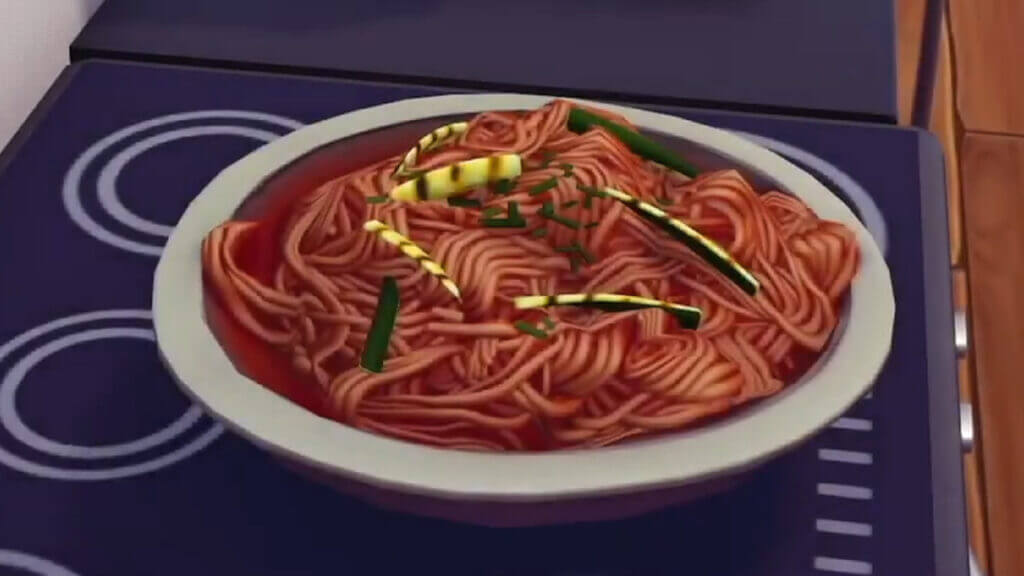
A Plate of Veggie Pasta in Disney Dreamlight Valley
This article is over 3 years old and may contain outdated information.

While serving customers at Chez Remy in Disney Dreamlight Valley, one dish that Dreamers might come across is the 3-Star Veggie Pasta Recipe. As its name implies, this dish takes the normal Pasta meal and adds a vegetable element for additional flavor. Those who have already cooked Pasta in Dreamight Valley might already have a good guess of how Veggie Pasta can be made. However, the ingredients are still a mystery for less experienced chefs. Fortunately, all the ingredients are easy to acquire within the first starting biomes of the game. Moreover, Veggie Pasta is a recipe that players will cook during the Main Quest, “With Great Power.”

Cooking the Veggie Pasta Recipe in Disney Dreamlight Valley

Veggie Pasta Recipe in Disney Dreamlight Valley

The ingredients for the Veggie Pasta Recipe in Disney Dreamlight Valley are Wheat, a Tomato, and Any Vegetable. Wheat and Tomato create the Pasta part of the dish, while the random Vegetable adds the veggie flavor. Since Tomato is considered a Vegetable in Disney Dreamlight Valley, it can also be used as a Vegetable ingredient.

Related: 

How to Make an Oyster Platter in Disney Dreamlight Valley

First, Wheat can be grown in the Peaceful Meadow or be purchased from Goofy’s Stall within this biome. While harvesting nodes in this area, such as Night Thorns or diggable mounds, it is possible for players to receive a bag of Wheat Seeds. Next, Tomatoes and its Seeds are acquired from Goofy’s shop on Dazzle Beach. This area becomes accessible once Dreamers have gained access to the Dream Castle and completed the Main Quest, “Friendship Is Everything.” As for the third ingredient, players can use a Tomato, Carrot, or Lettuce since all these items are valid Vegetables for the Veggie Pasta Recipe in Disney Dreamlight Valley. 

As mentioned above, Veggie Pasta in Disney Dreamlight Valley is a recipe that players will need to cook while exploring the Mystical Cave during “With Great Power.” Once players have made and consumed their Veggie Pasta, the gate will open, granting them access to the Orb of Power.

Disney Dreamlight Valley is available on PlayStation 4, PlayStation 5, Xbox One, Xbox Series X|S, Nintendo Switch, and PC.

Related Topics
disney dreamlight valley Guide
Share. Facebook Twitter LinkedIn Reddit Email
August

August Webb is TNS's Lead Guide Editor who additionally helps in covering celebrity and pop culture news. She provides assistance to other freelancers and staff on trendy topics to write about. When not working, she's playing a visual novel, fanning over an indie gem, or lost in the world of VR. Residing in Daegu, South Korea, August has a Bachelor's, double-majoring in Media and Communication and Business Administration. She graduated in Yeungnam University of Gyeongsan, South Korea. August's areas of expertise include Game Strategy Guides, Video Game Features, and Celebrity News and Gossip. August has worked in online media for over four years since 2021. Starting out as a freelancer, she's written for TNS, ScreenRant of Valnet, and Gamepur of GAMURS GROUP. She has experience publishing short and long-form video game guides, game features, and game reviews. Currently serving as the Lead Guide Editor for the Guide Writing department at The Nerd Stash, she edits a variety of articles while also helping with providing topics to write about via tools like Google Trends or SemRush. She works alongside TNS's Editorial Team, discussing and executing strategies to better improve the site's traffic and experience for users.

SUGGESTED READS

Games to Pre-order With Your Holiday Gift Cards
Features

Top 2026 Games to Save Your Holiday Gift Cards For

Best Steam Winter Sale Deals of 2025
Features

Best Holiday Steam Deals of 2025

Best PlayStation Holiday Deals of 2025
Features

Best Holiday PlayStation Deals of 2025

Best Gaming Holiday Deals of 2025
Features

Best Holiday Gaming Deals of 2025

Minecraft Accused of Mocking Lonely Kids, Sparking Mental Health Backlash: 'One of the Ickiest Things I've Seen'
Features

Minecraft Accused of Mocking Lonely Kids, Sparking Mental Health Backlash: ‘One of the Ickiest Things I’ve Seen’

Destiny 2 Renegades PS5 Review
8.5
Features

Destiny 2: Renegades Review – The Shooter Strikes Back

Trending
Games to Pre-order With Your Holiday Gift Cards

Top 2026 Games to Save Your Holiday Gift Cards For

Best Steam Winter Sale Deals of 2025

Best Holiday Steam Deals of 2025

Best PlayStation Holiday Deals of 2025

Best Holiday PlayStation Deals of 2025

Best Gaming Holiday Deals of 2025

Best Holiday Gaming Deals of 2025

The Nerd Stash
Facebook X (Twitter) Instagram YouTube LinkedIn
  • About Us
  • Join Our Team
  • Meet the Team
  • Privacy Policy
  • DMCA Policy
  • Contact Us
  • Terms of Use
  • Sitemap
  • Editorial Guidelines
  • Advertising Policy
© 2025 The Nerd Stash. All Rights Reserved.

Type above and press Enter to search. Press Esc to cancel.




