

Close Menu
  • Gaming
    • Platforms
      • Nintendo
      • PC
      • PlayStation
      • Xbox
  • Entertainment
    • Movies
    • TV
    • Royals
  • Celebrity
    • Hollywood
  • Human Interest
  • Astrology
  • More
    • Anime
    • Reviews
Facebook X (Twitter) Instagram LinkedIn YouTube
  • About Us
  • Join Our Team
  • Meet the Team
  • Privacy Policy
  • DMCA Policy
  • Contact Us
  • Terms of Use
  • Sitemap
  • Editorial Guidelines
  • Advertising Policy
The Nerd Stash
  • Gaming
  • Celebrity
  • Hollywood
  • Human Interest
The Nerd Stash
Home»Gaming»How to Get the Skull Cloak in Minecraft from the Discord Quest

How to Get the Skull Cloak in Minecraft from the Discord Quest

Celebrate winter with… a late Halloween-themed gift?

Sidharta F. RasidiBy Sidharta F. RasidiDecember 7, 20243 Mins Read
Image source: Mojang via The Nerd Stash

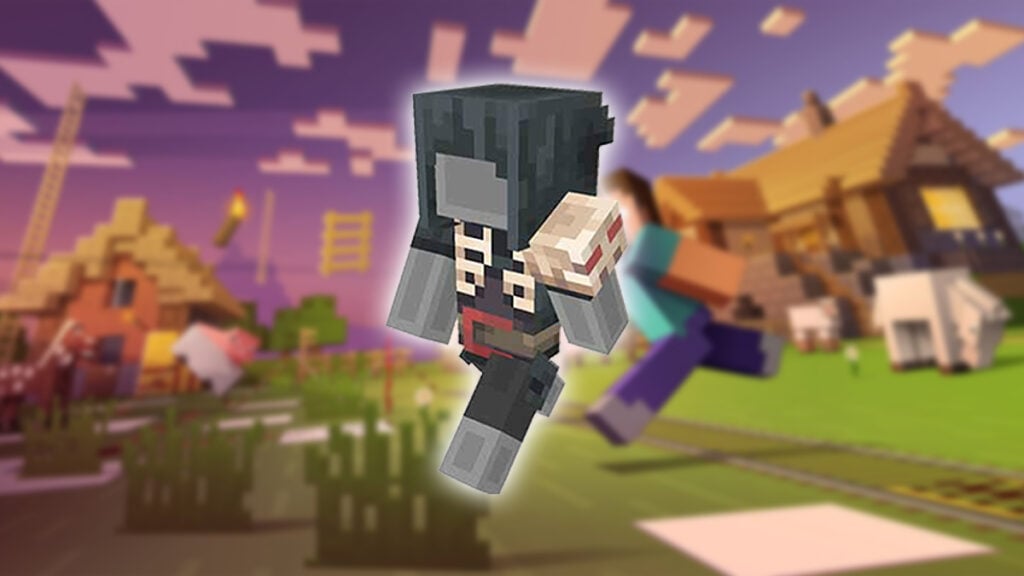
During this holiday, Minecraft players have the opportunity to obtain exclusive cosmetics via the Discord app. You can get the Skull Cloak skin for your Minecraft Bedrock avatar by completing one very simple Discord Quest objective. But we warn you, you want to act fast as the reward is only available for a few weeks. Any self-proclaimed hardcore mining and crafting fan who mingles on Discord often wouldn’t want to miss out on this once-in-a-lifetime item!

How Can You Unlock the Skull Cloak from Minecraft Holiday Discord Quest?

How Can You Unlock the Skull Cloak from Minecraft Holiday Discord Quest?
Image source: Mojang, Discord

All you need to do to unlock the Skull Cloak is to spend 15 minutes running Minecraft Java, Bedrock, or Windows. That’s it! This works whether you’re playing on PC, PS4 or PS5, or Xbox Series X and S. Unfortunately, that means, Education Edition isn’t eligible and Switch and mobile players will be out of luck on this free offering. Do keep in mind that the Cloak is also only redeemable on Minecraft: Bedrock Edition and after you have activated the Holiday Quest on Discord.

After that’s over, you should receive a code to redeem the Minecraft Holiday Quest reward from the Discord Quest menu or your email. You can then use the code on the Skull Cloak module at Minecraft‘s official code redemption website.

The Discord Quest will be available until December 20, 2024, 11:59 PM UTC. Meanwhile, the Skull Cloak reward will expire on January 20, 2025. Anyone playing on a PC will also need to run the Discord desktop app simultaneously. For console players, the Quest tracking will begin as long as your Discord account is already connected to your console account.

What Are Minecraft Color Codes (& How to Use Them)?
Related: What Are Minecraft Color Codes (& How to Use Them)?

Connecting your Discord account with your console is easy:

  1. Open the Discord app.
  2. Select the ‘User Settings’ option and pick ‘Connections’ if you’re on a desktop or web.
  3. On the mobile app, pick ‘User Settings’ and then ‘Connection’ instead.
  4. Afterward, click on the console icon of your choosing, login to your account, and authorize account linking.

Continue reading if you have questions about how to search for the Skull Cloak Minecraft Holiday Discord Quest.

How to Check Your Discord Quests List
How to Check Your Discord Quests List
Image source: Discord via The Nerd Stash

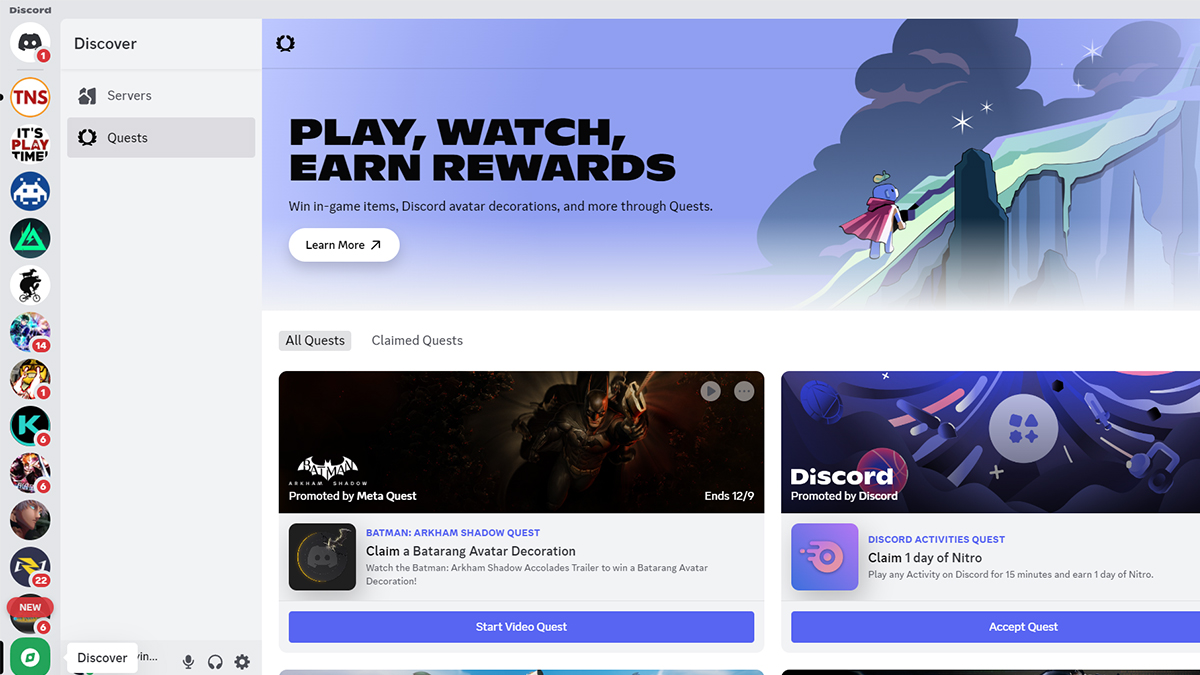
Before you can unlock the Skull Cloak in Minecraft Bedrock, first, you need to accept the Discord Quest. To do so, you need to access the Quest menu in the voice chat app:

PC:

  1. Open the Discord app.
  2. Click on the green ‘Discover’ button below your joined servers list.
  3. Click on the ‘Quest’ option.
  4. Look for the Minecraft Holiday Quest block and press ‘Accept Quest.’

Mobile:

  1. Open the Discord app.
  2. Open your profile and press the ‘Settings’ gear icon.
  3. Scroll down to the ‘Billing Settings’ section and tap on ‘Quests.’
  4. Look for the Minecraft quest and press ‘Accept Quest.’
  5. Update your app if the option doesn’t show up.
How to Enable Cheats in Minecraft and Play Around in God Mode
Related: How to Enable Cheats in Minecraft and Play Around in God Mode

If you cannot find it, however, that means your account is in an ineligible region. The FAQ does say that the Minecraft Skull Cloak Quest is ‘available on all platforms where Minecraft is available.’ But players outside of the US or Europe like me don’t seem to be able to claim the Quest.


Related Topics
Guide Minecraft
Share. Facebook Twitter LinkedIn Reddit Email
Sidharta F. Rasidi
  • Website

An ordinary Indonesian who enjoys playing and talking about video games. His favorite games are Monster Hunter: World, Space Invader Extreme 2, THE iDOLM@STER SP, Road Trip Adventure, Halo series, and KOEI Tecmo's Warriors series.

SUGGESTED READS

MindsEye Layoffs 2026
Gaming

Studio Behind GTA-like Game, MindsEye, Hit With More Layoffs, and Nobody is Surprised: ‘Shocked There’s Even a Janitor Working There’

Princess Peach Spin-Off Movie May Already Be in Development, Job Listing Suggests
Gaming

Princess Peach Spin-Off Movie May Already Be in Development, Job Listing Suggests

Xbox's New CEO Wants to Reconnect With the 'Community,' Yet Brings In More CoreAI Leaders
Gaming

Xbox’s New CEO Wants to Reconnect With the ‘Community,’ Yet Brings In More CoreAI Leaders

Diablo 4 Season 13 Tier List
Gaming

Class Tier List for Diablo 4 Season 13 (Best Classes for Endgame & Leveling)

Take-Two Boss Finally Explains Why GTA 6 Is Skipping PC at Launch: 'We'll See How It Works Out'
Gaming

Take-Two Boss Finally Explains Why GTA 6 Is Skipping PC at Launch: ‘We’ll See How It Works Out’

Rockstar Employee Review Claims 'Unrealistic' Crunch as GTA 6 Development Intensifies: 'Had to Work Till 3AM'
Gaming

Rockstar Employee Review Claims ‘Unrealistic’ Crunch as GTA 6 Development Intensifies: ‘Had to Work Till 3AM’

The Nerd Stash
Facebook X (Twitter) Instagram YouTube LinkedIn
  • About Us
  • Join Our Team
  • Meet the Team
  • Privacy Policy
  • DMCA Policy
  • Contact Us
  • Terms of Use
  • Sitemap
  • Editorial Guidelines
  • Advertising Policy
© 2026 The Nerd Stash. All Rights Reserved.

Type above and press Enter to search. Press Esc to cancel.



