Close Menu
  • Gaming
    • Platforms
      • Nintendo
      • PC
      • PlayStation
      • Xbox
  • Entertainment
    • Movies
    • TV
    • Royals
  • Celebrity
    • Hollywood
  • Human Interest
  • Astrology
  • More
    • Reviews
Facebook X (Twitter) Instagram LinkedIn YouTube
  • About Us
  • Join Our Team
  • Meet the Team
  • Privacy Policy
  • DMCA Policy
  • Contact Us
  • Terms of Use
  • Sitemap
  • Editorial Guidelines
  • Advertising Policy
The Nerd Stash
  • Gaming
  • Celebrity
  • Hollywood
  • Human Interest
The Nerd Stash
Home»Gaming»How to Make a Circle in Minecraft

How to Make a Circle in Minecraft

A even more perfect circle

Patrick ArmstrongAugustBy Patrick Armstrong and AugustSeptember 19, 20243 Mins Read
Image Source: Minecraft via The Nerd Stash
This article is over 1 years old and may contain outdated information.

Whether you’re building structures in Survival or Creative, knowing how to make circles in Minecraft can come in handy. You may be constructing a round, spiraling tower as an overlook for your home base in Mojang‘s infinite wilderness. Alternatively, you may be trying to make a massive mural, and circles are a pattern you want in the picture. Making squares out of blocks is easy, thanks to their sharp edges and cube shape. However, knowing how to make a perfect circle in Minecraft can be a challenge.

Minecraft X Method and Circle Guide

(Updated on September 19, 2024 – updated images, links, and format)
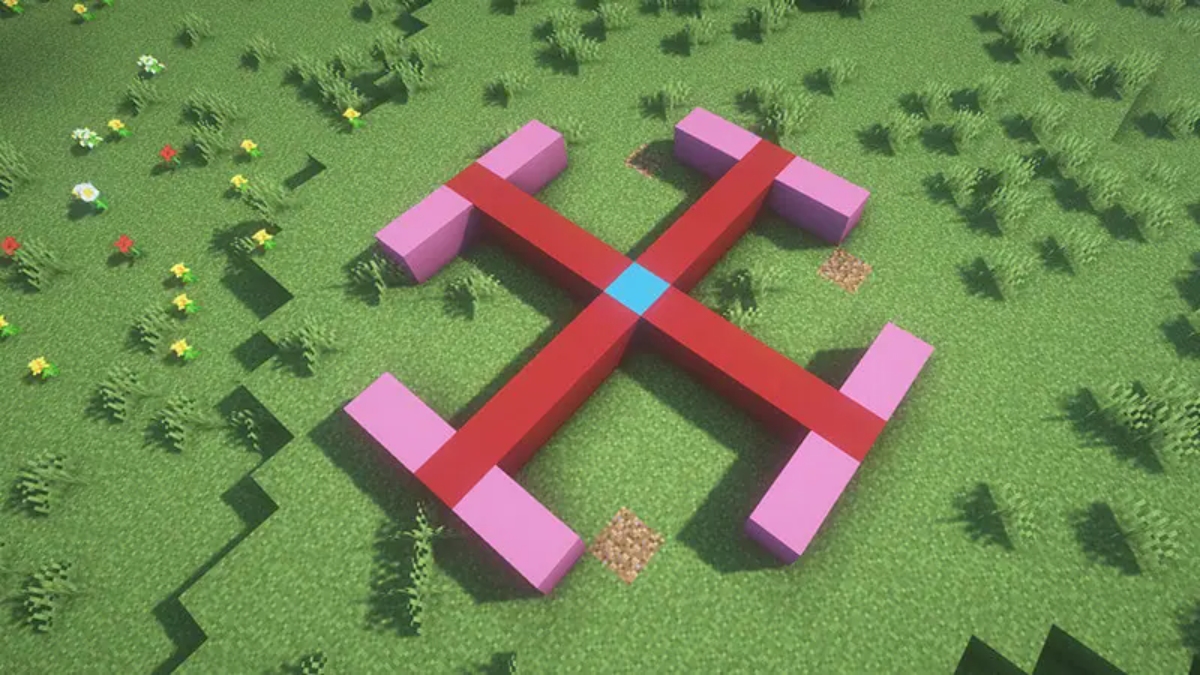
A player uses the X Method to make a circle in Minecraft
Image Source: Minecraft via The Nerd Stash

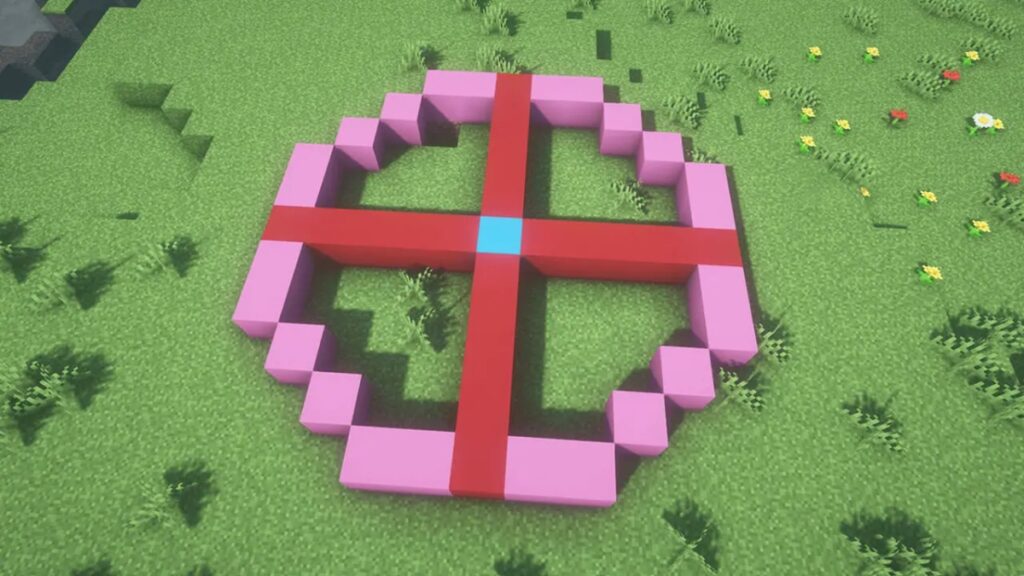
You have two primary options to make a Minecraft circle pattern without console commands: the “X method” or free online tools. While it has no official name, the X Method involves creating an X shape, using the lines of the X as the circle’s diameter. Conversely, you can find multiple Minecraft circle generators and even Minecraft sphere generators on the web.

Related:

How To Craft (& Use) a Lectern in Minecraft

This X Method for making circles in Minecraft requires no additional tools and is simple to do. You can follow the steps below for a variety of circle sizes:

  1. Place down a block, which will serve as the center of your circle.
  2. Extend several straight lines from the center, creating an X. The number of blocks on all sides must be equal.
  3. Add four sides to the X’s edges. The number will slightly differ on the size of the circle.
  4. Connect the side with diagonal lines to create the circle.

Pixel Circle Generator by Donat Studios
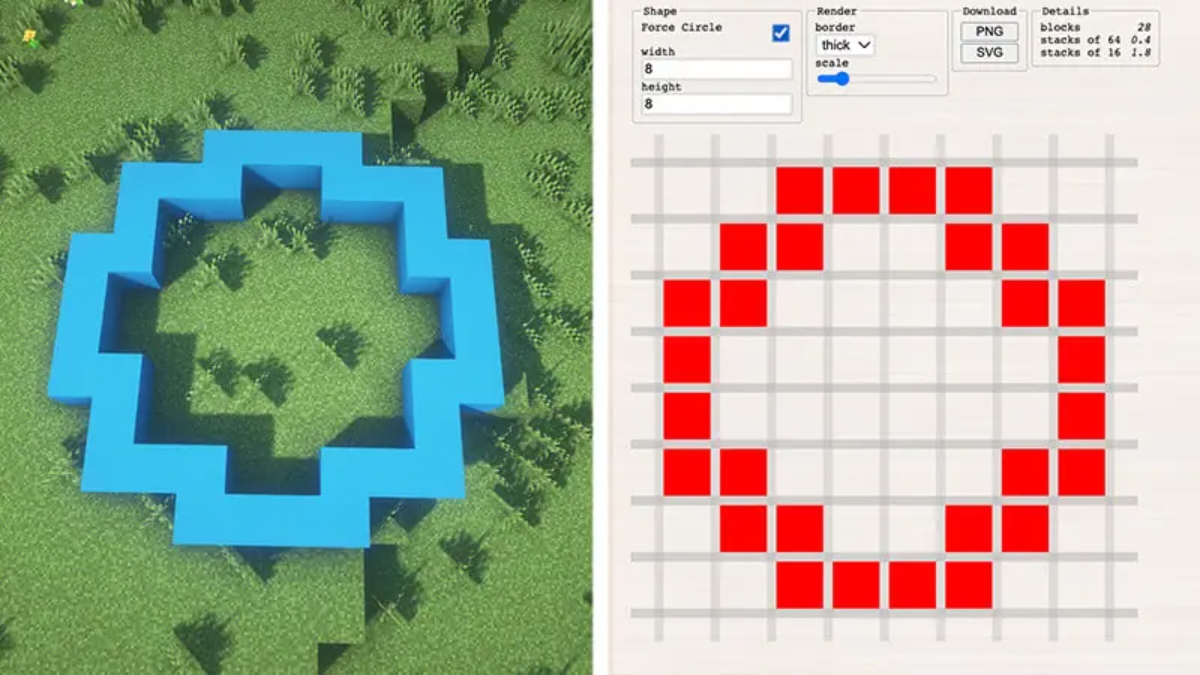
A pixel circle generator
Image Source: Minecraft via The Nerd Stash

On the other hand, you can use the Pixel Circle / Oval Generator by Donat Studios to make a perfect circle in Minecraft on your behalf. 

  1. Determine the width and height of your circle.
  2. Afterward, you can choose a thin or thick border. After our experience using the “thick” option, we recommend selecting “thin” for a cleaner, round look. 
  3. In-game, recreate the Minecraft circle chart’s pixel art on your browser by placing the number of blocks shown on each side.

Plotz Sphere Generator
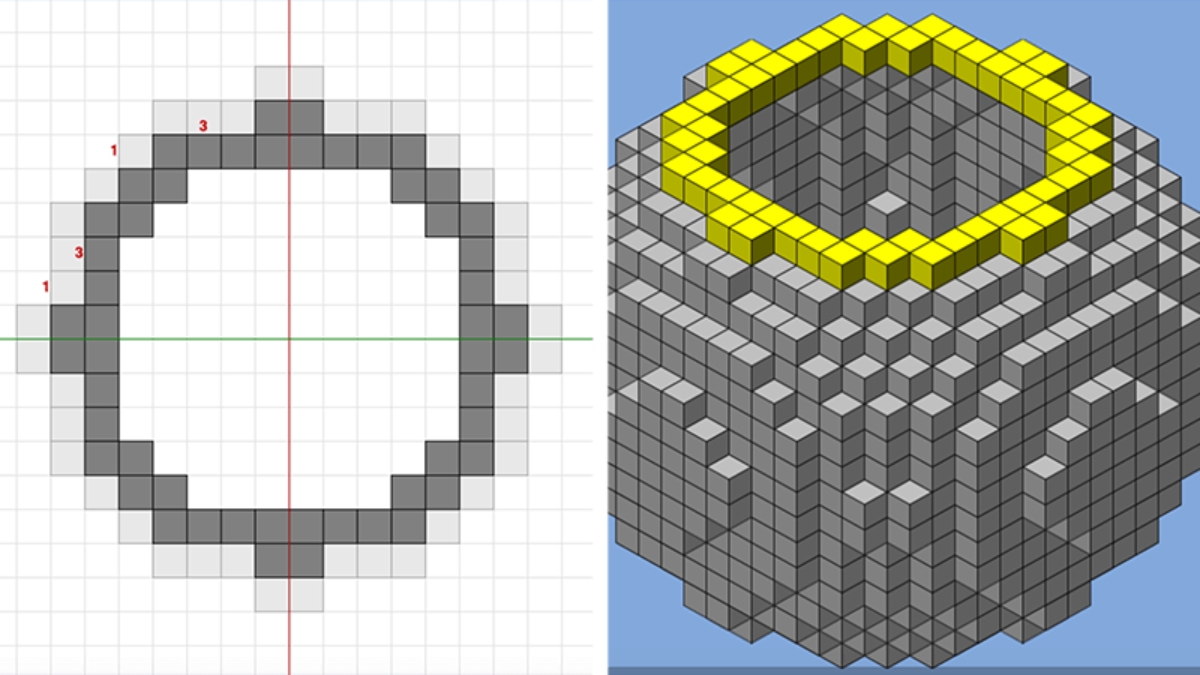
A player uses the Plotz Sphere Generator to model a voxel sphere
Image Source: Plotz via The Nerd Stash

Making a 3D sphere in Minecraft is exponentially harder than a 2D circle. Fortunately, we can use Plotz Sphere Generator by Plotz Model Selection to customize the shape to our liking. 

  1. Select a size by sliding the bottom bar from 8 to 256.
  2. Use the sidebar on the right to see the sphere’s 3D interior and exterior.
  3. Press 2D at any time in the top-left corner to view the shape from a 2D view.

With these techniques under your voxel belt, you’ll be churning out circles in no time. That satisfaction has an infinite radius.


Related Topics
Guide Minecraft
Share. Facebook Twitter LinkedIn Reddit Email
Patrick Armstrong, August
  • Website

Artist and writer with a lifelong love of video games. Their favorite games include Dead by Daylight, Meet Your Maker, and Project Zomboid.

Patrick Armstrong, August
  • Website

Artist and writer with a lifelong love of video games. Their favorite games include Dead by Daylight, Meet Your Maker, and Project Zomboid.

SUGGESTED READS

COD Modern Warfare 4 Free Open Beta Starts This August, Nintendo Switch 2 Included
Gaming

COD Modern Warfare 4 Free Open Beta Starts This August, Nintendo Switch 2 Included

All Wandering Merchant Locations in Palworld
Gaming

All Wandering Merchant Locations in Palworld

How to find Pure Quartz in Palworld 1.0
Gaming

Where To Find Pure Quartz in Palworld

Sicario Writer's Call of Duty Movie To Adapt 'Modern Warfare' Universe, Confirmed Paramount
Gaming

Sicario Writer’s Call of Duty Movie To Adapt ‘Modern Warfare’ Universe, Confirmed Paramount

Fatal Fury City of the Wolves Rick Strowd Hands-on Impressions
Gaming

Fatal Fury: City of the Wolves Rick Strowd Hands-On Impressions – A Strong Start

Zenless Zone Zero Version 3.1 Anniversary
Gaming

Zenless Zone Zero Celebrates Its 2-Year Milestone With Free S-Rank Agents and a Crossover Announcement

The Nerd Stash
Facebook X (Twitter) Instagram YouTube LinkedIn
  • About Us
  • Join Our Team
  • Meet the Team
  • Privacy Policy
  • DMCA Policy
  • Contact Us
  • Terms of Use
  • Sitemap
  • Editorial Guidelines
  • Advertising Policy
© 2026 The Nerd Stash. All Rights Reserved.

Type above and press Enter to search. Press Esc to cancel.