

Close Menu
  • Gaming
    • Game Guides
    • Codes
    • Game News
    • Game Previews
    • Game Reviews
    • Game Features
    • Game Lists
    • Platforms
      • Nintendo
      • PC
      • PlayStation
      • Xbox
      • Mobile
  • Entertainment
    • Movies
    • Movie Features
    • Movie Reviews
    • TV
    • Reality TV
    • Royals
  • Celebrity
    • Hollywood
  • Human Interest
  • Astrology
  • More
    • Anime
    • Lists
    • Podcasts
    • Reviews
Facebook X (Twitter) Instagram LinkedIn YouTube
  • About Us
  • Join Our Team
  • Meet the Team
  • Privacy Policy
  • DMCA Policy
  • Contact Us
  • Terms of Use
  • Sitemap
  • Editorial Guidelines
  • Advertising Policy
The Nerd Stash
  • Gaming
  • Celebrity
  • Hollywood
  • Human Interest
The Nerd Stash
Home»Game Guides»How to Make Sea Turtle a Companion in Disney Dreamlight Valley

How to Make Sea Turtle a Companion in Disney Dreamlight Valley

Under the sea, a new friend for me

Patrick ArmstrongAugustBy Patrick Armstrong and AugustSeptember 3, 20242 Mins Read
A close-up of a Sea Turtle on the beach in Disney Dreamlight Valley
Image Source: Gameloft via The Nerd Stash
This article is over 1 years old and may contain outdated information.

It’s a lot harder to be lonely when you’re surrounded by kind and considerate friends. Disney Dreamlight Valley is full of those (if you’re willing to overlook Scrooge and the occasional villain). While Villagers are practical companions who boost your resource harvesting rates, Critters such as Sea Turtles serve as comfort friends, keeping you company wherever you go. Though they don’t provide any gameplay bonuses or help with those pesky Night Thorns, having a Squirrel, Raccoon, or Sea Turtle in tow is fun. Here’s how to make a Sea Turtle a Companion in Disney Dreamlight Valley.

Dreamlight Valley Sea Turtle Companion Guide

(Updated on September 3, 2024 – updated intro, images, and links)
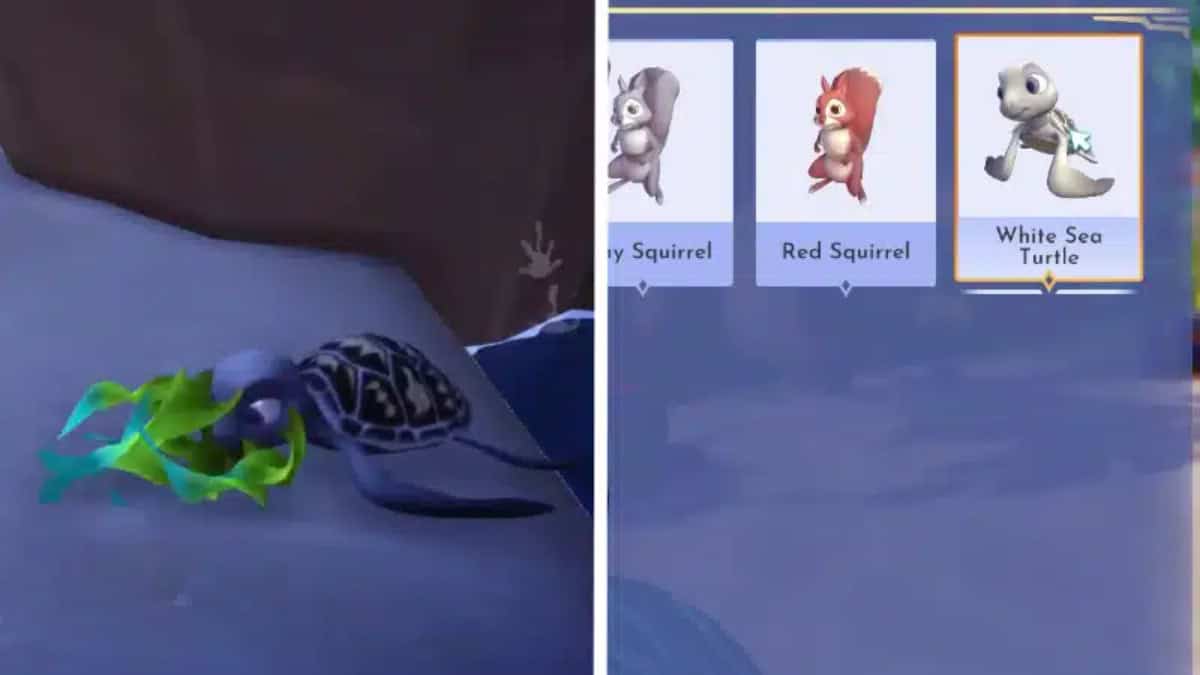
A Sea Turtle in the Critter List and eating its favorite food on the beach
Image Source: Gameloft via The Nerd Stash

Dazzle Beach (the ocean east and south of Peaceful Meadow) isn’t just where you search for clams. It’s also the key to unlocking the Sea Turtle as a Critter Companion in Disney Dreamlight Valley. Here’s what you’ll need to do to make a shelled friend of your own:

  1. Go to Dazzle Beach
  2. Find a Sea Turtle
  3. Give the Sea Turtle Seaweed or Seafood
  4. Feed the Sea Turtle once per day until it becomes your companion

If you don’t have Seaweed to feed the Sea Turtle, no worries. You can find some right on Dazzle Beach. Use your Royal Fishing Rod to fish, but do not cast your line into a fishing spot. There’s a good chance you’ll catch a tasty Seaweed clump to feed your new friend.

Related:

How To Get All 16 Emerald Bottles in Disney Dreamlight Valley

To change your Companion to a Sea Turtle in Disney Dreamlight Valley, open the sidebar menu and select Wardrobe. Next, navigate to “Companions” and select the Sea Turtle from the list. Now your finned follower can keep you company on all your adventures through the Magical Kingdom. Merlin would be proud.


Related Topics
disney dreamlight valley Guide
Share. Facebook Twitter LinkedIn Reddit Email
Patrick Armstrong, August
  • Website

Artist and writer with a lifelong love of video games. Their favorite games include Dead by Daylight, Meet Your Maker, and Project Zomboid.

Patrick Armstrong, August
  • Website

Artist and writer with a lifelong love of video games. Their favorite games include Dead by Daylight, Meet Your Maker, and Project Zomboid.

SUGGESTED READS

how to make gunpowder Windrose
Game Guides

How to Make Gunpowder in Windrose

Best Server Settings Windrose
Game Guides

Best Server Settings for Windrose

Skate Nike SB Limited-time Event
Game News

Skate. Kicks Off a Limited-time Event With Nike SB, and It’s Free For All

All Materials in Windrose
Game Guides

Windrose: All Materials (& How to Obtain Them)

Bloodborne Anime Announced, Sony Keeps It R-Rated to Stay 'True' to the Game
Game News

Bloodborne Anime Movie Announced, Sony Keeps It R-Rated to Stay ‘Very True’ to the Game

Pragmata PS5 Review
9.5
Game Features

Pragmata Review – Bold, Beautiful, and Unforgettable

The Nerd Stash
Facebook X (Twitter) Instagram YouTube LinkedIn
  • About Us
  • Join Our Team
  • Meet the Team
  • Privacy Policy
  • DMCA Policy
  • Contact Us
  • Terms of Use
  • Sitemap
  • Editorial Guidelines
  • Advertising Policy
© 2026 The Nerd Stash. All Rights Reserved.

Type above and press Enter to search. Press Esc to cancel.