
Close Menu
  • Gaming
    • Platforms
      • Nintendo
      • PC
      • PlayStation
      • Xbox
  • Entertainment
    • Movies
    • TV
    • Royals
  • Celebrity
    • Hollywood
  • Human Interest
  • Astrology
  • More
    • Anime
    • Reviews
Facebook X (Twitter) Instagram LinkedIn YouTube
  • About Us
  • Join Our Team
  • Meet the Team
  • Privacy Policy
  • DMCA Policy
  • Contact Us
  • Terms of Use
  • Sitemap
  • Editorial Guidelines
  • Advertising Policy
The Nerd Stash
  • Gaming
  • Celebrity
  • Hollywood
  • Human Interest
The Nerd Stash
Home»Gaming»How To See Hidden Games on Steam

How To See Hidden Games on Steam

Thanks to the amazing sales Steam has every now and then and all the great demos you can add to your library and play, there…

Masoud KazemiBy Masoud KazemiJuly 13, 20232 Mins Read
Steam Hidden Games
Image Source: Steam
This article is over 2 years old and may contain outdated information.

Thanks to the amazing sales Steam has every now and then and all the great demos you can add to your library and play, there is a good chance you will overcrowd your library with games. While almost everyone enjoys looking at the large library they have gathered all over the years, there might be some games you don’t want as well. In that case, the best option available is to hide them. Still, there may come a time that you will miss that game or just want to give it another chance, but because it is hidden, you cannot find it. So here is how to see your hidden games on Steam and Steam Deck.

How to View Hidden Games on Steam Deck
How to View Hidden Games on Steam
Image Source: The Nerd Stash

Steam is the most popular gaming platform on PC. It has been around a long time, has a fantastic and strong fan base, and you can almost find any game released on PC as well. Not to mention all the amazing discounts it gives its users that will temp players to buy even more games. Buying more games requires more organizing, and it means you have to cut out some games.

The best option for that is to hide your game. With hiding, the game won’t appear in your library, so neither you nor anyone else will be able to see it unless you make it unhidden. To view your hidden games is a simple task, but since Steam doesn’t exactly tell you where to access your hidden games when you hide them, it can cause confusion.

Related:

How to Refund a Game on Steam

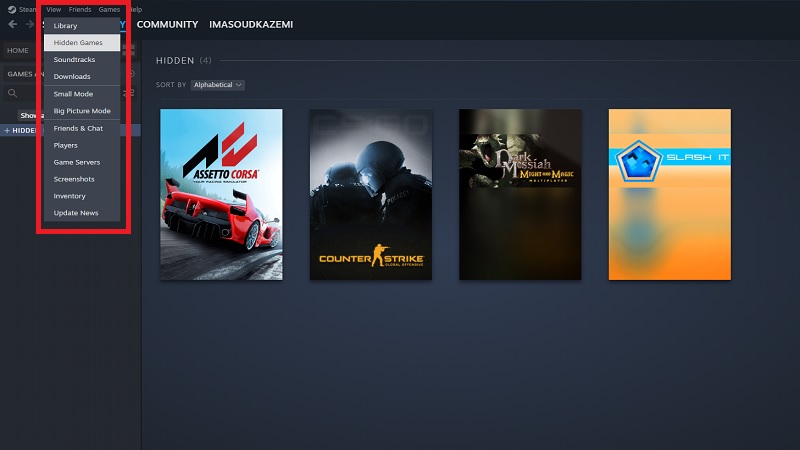
In order to see your hidden games on Steam or Steam Deck follow these steps:

  • Open Steam and login into your account
  • From the top left corner select the View option
  • In the menu press View Hidden Games

Once you do that, you will be taken to the Hidden Games page, where all your hidden games can be seen. If you want to unhide them, simply right-click on the game, hit the Manage option, and then select Remove from Hidden. And afterward, the game appears in your main library.


Related Topics
pc Steam
Share. Facebook Twitter LinkedIn Reddit Email
Masoud Kazemi
  • Website
  • X (Twitter)

I don't care about the real world. I cared only about the world of fiction. -Woody Allen

SUGGESTED READS

Diablo 4 Season 13 Tier List
Gaming

Class Tier List for Diablo 4 Season 13 (Best Classes for Endgame & Leveling)

Take-Two Boss Finally Explains Why GTA 6 Is Skipping PC at Launch: 'We'll See How It Works Out'
Gaming

Take-Two Boss Finally Explains Why GTA 6 Is Skipping PC at Launch: ‘We’ll See How It Works Out’

Rockstar Employee Review Claims 'Unrealistic' Crunch as GTA 6 Development Intensifies: 'Had to Work Till 3AM'
Gaming

Rockstar Employee Review Claims ‘Unrealistic’ Crunch as GTA 6 Development Intensifies: ‘Had to Work Till 3AM’

All Rewards from Admin Abuse Eggs & Box in Roblox Adopt Me
Gaming

All Rewards from Admin Abuse Eggs & Box in Roblox Adopt Me

Gaming

World Heroes Perfect Reminds Me of the Golden Age of Fighting Games

Fatal Fury City of the Wolves Mr Karate Reveal
Gaming

Fatal Fury: City of the Wolves Unveils Its Next Season 2 Fighter, and It’s a Classic

The Nerd Stash
Facebook X (Twitter) Instagram YouTube LinkedIn
  • About Us
  • Join Our Team
  • Meet the Team
  • Privacy Policy
  • DMCA Policy
  • Contact Us
  • Terms of Use
  • Sitemap
  • Editorial Guidelines
  • Advertising Policy
© 2026 The Nerd Stash. All Rights Reserved.

Type above and press Enter to search. Press Esc to cancel.