Want to know how to use the Marketplace in Madden 23 Ultimate Team? Fans of the Madden series are already enjoying the new gameplay, participating in various game modes, and assembling the best team of their dreams. Many old and loved by the players features like Taunt and Celebrate or Fantasy Draft are back in this new installment of the legendary game series. But some features were present in the old games in the series but received a lot of changes in Madden 23. One such feature is the Ultimate Team, and our guide is here to help you and tell you how to use the Marketplace in Madden 23 Ultimate Team.
Madden 23: How to Use the Marketplace in Ultimate Team
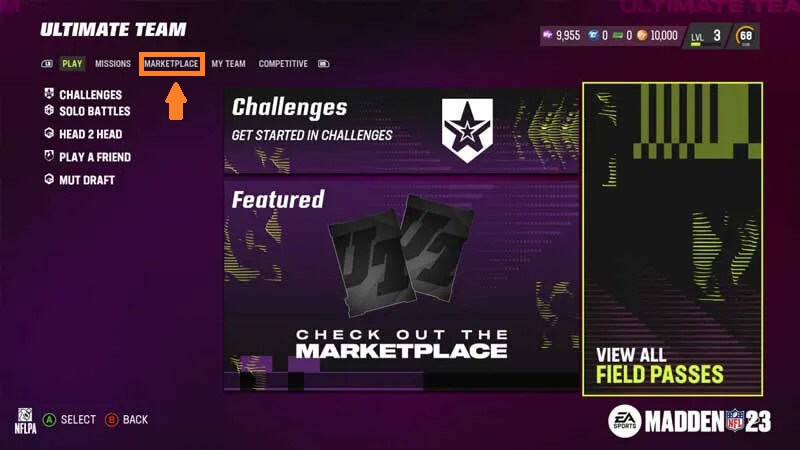
First, it is worth noting that the Ultimate Team has changed significantly compared to previous gaming years. Now trading on the Marketplace is more variable, as you can use three types of currencies. In addition, you can visit the Auction House tab and easily buy or sell multiple players for constantly changing prices.
To use the Marketplace in Madden 23 Ultimate Team, you must go to the appropriate tab in the main menu. Here you can visit the Store, Auction House, and Trade Block, so let’s get started.
Madden 23 Ultimate Team Store
Going to the Store tab, you will see a large selection of goods, including many valuable players or sets of players. All Store offers are divided into subgroups, and you will find out what products are in each of them below:
- Featured: All new Bundles, New Player Cards, and Starter Packs.
- Headliners: Headliners, Headliners Packs.
- Select Offers: Small Bundles and Discount Offers.
- Training: Headliner Players, Sets for training players.
- Gear: Cosmetic items and Uniforms for players.
Depending on the offer, you can pay for the purchase of one of the three in-game currencies:
- Madden Points. You can buy for real money in the in-game store.
- Training Points. Sell unnecessary players to get some of this currency.
- Coins. Enjoy the game and participate in all game modes to get Coins.
Related:
All Superstar X-Factors in Madden 23
Madden 23 Ultimate Team: Auction House
As the name suggests, you can buy and sell players at constantly changing prices in the Auction House tab. Auction House has a helpful tool:
- Thanks to the first tool, you can find any player from any set with any characteristics.
- The second tool will help you create your lot for sale.
Madden 23 Ultimate Team: Trade Block
Trade Block will help you get any player without in-game currency on your balance. In this place, you can make trades with other players. Select your player from the My Team collection and click on Trade. You can exchange with your friends or any other players from all over the world.
Madden 23 is available on Xbox Series X|S, Xbox One, PS5, PS4, and PC.