
Close Menu
  • Gaming
    • Game Guides
    • Codes
    • Game News
    • Game Previews
    • Game Reviews
    • Game Features
    • Game Lists
    • Platforms
      • Nintendo
      • PC
      • PlayStation
      • Xbox
      • Mobile
  • Entertainment
    • Movies
    • Movie Features
    • Movie Reviews
    • TV
    • Reality TV
    • Royals
  • Celebrity
    • Hollywood
  • Human Interest
  • Astrology
  • Videos
  • More
    • Anime
    • Lists
    • Podcasts
    • Reviews
Facebook X (Twitter) Instagram LinkedIn YouTube
  • About Us
  • Join Our Team
  • Meet the Team
  • Privacy Policy
  • DMCA Policy
  • Contact Us
  • Terms of Use
  • Sitemap
  • Editorial Guidelines
  • Advertising Policy
The Nerd Stash
  • Gaming
  • Celebrity
    • Hollywood
  • Human Interest
  • Videos
The Nerd Stash
Home»Game Guides»How To Use the New Attack Helicopter in Rust

How To Use the New Attack Helicopter in Rust

As always, new updates continue to come to Rust every month. This time, Rust added an attack helicopter that you can use. Yes, you heard…

Akın BilginBy Akın BilginAugust 11, 20233 Mins Read
rust attack helicopter
Image Source: Facepunch Studios via ThatGermanGuy
This article is over 2 years old and may contain outdated information.

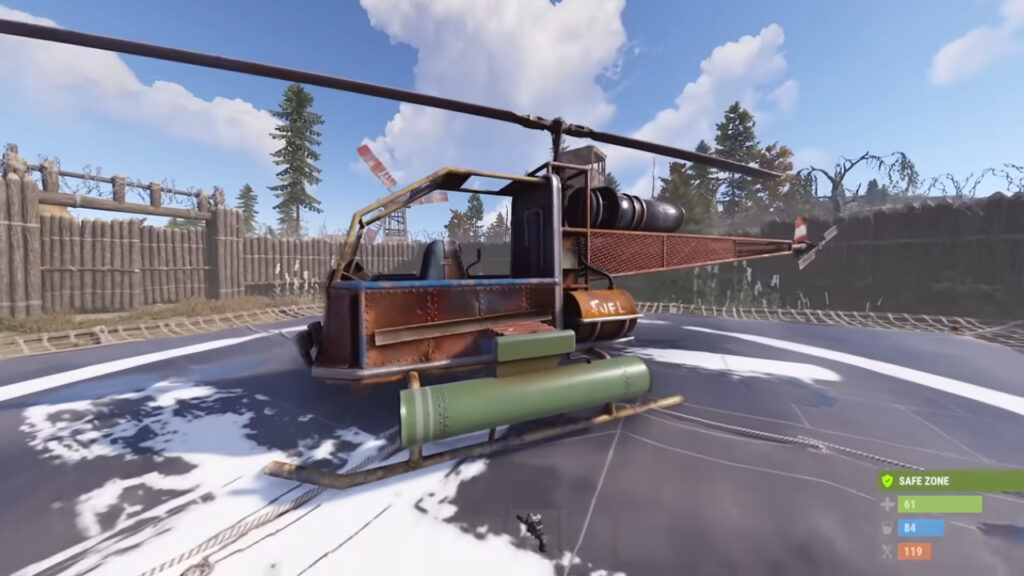
As always, new updates continue to come to Rust every month. This time, Rust added an attack helicopter that you can use. Yes, you heard it right, an Attack Helicopter! This helicopter is similar to the Patrol Helicopter, but of course, it is not as destructive and powerful. You can buy the Rust Attack Helicopter from the Airwolf Vendor in Bandit Camp. The current price is 2250 Scrap. Attack Helicopter is currently in the Rust Staging Branch, so it has not yet been added to the main game. The things we will talk about in this article will be entirely about the staging branch. Without making you wait any longer, let’s take a look at this helicopter that you can raid and equip with weapons.

How to Control Rust Attack Helicopter
rust attack helicopter camera
Image Source: Facepunch Studios via ThatGermanGuy

It is worth mentioning again that these things we will talk about are based on the Attack Helicopter as it is in the current Staging Branch. There may be some features removed, changed, or added when it was added to the game. Rust Attack Helicopter is a 2-man vehicle just like Minicopter.

It is bigger than a Minicopter but smaller than a Transport Helicopter. You can add as many Rockets to the torpedo of this helicopter as a Wood Storage Box. This can be a High-Velocity Rocket or a normal Rocket.

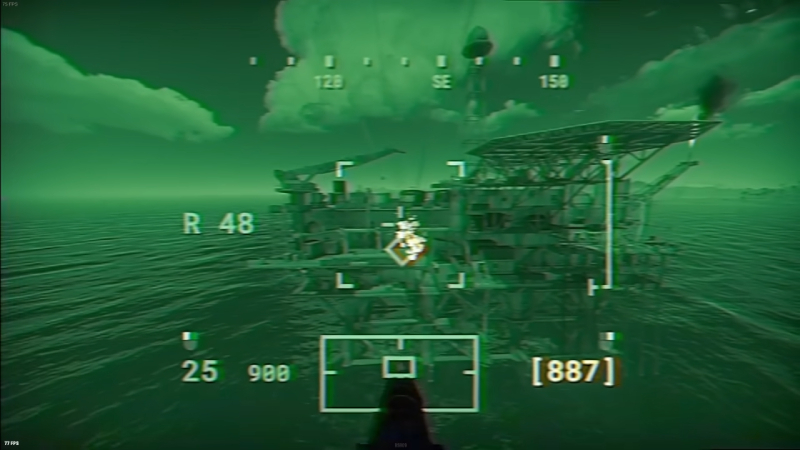
Another feature allows you to put any weapon you want underneath the Rust Attack Helicopter and shoot with that weapon. You can add 6 slots of ammo to whatever you have attached, just like with Auto Turrets. Of course, you’ll need a co-pilot to operate the helicopter’s rocket launcher and turret. As mentioned before, this is a two-man vehicle — one person has to drive the helicopter while the other shoots. You can’t do both alone.

Attack Helicopter Controls

When we come to the control of the helicopter, just like in other helicopters, hold the “W” key to get up in the air, and when you move your mouse forward, you will start moving forward. But you have to move your mouse very slowly.

Then, you can direct the Rust Attack Helicopter using the “A” and “D” keys. If you have never driven a helicopter in Rust before, it would be much better to learn how to drive a helicopter on a Creative Server first because there is a very high probability that you will crash your first time.


Related:

How To Get (& Use) Weapon Racks in Rust

Related Topics
Guide Rust
Share. Facebook Twitter LinkedIn Reddit Email
Akın Bilgin
  • Website
  • X (Twitter)

Akın Bilgin loves colony simulators, survival, and souls-like games. He has been a freelance guide writer for two years and is studying English Language and Literature in Turkey.

SUGGESTED READS

Minecraft Accused of Mocking Lonely Kids, Sparking Mental Health Backlash: 'One of the Ickiest Things I've Seen'
Features

Minecraft Accused of Mocking Lonely Kids, Sparking Mental Health Backlash: ‘One of the Ickiest Things I’ve Seen’

Destiny 2 Renegades PS5 Review
8.5
Features

Destiny 2: Renegades Review – The Shooter Strikes Back

Clair Obscur: Expedition 33 Loses GOTY, Other Award from Indie Game Awards Over Generative AI: 'Some Weird Performative BS'
Game News

GOTY Stripped Over AI?: Clair Obscur: Expedition 33 Loses Awards at Indie Game Awards, ‘Some Weird Performative BS’

Sony Patents Real-time AI Game Censorship Tech That Could Even Make GTA 6 Kid-Friendly
Game News

Sony Patents Real-Time AI Game Censorship Tech That Could Even Make GTA 6 Kid-Friendly

Zenless Zone Zero Version 2.5 Announcement
Game News

Zenless Zone Zero Version 2.5 Is Ready To Wrap Up the Year With Two New Agents and a Free Outfit

PC Gamers Can't Catch a Break as Nvidia Plans 40% GeForce GPU Production Cuts, Report: 'Who Needs a PC Anyways'
Game News

PC Gamers Can’t Catch a Break as Nvidia Reportedly Plans 40% GeForce GPU Production Cuts: ‘Who Needs a PC Anyways’

Trending
Minecraft Accused of Mocking Lonely Kids, Sparking Mental Health Backlash: 'One of the Ickiest Things I've Seen'

Minecraft Accused of Mocking Lonely Kids, Sparking Mental Health Backlash: ‘One of the Ickiest Things I’ve Seen’

Destiny 2 Renegades PS5 Review
8.5

Destiny 2: Renegades Review – The Shooter Strikes Back

Clair Obscur: Expedition 33 Loses GOTY, Other Award from Indie Game Awards Over Generative AI: 'Some Weird Performative BS'

GOTY Stripped Over AI?: Clair Obscur: Expedition 33 Loses Awards at Indie Game Awards, ‘Some Weird Performative BS’

Sony Patents Real-time AI Game Censorship Tech That Could Even Make GTA 6 Kid-Friendly

Sony Patents Real-Time AI Game Censorship Tech That Could Even Make GTA 6 Kid-Friendly

The Nerd Stash
Facebook X (Twitter) Instagram YouTube LinkedIn
  • About Us
  • Join Our Team
  • Meet the Team
  • Privacy Policy
  • DMCA Policy
  • Contact Us
  • Terms of Use
  • Sitemap
  • Editorial Guidelines
  • Advertising Policy
© 2025 The Nerd Stash. All Rights Reserved.

Type above and press Enter to search. Press Esc to cancel.




