Close Menu
  • Gaming
    • Game Guides
    • Codes
    • Game News
    • Game Previews
    • Game Reviews
    • Game Features
    • Game Lists
    • Platforms
      • Nintendo
      • PC
      • PlayStation
      • Xbox
      • Mobile
  • Entertainment
    • Movies
    • Movie Features
    • Movie Reviews
    • TV
    • Reality TV
    • Royals
  • Celebrity
    • Hollywood
  • Human Interest
  • Astrology
  • Videos
  • More
    • Anime
    • Lists
    • Podcasts
    • Reviews
Facebook X (Twitter) Instagram LinkedIn YouTube
  • About Us
  • Join Our Team
  • Meet the Team
  • Privacy Policy
  • DMCA Policy
  • Contact Us
  • Terms of Use
  • Sitemap
  • Editorial Guidelines
  • Advertising Policy
The Nerd Stash
  • Gaming
  • Celebrity
    • Hollywood
  • Human Interest
  • Videos
The Nerd Stash
Home»Game Guides»Stardew Valley – How to Get Beets

Stardew Valley – How to Get Beets

In Stardew Valley, there are a plethora of different crops the player can plant and harvest and one of these is beets. However, beets are…

Andrew VaughanBy Andrew VaughanAugust 11, 20203 Mins Read
Stardew Valley Beets
This article is over 5 years old and may contain outdated information.

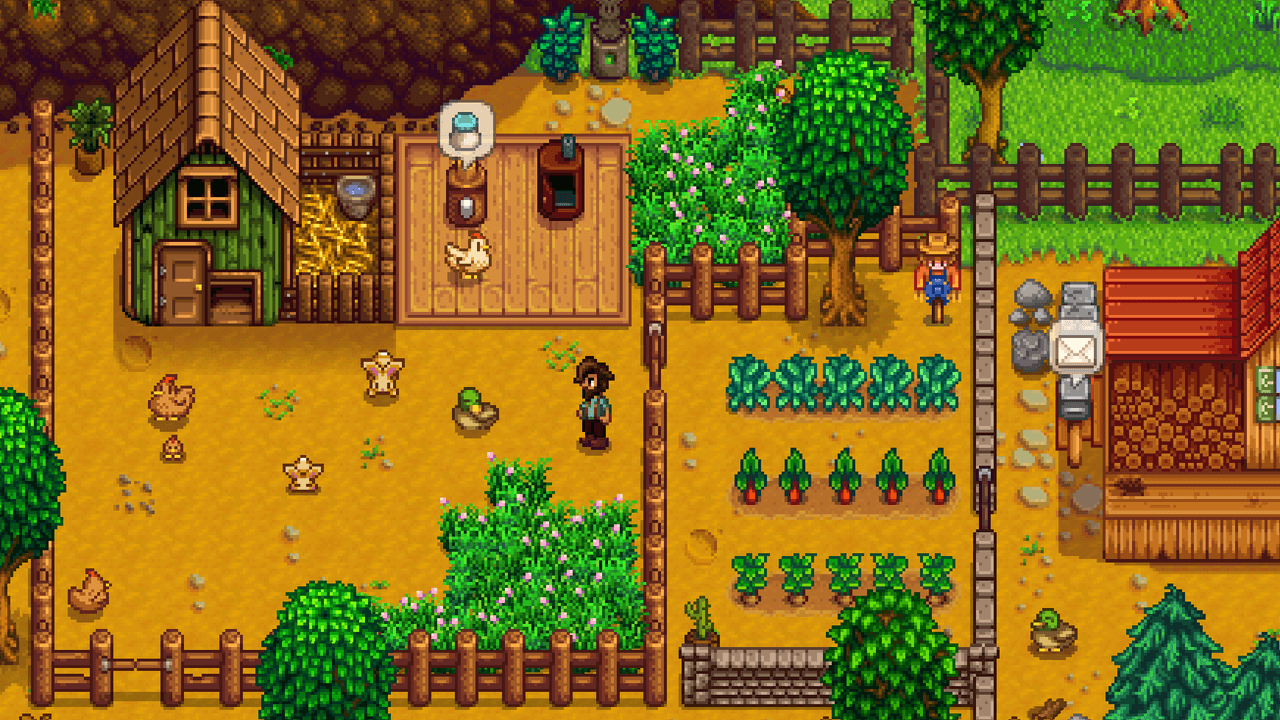
In Stardew Valley, there are a plethora of different crops the player can plant and harvest and one of these is beets. However, beets are not just your average vegetable as they are also required in the production of sugar. That said, if you want to know how to get Stardew Valley beets, you have come to the right place!

How to Get Beets in Stardew Valley

Stardew Valley Beets

In order to get beets, you must first purchase some seeds first, which is the case with all plants in the game. You can find Beet seeds at the Oasis shop located in the desert or at the Travelling Cart that appears south of the farm. The player can also find seeds from time to time in treasure rooms in the Skull Cavern, but we don’t recommend relying on this method as it is the least reliable. 

After you get your seeds from either the Oasis shop or Travelling Cart, all you need to do next is plant the seeds and water them. Once the beets are planted, you will then need to wait a total of six days for them to mature. After that time has passed, you will then have your highly coveted beets, which can then be sold as-is at the shipping bin right of your house or alternatively made into other items.

Other Stardew Valley Guides

  • Stardew Valley Blueberry – How to Get

For instance, we recommend using the beets to make sugar as beets only sell for 50g. You can make Stardew Valley beets into sugar in the Mill that can be purchased from Robin at the Carpenter’s Shop. However, it will cost you 2500K. In the end, it will be worth the cost. This is due to the fact sugar is required in the crafting of all pastries in the game, which also sells for a lot more than the beets.

In addition, certain pastries make for great gifts for some NPCs in the game and also give special buffs to the player. With that said, we highly recommend getting the mill for the aforementioned reasons. Furthermore, players should also note that they will not just need 2500k but will also require the following materials listed below to get the mill.

  • 50 Stone
  • 150 Wood
  • 4 Cloth

The mill can also make flour and rice, thus making it all the more useful to the player. That’s everything you need to know on how to get Stardew Valley beets. We hope you found our guide useful, and if you did let us know in the comments below. Also, feel free to leave any feedback you may have regarding the guide. That’s all for now. Happy farming!

Related Topics
Guide Stardew Valley
Share. Facebook Twitter LinkedIn Reddit Email
Andrew Vaughan
  • Website
  • X (Twitter)

Andrew is a man of many talents and has been playing games for decades. He has a great love for Diablo-style RPGs and C&C style RTS. He specializes in writing guides. follow him on Twitter at @HighwaymanSlade.

SUGGESTED READS

Minecraft Accused of Mocking Lonely Kids, Sparking Mental Health Backlash: 'One of the Ickiest Things I've Seen'
Features

Minecraft Accused of Mocking Lonely Kids, Sparking Mental Health Backlash: ‘One of the Ickiest Things I’ve Seen’

Destiny 2 Renegades PS5 Review
8.5
Features

Destiny 2: Renegades Review – The Shooter Strikes Back

Clair Obscur: Expedition 33 Loses GOTY, Other Award from Indie Game Awards Over Generative AI: 'Some Weird Performative BS'
Game News

GOTY Stripped Over AI?: Clair Obscur: Expedition 33 Loses Awards at Indie Game Awards, ‘Some Weird Performative BS’

Sony Patents Real-time AI Game Censorship Tech That Could Even Make GTA 6 Kid-Friendly
Game News

Sony Patents Real-Time AI Game Censorship Tech That Could Even Make GTA 6 Kid-Friendly

Zenless Zone Zero Version 2.5 Announcement
Game News

Zenless Zone Zero Version 2.5 Is Ready To Wrap Up the Year With Two New Agents and a Free Outfit

PC Gamers Can't Catch a Break as Nvidia Plans 40% GeForce GPU Production Cuts, Report: 'Who Needs a PC Anyways'
Game News

PC Gamers Can’t Catch a Break as Nvidia Reportedly Plans 40% GeForce GPU Production Cuts: ‘Who Needs a PC Anyways’

Trending
Minecraft Accused of Mocking Lonely Kids, Sparking Mental Health Backlash: 'One of the Ickiest Things I've Seen'

Minecraft Accused of Mocking Lonely Kids, Sparking Mental Health Backlash: ‘One of the Ickiest Things I’ve Seen’

Destiny 2 Renegades PS5 Review
8.5

Destiny 2: Renegades Review – The Shooter Strikes Back

Clair Obscur: Expedition 33 Loses GOTY, Other Award from Indie Game Awards Over Generative AI: 'Some Weird Performative BS'

GOTY Stripped Over AI?: Clair Obscur: Expedition 33 Loses Awards at Indie Game Awards, ‘Some Weird Performative BS’

Sony Patents Real-time AI Game Censorship Tech That Could Even Make GTA 6 Kid-Friendly

Sony Patents Real-Time AI Game Censorship Tech That Could Even Make GTA 6 Kid-Friendly

The Nerd Stash
Facebook X (Twitter) Instagram YouTube LinkedIn
  • About Us
  • Join Our Team
  • Meet the Team
  • Privacy Policy
  • DMCA Policy
  • Contact Us
  • Terms of Use
  • Sitemap
  • Editorial Guidelines
  • Advertising Policy
© 2025 The Nerd Stash. All Rights Reserved.

Type above and press Enter to search. Press Esc to cancel.